
Quick Answer
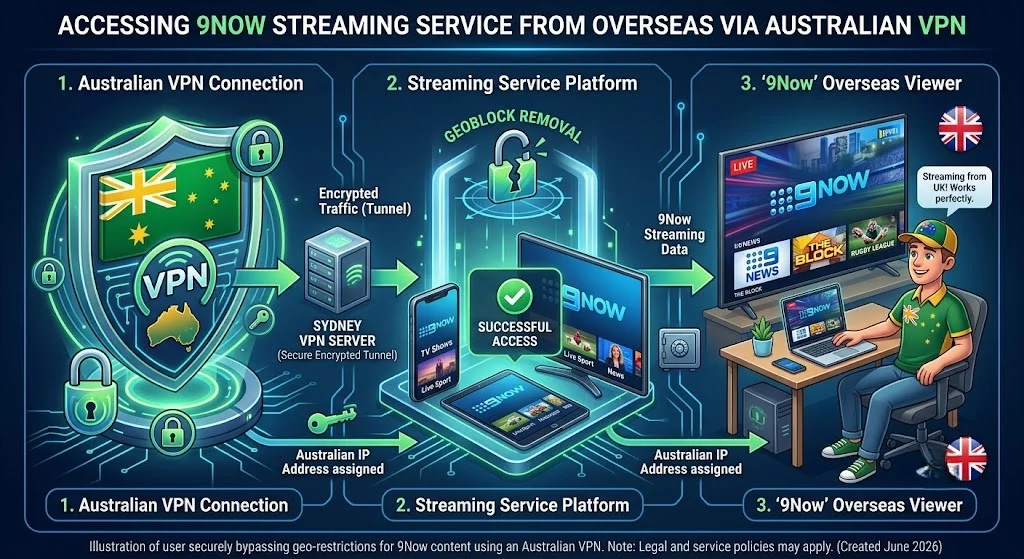
Here’s how to watch Channel 9 overseas: 9 Now it’s completely free, but it’s geo-blocked to Australian IP addresses only. To watch it overseas — whether you’re in the US, the UK, or anywhere else — you need a VPN connected to an Australian server and an Australian postcode to register your account. There’s no subscription fee involved at any point — the only cost is the VPN itself.
At a Glance
✔ Service: 9Now
✔ Cost: Free
✔ Australian Account Required: Yes
✔ Australian Postcode Required: Yes
✔ VPN Required Overseas: Yes
✔ Works in the UK, US, and Elsewhere: Yes (same process everywhere)
✔ Live TV: Yes
✔ On-Demand: Yes
Key Takeaways
- 9Now is 100% free — there’s no subscription, ever
- You need an Australian postcode to register, even with a VPN active
- 9. Now actively detects and blocks VPN traffic, so a reputable, streaming-optimised VPN matters more than price
- The process is identical regardless of which country you’re watching from — US, UK, anywhere
- Live sport (NRL and all four tennis Grand Slams including the US Open) is the content most likely to have streaming issues, since it draws the heaviest simultaneous overseas traffic
- For the legal side of all this – short version: it’s not illegal, but it does breach 9Now’s terms of service
In This Guide
- Why Is 9Now Geo-Blocked Overseas?
- What You’ll Need (Requirements)
- How to Watch 9Now From Overseas: Step by Step
- Does 9Now Work on Smart TVs and Apple TV Overseas?
- What’s Actually Worth Watching on 9Now
- Is This Legal?
- Common Problems and How to Fix Them
- FAQ
Why Is 9Now Geo-Blocked Overseas?
9Now is the free streaming arm of the Nine Network, one of Australia’s major commercial broadcasters. Like every commercial broadcaster, Nine licenses its content — local productions, international shows, and sport — specifically for distribution in Australia.
The moment you leave the country, 9Now’s geo-detection identifies your new location and blocks access, because Nine’s distribution agreements with content owners and sports bodies don’t cover overseas viewing.
This is exactly the same mechanism covered in our main guide to watching Australian TV overseas — it isn’t a 9Now-specific quirk; it’s how every Australian free-to-air streaming app (7plus, 9Now, 10 Play, ABC iView, and SBS On Demand) operates once you’re outside the country.
What You’ll Need (Requirements)
| Requirement | Needed? |
|---|---|
| VPN | ✅ |
| Australian postcode | ✅ |
| Australian account | ✅ |
| Subscription | ❌ |
| Australian phone number | ❌ |
That’s the entire list. No payment details, no Australian ID, no Australian phone number — just a postcode and a VPN.
How to Watch 9Now From Overseas: Step by Step
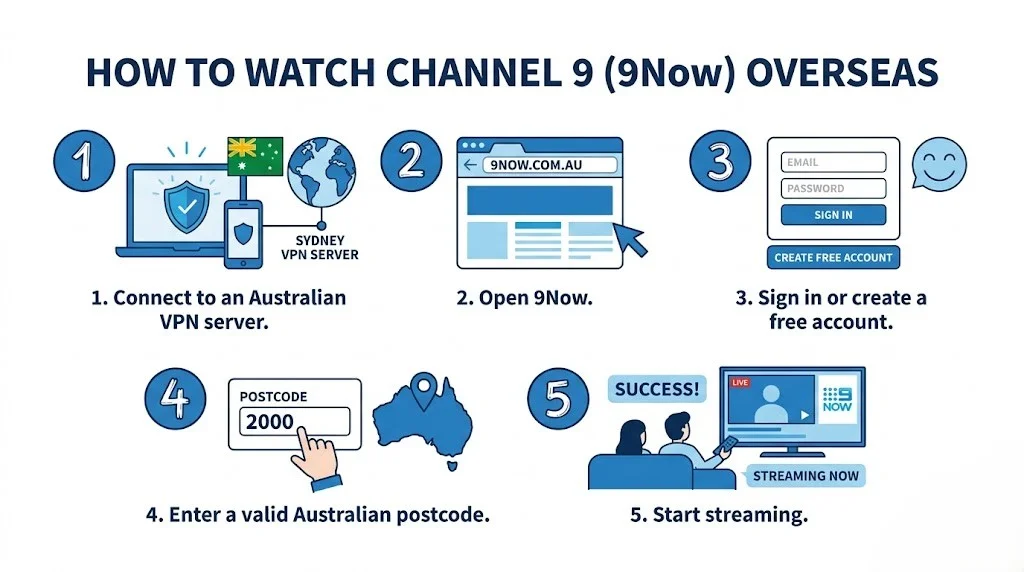
Step 1: Get a VPN with Australian servers.
This is non-negotiable. 9Now actively checks for VPN and proxy traffic, so Smart DNS alone is often not enough — pick a reputable, streaming-optimised VPN rather than a free one. If you’re wondering where VPN use itself stands legally, our IPTV VPN legal guide covers that separately from the geo-blocking question.
Step 2: Connect to an Australian server before doing anything else.
Connect first, then open your browser or app. If you open 9Now before connecting, it may cache your real location temporarily.
Step 3: Create or log into your 9Now account.
9Now works directly through a browser at 9now.com.au, so you don’t need to install the app if you prefer not to. If you’re creating a new account, you’ll need a valid email address and any valid Australian postcode — it doesn’t need to match where you currently live. If you already have a 9Now account from when you lived in Australia, simply sign in.
Step 4: Verify your email.
Standard email verification — nothing unusual here.
Step 5: Start streaming.
Once registered and connected to an Australian server, 9Now behaves exactly as it would at home — same library, same live channels, same EPG.
Does 9Now work on smart TVs and Apple TV overseas?
This issue is one of the most common sticking points for overseas viewers. Most smart TV operating systems — and Apple TV specifically — don’t support installing a VPN app directly, which is why 9Now can appear geo-blocked even when your VPN is working fine elsewhere on your network.
The two practical workarounds:
- Router-level VPN: Configure the VPN on your home router instead of the device itself. Every device on the network, including your Smart TV or Apple TV, will then automatically appear to be in Australia.
- Cast or AirPlay from a connected device: Run the VPN on your phone or laptop, open 9Now there, and cast or AirPlay the stream to your TV. If you’re setting up Apple TV for IPTV generally, our Apple TV IPTV setup guide covers the device side of this in more depth.
What’s Actually Worth Watching on 9Now
9Now isn’t just catch-up TV — it covers live channels (Channel 9, 9Gem, 9Go!, 9Life, and 9Rush) plus a genuinely strong on-demand library, split across a few categories worth knowing about separately.
Live Sport
This is 9Now’s strongest card for overseas viewers. Under its “Wide World of Sports” banner, Nine holds rights to live tennis, rugby union, rugby league, and golf, including coverage of all four tennis Grand Slams — meaning the Australian Open, Wimbledon, the French Open, and the US Open are all accessible free through 9Now, alongside full NRL coverage.
Reality TV
Married at First Sight In this category, 9Now’s biggest draws are Married at First Sight Australia, The Block, and Love Island Australia, and these are often the shows that expats miss most.
News and Current Affairs
60 Minutes and Nine News are both available live and on-demand, useful if you want Australian news framed for an Australian audience rather than wire coverage.
Entertainment
Beyond the above, 9Now carries a broad drama and movie catalogue, though this is the category with the most overlap with what you likely already have access to through Netflix or local services in your country.
For expats who specifically miss live NRL or tennis, 9Now is often the single most valuable free-to-air app to get working — more so than the entertainment catalogue.
Is This Legal?
Short answer: yes, watching 9 Being overseas with a VPN isn’t illegal anywhere; this has been tested — but it does breach 9Now’s terms of service, which is a different thing entirely. We cover this distinction in detail, including what a platform can and can’t actually do about it, in our full legal breakdown. In short, there’s no criminal risk, but you might get a blocked stream if 9Now’s detection catches up with your VPN.
Common Problems and How to Fix Them
9. Now detects your VPN and blocks the stream anyway:
This is the most common issue, and it’s expected — 9Now actively runs VPN/proxy detection, and it’s an ongoing back-and-forth between streaming platforms and VPN providers. A server that worked last month may get flagged today. Switch to a different Australian server within the same VPN app, or clear your browser cache and cookies. For a deeper dive into VPN-specific connection problems across IPTV, see our VPN and IPTV troubleshooting guide.
Registration won’t accept your postcode:
Please ensure you are entering a valid Australian postcode, rather than a placeholder such as ‘0000’. Any valid postcode works, even if it’s not where you currently live.
If you’re trying to change your “location” directly in 9Now,
There’s no manual location setting inside 9Now itself — your apparent location is entirely determined by your VPN’s IP address. To change it, disconnect and reconnect to a different Australian server.
Buffering during live sport specifically:
This issue is usually bandwidth-related rather than a VPN fault — live sport draws far more simultaneous overseas VPN traffic than catch-up TV does, which strains both the VPN server and 9Now’s own infrastructure during marquee events. A wired connection generally helps; our general IPTV buffering fixes guide covers the connection-side basics if this keeps happening across other services too.
Frequently Asked Questions
Is 9Now streaming free?
Yes. 9Now has no subscription fee anywhere in the world. The only cost involved in watching it overseas is a paid VPN subscription, which is unrelated to 9Now itself.
Do I need an account to use 9Now?
Yes. A free 9Now account is required before you can stream live or on-demand content, whether you’re in Australia or overseas.
Can I watch 9Now from overseas?
Yes. With a VPN connected to an Australian server and a registered account, 9Now works overseas just as it does in Australia — with the same live channels and the same on-demand library.
How can I watch 9Now in the UK?
The process is identical to watching from anywhere else overseas: connect to an Australian VPN server, log in (or register with a valid Australian postcode if you don’t already have an account), and stream as normal. There’s nothing UK-specific about it.
Does 9Now detect VPN?
Yes, 9Now actively checks for VPN and proxy traffic, which is why a reputable streaming-optimised VPN is more important than a free or generic one. Detection is an ongoing back-and-forth – a server that works today may get flagged next month, which is normal and not something you’ve done wrong.
Can I watch 9Now without the app?
Yes, 9Now works directly through a browser at 9now.com.au — you don’t need to install the app to stream, provided your VPN is connected and you’re logged into your account.
Does 9Now stream the US Open?
Yes. As part of Nine’s “Wide World of Sports” rights, 9Now streams all four tennis Grand Slams — including the US Open — live and free, alongside the Australian Open, Wimbledon, and the French Open.
Is a free VPN good enough for 9Now?
Not recommended. Free VPNs typically offer far fewer Australian server options, get detected and blocked faster, and log and monetise your browsing data in numerous instances. A paid VPN is a more reliable and safer choice for regular use.
Conclusion
Watching Channel 9 from overseas requires two things: a reliable VPN with genuine Australian servers and a valid Australian postcode to get past registration. Once that’s sorted, you get the full 9Now experience — including some of the best free live sport coverage available anywhere, Grand Slam tennis (the US Open included), and the NRL among them. The related guides linked throughout this article cover the bigger picture, the legal side, and the troubleshooting details in more depth.
Written by Daniel Carter
IPTV Systems Analyst & Service Comparison Specialist — Melbourne, Australia
5+ years analysing Australian IPTV services and international streaming solutions
🔗 Explore More — Australian IPTV Overseas
Browse the full Australian IPTV Overseas hub for every guide in this category, or jump straight to the following:
- ✅ Watch Australian TV Overseas: The Complete Guide for Expats and Travellers
- ✅ Watch Australian TV from the USA
- ✅ Is It Legal to Bypass Geo-Blocking in Australia?
- ⏳ Stream SBS On Demand Outside Australia (coming soon)
- ⏳ Best VPN for Australian IPTV (coming soon)