
By Daniel Carter, IPTV Systems Analyst & Service Comparison Specialist · IPTV Australia Guide · Last updated: September 2026

Quick Answer
How IPTV works comes down to four stages: a channel is encoded into internet-ready data, held on a server, carried across the network to your home, and decoded by an app on your screen. Almost every fault you will ever see happens at one of those four points.
How IPTV works is worth understanding for one practical reason: when something goes wrong, knowing which stage failed tells you whether it is worth troubleshooting at all. A stream that stutters, a guide that shows the wrong times and a single dead channel have three different causes, and only one of them is something you can fix. This article walks through the chain and points out what breaks where. For the practical setup instead, the step-by-step guide to watching IPTV in Australia covers that side.
The Four Stages, From Broadcast to Your Screen
A television channel starts as a broadcast feed and ends as a picture on your screen. Four things happen in between.
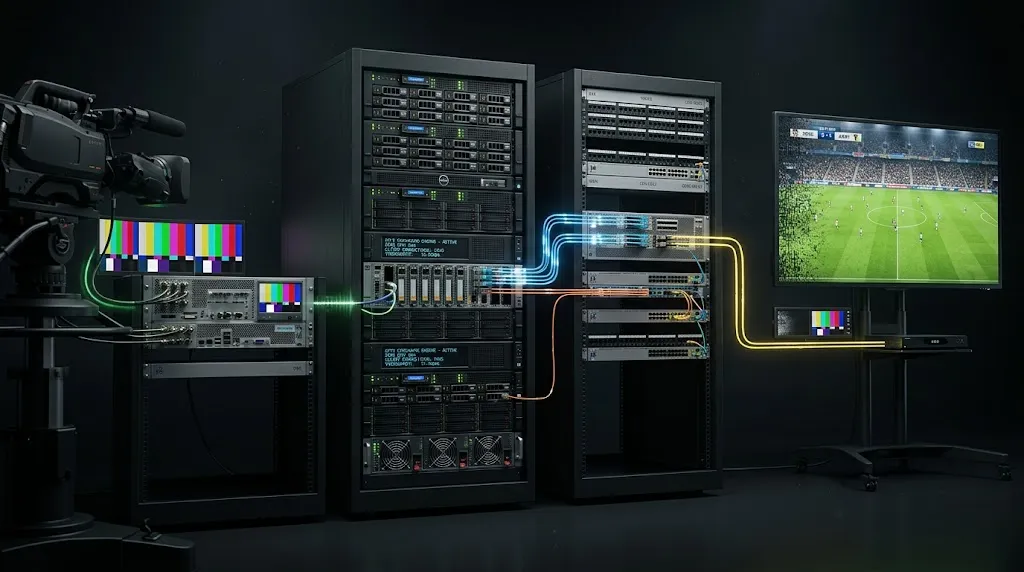
Encoding. The feed is converted into compressed digital video. Raw video is far too large to send over an internet connection, so it is compressed into a format built for streaming. This is where picture quality is set, and no amount of internet speed at your end can improve on what was encoded at the source.
Serving. The encoded channel is held on a server that keeps it running continuously, ready for anyone who tunes in. Each channel is a separate stream, maintained separately. That detail matters more than it sounds, and it explains a lot of what you see later.
Delivery. When you open a channel, your app requests that stream and the data travels to your home across the internet — through the service’s infrastructure, across whatever networks lie between, into your provider’s network, and finally through your router.
Decoding. Your device reverses the compression and puts the picture on screen, overlaying the programme guide if one is available.
The whole chain runs continuously while you watch rather than as a single download, and each stage depends on the one before it. The infrastructure guide covers the middle two stages in more detail.
Why Live Streams Run Behind the Broadcast

A stream always arrives slightly later than the same event on traditional television, and the reason is built into the method rather than being a fault.
Video has to be encoded before it can be sent, which takes time. It is then divided into pieces and sent in sequence, which takes more. And your player deliberately holds a small amount of video before playing it, so that a brief network hiccup does not stop the picture — that held video is a buffer, and without it every small interruption would freeze the screen.
Each of those steps trades delay for stability, which is why nobody eliminates it entirely. How the stream is divided and sent varies between methods, and the difference affects both the delay and how quickly channels switch. The streaming protocols guide compares the approaches in use.
Where the Servers Sit, and Why It Matters
Distance affects a stream in two ways, and the second matters more than the first.
Data takes longer to travel further, which adds delay. But the bigger effect is the number of network handovers along the route. Every point where data passes from one network to another is a point where it can be delayed, queued behind other traffic, or dropped entirely. A stream crossing several networks and an undersea cable has more places to go wrong than one that stays inside Australia.
This is why a service can perform well for viewers in one country and poorly in another using identical infrastructure. Nothing about the service changed; the route did. It also explains a symptom people find confusing: a stream that is fine most of the time and unwatchable occasionally, because congestion at any single handover along the route affects everything travelling through it.
The server location guide covers what this means for Australian viewers, and the servers and CDN guide covers how services distribute streams to shorten those routes.
What the NBN Actually Does in the Evening
This is where most assumptions are out of date. The belief that NBN collapses every evening was accurate once, and is no longer a safe starting point for diagnosing anything.
The ACCC ran the Measuring Broadband Australia program from 2018 until June 2026, testing real household connections rather than relying on advertised figures. Its final report found that fixed-line NBN households received, on average, 99.4 per cent of their plan’s download speed during the busy evening period, up from 98.5 per cent in the previous quarter. The program’s early reports, back in 2017 and 2018, measured between 80 and 85 per cent.
That is a substantial change, and it shifts where the fault usually sits. If your fixed-line connection is delivering close to its plan speed at 8pm, an evening stutter is unlikely to be the NBN itself.
The exception is worth knowing. The same reporting found fixed wireless connections averaging around 89.7 per cent of plan speed across all hours, dropping to roughly 83.8 per cent during busy hours. The meaningful divide is between fixed-line and fixed wireless, not between day and night.
Two things the figures do not cover, and both sit inside your house. Plan speed says nothing about how much of it reaches the device — Wi-Fi interference, distance from the router and other devices using the connection all take their share. And a download speed test measures peak throughput, while live streaming depends on steadiness; a connection that tests fast but fluctuates will still stutter.
The NBN guide covers how each connection type behaves, and the peak-hour guide covers what happens when demand on your connection and demand on a service coincide.
Key takeaway: on a fixed-line NBN connection, evening streaming problems are more likely to originate inside the home or at the service than with the NBN itself.
How the Programme Guide Works
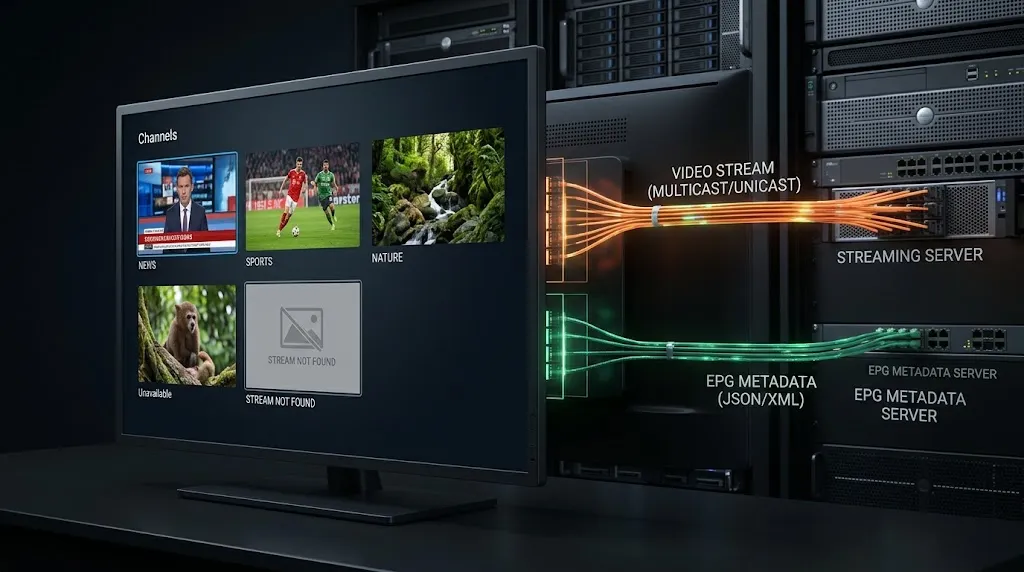
The guide is not part of the stream. It is a separate file, in a standard schedule format, that your app downloads and matches against your channel list.
That separation explains every guide problem you will encounter. Times are wrong because the schedule data carries its own timezone and was not adjusted for Australia. Channels show no information because the guide file has no entry matching that channel’s name. The guide is blank entirely because the file failed to load or was never configured.
None of these affect playback, because the stream and the guide arrive independently. A channel with no guide data plays perfectly well; it simply gives you nothing to read. The EPG explainer covers how the matching works and why names have to line up exactly.
Why One Channel Fails While the Rest Work
This is the pattern I get asked about most, and the four-stage chain answers it directly.
Every channel is a separate stream, served separately, sourced separately. They share your connection and your app, but nothing else. So when one channel fails while everything else plays, your connection is demonstrably fine — it is carrying the others — and the fault is either in the app or at the source of that particular stream.
The app side is the part you can check. Reloading the playlist, clearing the app’s cached data, or reopening the channel after a restart resolves it when the app is holding a stale reference to something that has moved.
If that changes nothing, the fault is at the source, and there is genuinely nothing to fix at your end. That stream has stopped, moved, or been replaced by the service, and only the service can restore it. Contacting them is not a last resort in this situation; it is the correct first step, and it saves an evening spent reinstalling apps that were never the problem.
The useful diagnostic is simply how many channels are affected. One channel points at that channel. A whole group points at a shared source. Everything at once points at your credentials, your connection or the service as a whole. The channel loading guide works through each case, and the troubleshooting hub covers the rest.
Compression: Why the Same Channel Looks Different
Compression decides how much data a channel needs, and two formats are in common use. The newer one delivers comparable quality using less bandwidth, which helps on connections with little headroom — but only if your device can decode it. An older device that cannot will either refuse the stream or fall back to its processor, which drains performance.
This is why the same channel can look different on two screens in one house. The compression guide covers how to check what your device supports.
The Bottom Line
Of the four stages, you control exactly one: what happens between your router and your screen. Encoding, serving and most of the delivery route belong to the service.
That is not a discouraging conclusion. It is a time-saving one. When one channel fails and the rest play, nothing at your end will fix it. When the guide shows the wrong times, the stream is not broken. When everything stutters at once on a fixed-line connection that tests near its plan speed, look inside the house before blaming the NBN.
Knowing which stage failed is most of the diagnosis, and it is the difference between a five-minute fix and an evening of reinstalling things that were working the whole time.