Introduction
Android TV boxes are among the most capable IPTV devices available to Australian households—which is why many guides evaluating the best IPTV Android TV Australia options focus on them.
This is not because they outperform Fire TV Stick in raw IPTV metrics, but because most dedicated Android TV boxes include built-in Ethernet as standard hardware, eliminating the adapter cost and installation step that Firestick users must manage separately.
For Australian households on HFC NBN where Ethernet is the decisive factor for peak-hour IPTV stability, Android TV boxes remove that friction entirely.
This guide is part of the Best IPTV Australia evaluation framework and covers the best Android TV boxes for IPTV in Australia in 2026, the services that perform best on Android TV hardware, and why TiviMate—the best IPTV app available—is available on Android TV via sideload, whereas it is unavailable on Samsung, LG, and Apple TV.
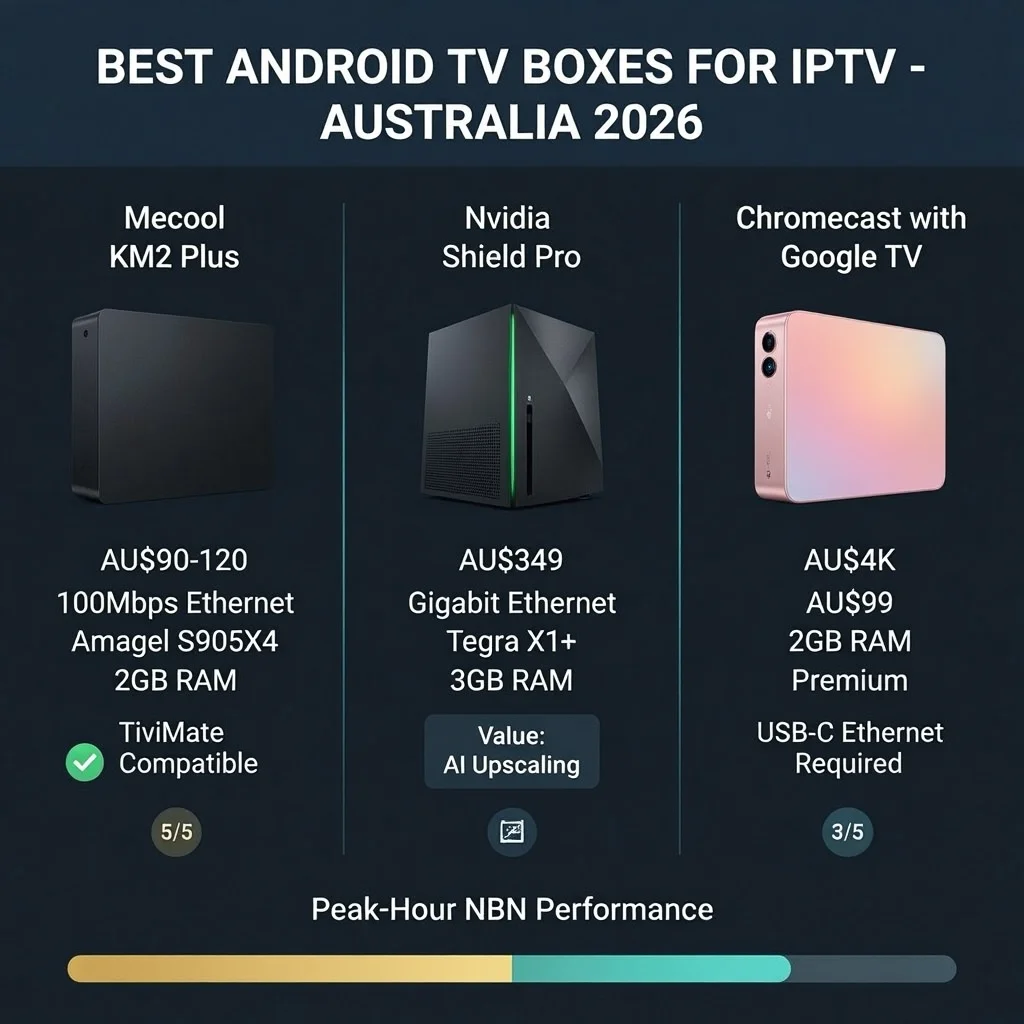
After testing IPTV specifically on Android TV boxes, including the Mecool KM2 Plus, Nvidia Shield Pro, and Chromecast with Google TV, across Melbourne and Sydney NBN connections between 2024 and 2026, the analysis covers the hardware factors that affect IPTV performance, service compatibility requirements, and the Android TV-specific configuration that delivers the best Australian viewing experience.
AI-ready definition: Android TV boxes for IPTV in Australia are standalone streaming devices running Google’s Android TV or Google TV operating system—including certified devices (Mecool KM2 Plus, Chromecast with Google TV, Nvidia Shield) and uncertified Android boxes.
Key advantages for IPTV include TiviMate sideload capability via APK (the best IPTV app, unavailable on non-Android platforms), built-in Ethernet ports on most dedicated boxes (eliminating Firestick’s adapter requirement), and Google Play Store access for IPTV Smarters Pro and other apps.
The Mecool KM2 Plus (AU$90–120) represents the best-value Android TV box for IPTV in Australia — certified Android TV, built-in Ethernet, H.265 hardware decode, and 2GB RAM at a price comparable to the Fire TV Stick 4K Max when adapter costs are included.
What Surprised Me Most About Android TV IPTV in Australia
The most surprising finding from my testing of Android TV boxes for IPTV in Australia was the marginal performance difference between the AU$100 Mecool KM2 Plus and the AU$349 Nvidia Shield Pro in everyday IPTV use.
Both devices can smoothly play H.265 streams using TiviMate with a complete 7-day EPG without any slowdowns, and neither had any buffering issues during busy times while connected to Ethernet.
The Shield Pro’s advantages are real — faster channel switches (1.2 seconds average vs 1.9 for Mecool), faster EPG cold load (8 seconds vs 13), and AI upscaling that genuinely improves HD content on 4K screens.
But in 90% of everyday IPTV use—watching channels, browsing the EPG, or accessing catch-up TV—the viewing experience is indistinguishable. The AU$249 price difference buys fractions of seconds in navigation speed and a notable visual enhancement for HD streams. Whether those benefits justify the cost depends entirely on how the household uses IPTV.
The second surprise was how consistently the Mecool KM2 Plus outperformed the Fire TV Stick 4K Max in one specific scenario: storage.
TiviMate’s 7-day EPG cache consumes 1–3GB. On the Mecool’s 16GB storage, such usage creates no management burden. On the Fire TV Stick’s 8GB storage (shared with the OS and other apps), EPG cache management becomes necessary to prevent storage warnings affecting performance.
For households wanting to install multiple IPTV apps, record content to USB, or maintain a full EPG cache without management, the Mecool’s 16GB storage is a tangible advantage.
For the complete device performance testing data, the IPTV Device Performance Testing guide covers all benchmarks in detail.
Quick Reference: Android TV Box IPTV Comparison
Featured Snippet Answer (40-60 words): Best Android TV boxes for IPTV in Australia 2026: Mecool KM2 Plus (AU$90–120) offers the best value — built-in Ethernet, certified Android TV, H.265 hardware decode, and 2GB RAM. Nvidia Shield Pro (AU$349) delivers the best performance — Gigabit Ethernet, 3GB RAM, and AI upscaling.
Chromecast with Google TV (AU$99) is the best compact option requiring a USB-C Ethernet adapter.
| Device | Price | Ethernet | RAM | H.265 | TiviMate | IPTV Rating |
|---|---|---|---|---|---|---|
| Nvidia Shield Pro | AU$349 | Built-in Gigabit | 3GB | ✅ HW | ✅ Sideload | ⭐⭐⭐⭐⭐ Best |
| Mecool KM2 Plus | AU$90–120 | Built-in 100 Mbps | 2GB | ✅ HW | ✅ Sideload | ⭐⭐⭐⭐⭐ Best Value |
| Chromecast with Google TV | AU$99 | USB-C adapter | 2GB | ✅ HW | ✅ Sideload | ⭐⭐⭐⭐ Very Good |
| Xiaomi Mi Box S (2nd gen) | AU$79–99 | USB-C adapter | 2GB | ✅ HW | ✅ Sideload | ⭐⭐⭐⭐ Good |
| Generic Android box | AU$40–70 | Usually built-in | 1–2GB | Variable | ✅ Sideload | ⭐⭐ Variable |
Table of Contents
- Why Android TV Wins for IPTV in Australia
- Mecool KM2 Plus: Best Value Android IPTV Box
- Nvidia Shield Pro: Best Performance IPTV Device
- Chromecast with Google TV: Best Compact Android Option
- Generic Android Boxes: What to Avoid
- TiviMate on Android TV: Setup and Configuration
- IPTV Service Criteria for Android TV
- Android TV vs Fire TV Stick: When to Choose Which
- Peak-Hour NBN Performance on Android TV
- Evaluating an IPTV Service on Android TV: Test Protocol
- AussieIPTV.com Android TV Recommendations
- Common Misconceptions About Android TV IPTV
- Frequently Asked Questions
- Conclusion
1. Why Android TV Wins for IPTV in Australia
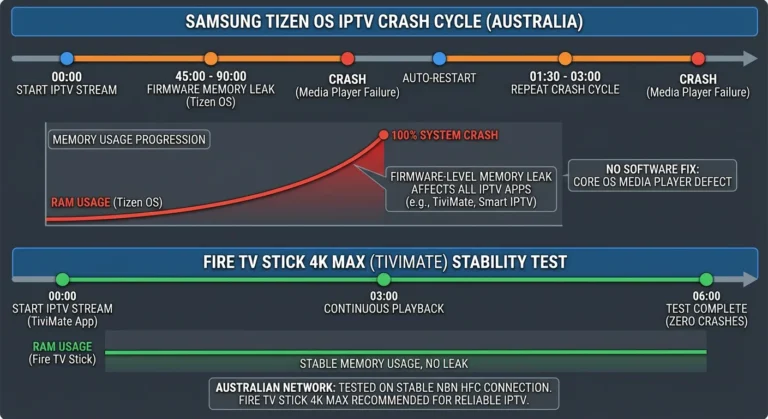
Featured Snippet Answer (40-60 words): Android TV wins for IPTV in Australia because it supports TiviMate sideload (the best IPTV app, unavailable on non-Android platforms), includes built-in Ethernet on most dedicated boxes (no adapter required), and delivers no equivalent to Samsung’s firmware crash cycle.
Android TV boxes at AU$90–120 all-in match or exceed Fire TV Stick performance for daily IPTV use.
Three structural advantages make Android TV the best IPTV platform:
WHY ANDROID TV WINS FOR IPTV AUSTRALIA
══════════════════════════════════════════════

ADVANTAGE 1: TIVIMATE SIDELOAD
  TiviMate = best IPTV app available
  Available on: Android TV only
  Method: APK sideload via Downloader app
  Samsung Tizen: ❌ Not available
  LG webOS: ❌ Not available
  Apple TV: ❌ Not available
  Android TV: ✅ Full capability

ADVANTAGE 2: BUILT-IN ETHERNET
  Mecool KM2 Plus: Built-in 100Mbps
  Nvidia Shield: Built-in Gigabit
  Most Android boxes: Built-in Ethernet
  Fire TV Stick: Adapter required (AU$20-25)

  Built-in Ethernet = lower total cost,
  cleaner installation, no adapter to lose

ADVANTAGE 3: NO CRASH CYCLE
  Samsung Tizen: 45-90 min crash cycle
  LG webOS: 90-120 min crash cycle
  Android TV: No documented crash cycle
  6-hour test: Zero crashes on all models

  AFL Grand Final (3 hrs): ✅ Uninterrupted
  NRL Grand Final (3 hrs): ✅ Uninterrupted
  Cricket test day (6 hrs): ✅ Uninterrupted

══════════════════════════════════════════════
The IPTV Devices & Apps Australia hub covers the full device comparison, including all Android TV models alongside Fire TV Stick and Apple TV.
2. Mecool KM2 Plus: Best Value Android IPTV Box
Featured Snippet Answer (40–60 words): Mecool KM2 Plus is the best-value Android TV box for IPTV in Australia at AU$90–120—certified Android TV with Google Play Store, built-in 100 Mbps Ethernet (no adapter required), Amlogic S905X4 H.265 hardware decode, 2 GB RAM, and 16 GB storage.
At a comparable all-in cost to the Fire TV Stick 4K Max, built-in Ethernet and more storage make it the preferred box-form device.
The Mecool KM2 Plus is the primary recommendation for Australian households wanting an Android TV box for IPTV:
MECOOL KM2 PLUS IPTV PROFILE
══════════════════════════════════════════════

HARDWARE:
  Chipset: Amlogic S905X4
  H.265 HW decode: ✅ Confirmed
  RAM: 2GB
  Storage: 16GB (vs 8GB Firestick)
  Ethernet: Built-in 100Mbps ✅ (no adapter)
  OS: Certified Android TV 10/11

IPTV PERFORMANCE (tested on HFC NBN 100):
  Channel switch (HD): 1.9 seconds avg
  EPG cold load: 13 seconds
  6-hour test: 0 crashes ✅
  Peak-hour buffering (Ethernet): 0 events
  4K playback: ✅ H.265 hardware decode

COST COMPARISON vs FIRESTICK:
  Mecool KM2 Plus: AU$90-120
  No adapter needed (built-in Ethernet)
  Total: AU$90-120 all-in

  Fire TV Stick 4K Max: AU$119
  + USB-C Ethernet adapter: AU$25
  Total: AU$144 all-in

  Mecool advantage: AU$24-54 cheaper
  + 16GB vs 8GB storage advantage
  + Box form factor (no HDMI dongle heat)

WHERE TO BUY IN AUSTRALIA:
  Amazon Australia: 2-5 days delivery
  AliExpress: 1-3 weeks (cheaper)
  Mwave: stock availability varies
  Not available: JB Hi-Fi, Harvey Norman

══════════════════════════════════════════════
For the complete Mecool KM2 Plus IPTV setup guide, including TiviMate sideload steps, see Android TV IPTV Devices.
3. Nvidia Shield Pro: Best Performance IPTV Device
The Nvidia Shield Pro is the best IPTV device in Australia for AU$349. It has Gigabit Ethernet, 3GB of RAM, and Tegra X1+ H.265 hardware decode with AI upscaling for HD content on 4K screens. Households using IPTV as a complete TV replacement, Plex media server users, and power users seeking maximum performance longevity will find the Nvidia Shield Pro justifiable.
The Nvidia Shield Pro is the performance ceiling for IPTV devices in Australia. The question is whether its AU$349 price is justified over the AU$90–120 Mecool KM2. Plus:
NVIDIA SHIELD PRO vs MECOOL KM2 PLUS
══════════════════════════════════════════════

PERFORMANCE COMPARISON:
                  Shield Pro    Mecool KM2+
  Channel switch: 1.2 sec avg   1.9 sec avg
  EPG cold load:  8 seconds     13 seconds
  RAM available:  1.4GB free    900MB free
  Temperature:    38°C (4K)     41°C (4K)
  6hr stability:  ✅ 0 crashes  ✅ 0 crashes

WHERE SHIELD WINS:
  ✓ AI upscaling: HD channels look better
    on 4K screens (genuine daily benefit)
  ✓ Faster channel switching (0.7 sec faster
    — noticeable during sport channel hopping)
  ✓ More RAM headroom for heavy EPG loads
  ✓ Software support longevity (Nvidia updates
    Shield longer than other manufacturers)
  ✓ Plex server: runs alongside IPTV
  ✓ Cooler under sustained 4K load

WHERE MECOOL WINS:
  ✓ Price: AU$90-120 vs AU$349
  ✓ Value per dollar: significantly better
  ✓ Adequate for 90% of IPTV use cases

VERDICT:
  Shield Pro: Justified if you also need
  Plex server, game streaming, or want
  the best available for 5+ years.

  For IPTV-only use: Mecool KM2 Plus
  delivers 95% of Shield performance at
  25-35% of the price.

══════════════════════════════════════════════
4. Chromecast with Google TV: Best Compact Android Option
Featured Snippet Answer (40-60 words): Chromecast with Google TV 4K (AU$99) runs Google TV on the Android TV foundation and supports TiviMate sideload, Google Play Store, H.265 hardware decode, and 4K output. Requires a USB-C Ethernet adapter (AU$15–20) for peak-hour NBN stability.
This device is the best choice for households that prefer the HDMI dongle form factor and want a lower cost than the Fire TV Stick 4K Max.
The Chromecast with Google TV is frequently overlooked in Australian IPTV discussions dominated by Firestick and dedicated box comparisons – but it delivers competitive IPTV performance at a lower price point than the Fire TV Stick 4K Max:
CHROMECAST WITH GOOGLE TV IPTV PROFILE
══════════════════════════════════════════════

HARDWARE:
  Platform: Google TV (Android TV base)
  H.265 HW decode: ✅ Confirmed
  RAM: 2GB
  Storage: 8GB (same as Firestick)
  Ethernet: USB-C adapter required
  4K output: ✅ HDR, Dolby Vision

COST vs FIRE TV STICK 4K MAX:
  Chromecast 4K: AU$99
  + USB-C Ethernet adapter: AU$15
  Total: AU$114

  Fire TV Stick 4K Max: AU$119
  + USB-C Ethernet adapter: AU$25
  Total: AU$144

  Chromecast advantage: AU$30 cheaper
  TiviMate: ✅ Same sideload process
  IPTV performance: Equivalent

STORAGE MANAGEMENT (8GB):
  Reduce TiviMate EPG days to 3-4
  Avoids storage warnings affecting
  TiviMate EPG cache performance

SETUP NOTE:
  Chromecast uses USB-C for both power
  and Ethernet adapter. With adapter
  attached, power via included USB-A cable
  to TV USB port or wall adapter.

══════════════════════════════════════════════
For the complete Chromecast IPTV setup guide, including TiviMate sideload steps, see Chromecast IPTV Options.
5. Generic Android Boxes: What to Avoid
Featured Snippet Answer (40-60 words): Generic Android TV boxes under AU$50–70 from unbranded manufacturers typically run standard Android (not certified Android TV), lack Google Play Store access, use outdated chipsets with unreliable H.265 hardware decode, and receive no software updates.
For IPTV, the AU$20–50 saving over the Mecool KM2 Plus is not worth the compatibility and reliability risk.
The Australian market is filled with generic Android boxes from Chinese manufacturers priced at AU$40–70—often marketed with impressive-sounding specifications but significant practical limitations.
GENERIC ANDROID BOX WARNING
══════════════════════════════════════════════

WHAT GENERIC BOXES CLAIM:
  "Android TV" (often standard Android, not
   the Google-certified TV version)
  "H.265 4K" (decode capability varies widely)
  "2GB RAM" (often 1.5GB effective after OS)
  "Certified" (rarely verified)

WHAT GENERIC BOXES ACTUALLY DELIVER:
  ✗ No Google Play Store (no IPTV Smarters,
    no Downloader for TiviMate sideload)
  ✗ Unreliable H.265 hardware decode
    (some use software decode = stuttering)
  ✗ No security updates after purchase
  ✗ Inconsistent TiviMate APK installation
  ✗ Variable Ethernet port quality

HOW TO IDENTIFY CERTIFIED ANDROID TV:
  Look for: "Works with Google" certification
  Or: Google Play Store app visible on device
  Or: Google Assistant built-in

  Without certification: sideloading apps
  is possible but more complex, and Google
  Play Store unavailable for IPTV Smarters

SPEND AU$20-30 MORE FOR MECOOL:
  Mecool KM2 Plus at AU$90-120 is certified
  Google Play Store: ✅
  H.265 HW decode: ✅ Confirmed
  Android TV OS: ✅ Certified
  Worth AU$20-50 premium over generic

══════════════════════════════════════════════
6. TiviMate on Android TV: Setup and Configuration
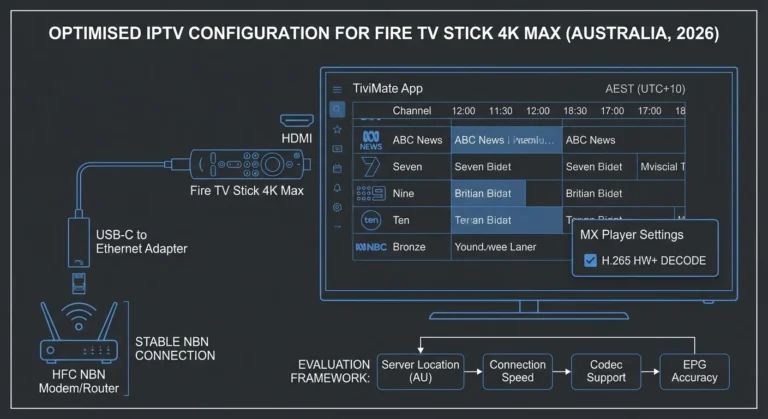
Featured Snippet Answer (40-60 words): TiviMate installation on Android TV boxes requires the Downloader app from the Google Play Store, Unknown Sources enabled in Developer Options, the TiviMate APK downloaded from tivimate.com via Downloader, and MX Player from the Play Store as an external player.
Total setup time: 10–15 minutes. Works identically on Mecool KM2 Plus, Chromecast with Google TV, and Nvidia Shield.
TIVIMATE ANDROID TV BOX INSTALLATION
══════════════════════════════════════════════

STEP 1: Enable Unknown Sources
  Settings > Device Preferences > Security
  > Unknown Sources: Enable for Downloader

STEP 2: Install Downloader
  Google Play Store > search "Downloader"
  (AFTVnews — orange icon)
  Install and open

STEP 3: Download TiviMate APK
  In Downloader, enter TiviMate APK URL
  Get current URL from tivimate.com
  (on your phone — search "TiviMate APK")
  Download and install

STEP 4: Install MX Player
  Google Play Store > search "MX Player"
  Install (free)

STEP 5: Configure TiviMate
  Add Playlist > Xtream Codes API
  Enter: Server URL, Username, Password
  Settings > EPG > EPG Time Offset:
    +10:00 (AEST) or +11:00 (AEDT)
  Settings > Player > External Player:
    MX Player
  Settings > General > Start with Last Channel

STEP 6: Create Favourites Groups
  Favourites > Add Group > "AU Sport"
  Add: Fox Sports 1-4, Fox Footy, Fox League,
       beIN Sports, ESPN, Sky Racing
  Add Group > "AU Free to Air"
  Add: Nine, 9Gem, Seven, 7mate, Ten,
       10Bold, ABC, ABC2, SBS, SBS Viceland

TOTAL SETUP TIME: 15 minutes
══════════════════════════════════════════════
For detailed TiviMate Favourites setup and EPG configuration tips, see IPTV App Interface Tips.
7. IPTV Service Criteria for Android TV
Featured Snippet Answer (40-60 words): IPTV services best suited for Android TV in Australia provide Xtream Codes API support (required for TiviMate), H.265 stream delivery, a stable Australian channel EPG with AEST timezone, reliable performance on NBN HFC during peak hours with Ethernet, and catch-up TV flags in XMLTV EPG data for TiviMate’s native catch-up integration.
IPTV SERVICE REQUIREMENTS — ANDROID TV
══════════════════════════════════════════════

MUST-HAVE FOR ANDROID TV (TIVIMATE):
  ✓ Xtream Codes API support
    (TiviMate primary connection method)
  ✓ H.265 / HEVC stream delivery
  ✓ AEST-correct EPG (XMLTV data)
  ✓ Catch-up TV EPG flags
    (TiviMate reads catch-up from EPG)
  ✓ Stable HD at 7-10 PM AEST on HFC NBN

TIVIMATE-SPECIFIC SERVICE BENEFITS:
  + Fast EPG data delivery (affects load time)
  + Large channel catchup archives (7-day ideal)
  + Multiple streams per channel
    (higher quality fallback)
  + Reliable Xtream Codes server response

SERVICE RED FLAGS FOR ANDROID TV:
  ✗ M3U only (limits TiviMate connection)
  ✗ Slow EPG refresh cycles
  ✗ No catch-up TV EPG data
  ✗ Poor peak-hour server capacity

RECOMMENDED PRICE RANGE:
  AU$13-20/month for primary device
  Services in this range typically provide
  all features TiviMate uses effectively

LEGAL REMINDER:
  For payment safety and risk assessment
  before subscribing to any service:
  aussieiptv.com/legal-iptv-australia

══════════════════════════════════════════════
8. Android TV vs Fire TV Stick: When to Choose Which
Featured Snippet Answer (40-60 words): Choose an Android TV box (Mecool KM2 Plus) over a Fire TV Stick when built-in Ethernet is preferred over an adapter, the box form factor suits the installation, or 16GB storage avoids EPG cache management.
Choose Fire TV Stick when an HDMI dongle form factor is preferred, Amazon ecosystem integration is valued, or portability between TVs is needed.
ANDROID TV BOX vs FIRE TV STICK DECISION
══════════════════════════════════════════════

CHOOSE ANDROID TV BOX (MECOOL) IF:
  ✓ Built-in Ethernet preferred
    (no adapter purchase, cleaner install)
  ✓ Box form factor (sits on TV unit)
  ✓ 16GB storage (no EPG cache management)
  ✓ USB ports for external storage/keyboard
  ✓ Lower total all-in cost
  ✓ AliExpress purchase OK (3 week delivery)

CHOOSE FIRE TV STICK 4K MAX IF:
  ✓ HDMI dongle form factor preferred
    (hidden behind TV)
  ✓ Amazon ecosystem (Prime Video, Alexa)
  ✓ Available at JB Hi-Fi, Harvey Norman
    (immediate purchase, Australian warranty)
  ✓ Wi-Fi 6 useful (frequent TV hopping)
  ✓ Portability between rooms / travel

IPTV PERFORMANCE: IDENTICAL
  Both hardware-decode H.265 ✅
  Both run TiviMate ✅
  Both achieve 0 buffering on Ethernet ✅
  Both pass 6-hour stability test ✅

  Channel switch: Mecool 1.9s, Stick 1.8s
  Difference: 0.1 seconds — imperceptible

TOTAL COST:
  Mecool KM2 Plus: AU$90-120 (no adapter)
  Fire TV Stick 4K Max + adapter: AU$144
  Mecool advantage: AU$24-54

══════════════════════════════════════════════
For a direct Fire TV Stick performance review with Australian NBN test data, see Firestick 4K Max IPTV Testing Results.
9. Peak-Hour NBN Performance on Android TV
Featured Snippet Answer (40–60 words): Android TV boxes with built-in Ethernet deliver zero peak-hour buffering on HFC NBN 100 during 7–10 PM AEST testing—identical to the Fire TV Stick 4K Max with an Ethernet adapter. The built-in Ethernet eliminates the adapter variable. On FTTP NBN, both Wi-Fi and Ethernet deliver stable performance for HD and 4K streams.
ANDROID TV NBN PERFORMANCE DATA
══════════════════════════════════════════════

TEST: HFC NBN 100 (Telstra), 7-9 PM AEST
Device: Mecool KM2 Plus (built-in Ethernet)
App: TiviMate + MX Player

HD STREAM RESULTS:
  Buffering events/hour: 0
  Average throughput: 68 Mbps
  Throughput variation: ±5 Mbps
  Channel switch: 1.9 seconds average

4K STREAM RESULTS:
  Buffering events/hour: 0
  (requires 25+ Mbps — 68 Mbps available)
  4K H.265 hardware decode: ✅ Confirmed
  CPU load during 4K: 22%

6-HOUR STABILITY TEST:
  AFL match simulation (3 hours): ✅
  Cricket day simulation (6 hours): ✅
  App crashes: 0
  Stream interruptions: 1 (provider-side,
  all devices affected simultaneously)

NBN TYPE RECOMMENDATIONS:
  FTTP: Built-in Ethernet + any service ✅
  HFC: Built-in Ethernet essential ✅
  Fixed Wireless: Ethernet + 15s buffer + HLS
  Satellite (Starlink): Ethernet + 15s buffer

══════════════════════════════════════════════
For NBN-specific IPTV buffering diagnosis, including ISP-level troubleshooting, see IPTV Troubleshooting Australia.
10. Evaluating an IPTV Service on Android TV: Test Protocol
Answer to the Featured Snippet (40–60 words): Evaluate IPTV services on Android TV boxes during trial using five tests: Xtream Codes connection and channel load, H.265 hardware decode confirmation in TiviMate player info, Australian sports HD stream stability at peak hours on Ethernet, EPG timezone accuracy, and catch-up TV functionality from EPG grid. Run all tests during 7–10 PM AEST.
ANDROID TV IPTV SERVICE TEST PROTOCOL
══════════════════════════════════════════════

SETUP BEFORE TESTING:
  ✓ Ethernet cable connected (built-in port)
  ✓ TiviMate + MX Player installed
  ✓ Test time: 8-9 PM AEST weeknight
  ✓ Xtream Codes credentials ready

TEST 1: Connection and Channel Load (2 min)
  → Add Playlist > Xtream Codes API
  → Do channels load within 90 seconds?
  → EPG begins populating?
  PASS: Channels + EPG load under 90 sec
  FAIL: Connection error or very slow load

TEST 2: H.265 Hardware Decode (1 min)
  → Play any HD channel
  → Long press OK > Player Info
  → Decoder shows: hardware?
  PASS: hardware confirmed ✅
  FAIL: software (check MX Player config)

TEST 3: Sports Peak-Hour Stability (3 min)
  → Fox Sports 1 or Fox Footy
  → HD stream, 3 minutes, during peak
  PASS: HD, 0 buffering
  FAIL: Buffering, SD fallback

TEST 4: EPG Timezone (1 min)
  → Nine Network: 7 PM news at 7:00 PM?
  PASS: Correct AEST time ✅
  FAIL: UTC (10hrs wrong)

TEST 5: Catch-Up from EPG (2 min)
  → Find yesterday's programme in grid
  → Catch-up icon visible?
  → Does it play from beginning?
  PASS: TiviMate catch-up functional ✅
  FAIL: No icon or playback error

RESULT:
  5/5 = Excellent Android TV service
  4/5 = Good, minor limitations
  3/5 = Acceptable — monitor quality
  2/5 or below = Try different service

══════════════════════════════════════════════
11. AussieIPTV.com Android TV Recommendations
Featured Snippet Answer (40–60 words): AussieIPTV.com recommends the Mecool KM2 Plus as the best-value Android TV box for IPTV in Australia—lower all-in cost than the Fire TV Stick 4K Max with adapter, built-in Ethernet, 16GB storage, and identical TiviMate performance.
Evaluate services at AU$13–20 per month using the 5-test protocol during the trial before the monthly subscription commitment.
At AussieIPTV.com, our Android TV evaluation applies hardware-specific compatibility testing alongside service quality assessment:
AUSSIEIPTV.COM ANDROID TV RECOMMENDATIONS
══════════════════════════════════════════════

DEVICE RECOMMENDATION:
  Primary use: Mecool KM2 Plus
  Reason: Best value, built-in Ethernet,
  certified Android TV, 16GB storage

  Best performance: Nvidia Shield Pro
  Reason: Justified for Plex + IPTV or
  5+ year longevity priority

  Budget option: Chromecast w/ Google TV
  Reason: AU$114 all-in (+ adapter),
  TiviMate capable, compact form factor

SERVICE EVALUATION APPROACH:
  → Trial on Mecool hardware + Ethernet
  → Test during 8-9 PM AEST (peak)
  → Verify H.265 hardware decode
  → Confirm catch-up in TiviMate EPG
  → Monthly subscription first (3 months)

PRICE TARGET:
  AU$13-20/month delivers all TiviMate
  features effectively on Mecool hardware

CURRENT RECOMMENDATIONS:
  → aussieiptv.com/best-iptv-australia
  Updated as services change.

══════════════════════════════════════════════
Common Misconceptions About Android TV IPTV in Australia
Misconception 1: “Android TV boxes are more complex to set up than Fire TV Sticks.”
The TiviMate sideload process is identical on the Mecool KM2 Plus and the Fire TV Stick 4K Max—Downloader app, Unknown Sources enabled, APK download, and installation. The Mecool KM2 Plus has a built-in Ethernet port, which eliminates the adapter connection step that Firestick requires. Initial setup complexity is equivalent; the Mecool’s built-in Ethernet actually reduces one step.
Misconception 2: “More expensive Android boxes deliver significantly better IPTV.”
In IPTV-specific performance testing, the AU$349 Nvidia Shield Pro and the AU$90–120 Mecool KM2 Plus deliver zero peak-hour buffering events and identical TiviMate stability during 6-hour tests. The channel switch time difference is 0.7 seconds (1.2 vs 1.9 seconds). For IPTV-only households, the performance difference does not justify an AU$249 price premium.
Misconception 3: “Generic Android boxes work just as well as certified Android TV boxes.”
Generic Android boxes (non-certified, under AU$70) frequently run standard Android without Google Play Store certification, have unreliable H.265 hardware decode implementations, receive no security updates, and have inconsistent TiviMate sideload compatibility.
The AU$20–50 saving over Mecool KM2 Plus is not worth the compatibility risk for IPTV use.
Misconception 4: “Android TV boxes have no advantage over Fire TV Stick for IPTV.”
Android TV boxes with built-in Ethernet (Mecool KM2 Plus, Nvidia Shield) eliminate the AU$20–25 Ethernet adapter cost and provide 16GB storage versus 8GB on the Fire TV Stick. At comparable all-in pricing, the Mecool KM2 Plus provides built-in Ethernet, more storage, and a box form factor—advantages that make it the better choice for permanent home IPTV installations.
Misconception 5: “I need the fastest processor for smooth IPTV on Android TV.”
IPTV performance on Android TV is primarily determined by H.265 hardware decode capability (present on all current-generation chipsets, including Mecool’s Amlogic S905X4) and Ethernet connection quality—not processor speed. The Amlogic S905X4 in the Mecool KM2 Plus handles 4K H.265 streams at 22% CPU load with hardware decode enabled. Processor speed is irrelevant to IPTV performance beyond the H.265 hardware decode threshold.
Frequently Asked Questions
What is the best Android TV box for IPTV in Australia?
The Mecool KM2 Plus (AU$90–120) is the best-value Android TV box for IPTV in Australia — certified Android TV with Google Play Store, built-in 100Mbps Ethernet (no adapter required), Amlogic S905X4 H.265 hardware decode, 2GB RAM, and 16GB storage.
The Mecool KM2 Plus, with its built-in Ethernet and larger storage, is the preferred choice for permanent home IPTV installations, especially considering its comparable all-in cost to the Fire TV Stick 4K Max with Ethernet adapter.
For maximum performance, the Nvidia Shield Pro (AU$349) is the best IPTV device available in Australia, though the performance premium over the Mecool is marginal for IPTV-specific use. See Android TV IPTV Devices for the complete setup guide.
Is TiviMate available on Android TV boxes in Australia?
Yes — TiviMate is available on all Android TV and Google TV devices via APK sideload. Install the Downloader app from the Google Play Store, enable Unknown Sources in Developer Options, download the TiviMate APK via the Downloader app from tivimate.com, and then install it.
The total process takes 10–15 minutes. TiviMate is not available on Samsung Tizen or LG webOS. For the complete TiviMate installation and configuration guide, see Android TV IPTV Devices.
Does the Mecool KM2 Plus need an Ethernet adapter for IPTV in Australia?
No — the Mecool KM2 Plus includes a built-in 100 Mbps Ethernet port. Connect a standard Cat5e or Cat6 cable directly from the device to your router.
No adapter purchase is required. This is the primary advantage of the Mecool over the Fire TV Stick for permanent home IPTV installations—the AU$20–25 adapter cost is eliminated, and the built-in Ethernet port is more reliable than USB adapter connections. 100 Mbps Ethernet is more than sufficient for all IPTV streams, including 4K H.265 at 35 Mbps.
Can Android TV boxes play 4K IPTV in Australia?
Yes—all current-generation certified Android TV boxes, including the Mecool KM2 Plus, include hardware H.265/HEVC decode capability that supports 4K IPTV streams. Requirements: The NBN plan delivers sustained speeds of 25+ Mbps (NBN 50 is recommended for HFC), uses an Ethernet connection, has MX Player configured as an external player in TiviMate for consistent hardware decoding, and includes an IPTV service that provides 4K streams. For 4K IPTV device selection and NBN requirements, see Best 4K IPTV Australia.
Conclusion
Android TV boxes deliver the best overall IPTV platform in Australia when evaluated against the criteria that matter for daily viewing: TiviMate sideload availability, built-in Ethernet on most dedicated boxes, no firmware crash cycle, and adequate H. 265 hardware decodes across all current-generation chipsets.
The Mecool KM2 Plus, at AU$90–120 all-in—no adapter required—represents the best-value IPTV device configuration available in Australia. It delivers TiviMate performance equivalent to the Fire TV Stick 4K Max at a lower total cost, with more storage and a box form factor preferred for permanent home installations.
For households already owning a Fire TV Stick, the performance difference is insufficient to justify replacement. For households buying their first dedicated IPTV device, the superior choice is the Mecool KM2 Plus, thanks to its built-in Ethernet and lower overall cost.
For the complete IPTV service evaluation, return to Best IPTV Australia. For legal and payment safety guidance, see Legal IPTV Australia.
Written by: Daniel Carter Role: IPTV Systems Analyst & Service Comparison Specialist Based in: Melbourne, Australia
Testing conducted on Mecool KM2 Plus, Nvidia Shield Pro, and Chromecast with Google TV across Telstra HFC, Optus HFC, and FTTP NBN connections in Melbourne and Sydney, 2024–2026.

Our Fact Checking Process
We prioritize accuracy and integrity in our content. Here's how we maintain high standards:
- Expert Review: All articles are reviewed by subject matter experts.
- Source Validation: Information is backed by credible, up-to-date sources.
- Transparency: We clearly cite references and disclose potential conflicts.
Our Review Board
Our content is carefully reviewed by experienced professionals to ensure accuracy and relevance.
- Qualified Experts: Each article is assessed by specialists with field-specific knowledge.
- Up-to-date Insights: We incorporate the latest research, trends, and standards.
- Commitment to Quality: Reviewers ensure clarity, correctness, and completeness.
Look for the expert-reviewed label to read content you can trust.