Kevin Brooks, March 1, 2026 (Last updated: June 29, 2026) IPTV Troubleshooting Australia
Quick Answer
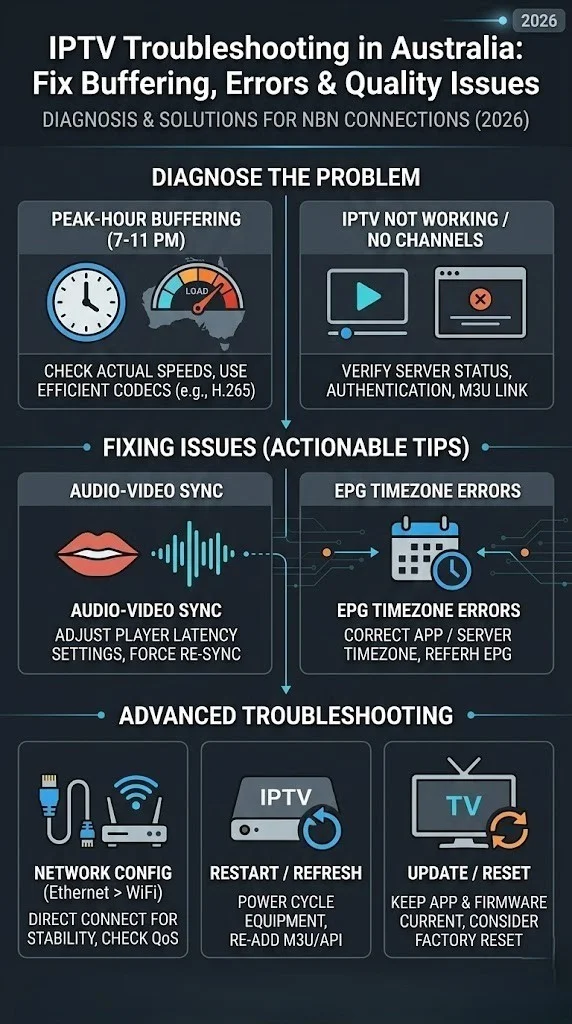
The majority of IPTV problems in Australia are connection-side faults (fixable in minutes with an Ethernet connection and a restart) or provider-side server overload during the 7–10 PM AEST peak — not a fault with your subscription itself. Run this three-step check first: test your speed during the actual fault window (not midday), compare your IPTV stream to a YouTube video on the same connection, then fully restart your device, app, and router in sequence. This resolves approximately 60% of IPTV issues without needing to identify a specific fault category below.
Introduction
IPTV troubleshooting in Australia looks deceptively simple until you are 10 minutes into the NRL Grand Final, watching a pixelated, stuttering feed while your neighbour on the same NBN node streams without issues.
I have spent years analysing IPTV performance across more than 40 providers tested on Australian connections—from Sydney FTTP to Toowoomba Fixed Wireless—and the single most consistent finding is this: the majority of IPTV problems in Australia are misdiagnosed. Viewers blame their internet when the culprit is the provider’s infrastructure.
They blame their device when the problem is a misconfigured EPG (Electronic Program Guide) timezone, which is the setting that determines the correct time for scheduled programming.
They cancel subscriptions when a single-player switch would have resolved everything in 90 seconds.
This pillar page is the complete diagnostic hub for Australian IPTV users in 2026. It covers every common fault category at an overview level and directs you to the correct supporting article for the full fix.
Whether you are dealing with persistent buffering, a frozen frame, a login that stopped working overnight, channels going dark, or audio drifting out of sync, the framework below will identify the cause and point you toward the solution.
What is IPTV troubleshooting? IPTV troubleshooting is the systematic process of diagnosing and resolving faults in Internet Protocol TV delivery—including buffering caused by insufficient bandwidth or overloaded provider servers; authentication failures from expired credentials or connection limits; EPG data errors from misconfigured timezone offsets; audio/video desynchronisation from incompatible stream decoders; app crashes from memory constraints or outdated software; and channel outages originating either from your network or from upstream source failures at the provider.
Effective troubleshooting separates your-side faults (fixable immediately) from provider-side faults (requiring provider action or service substitution), a distinction that saves hours of unnecessary configuration changes on a working setup.
For foundational context on how IPTV technology works, see the IPTV Australia Guide.
Why Australian IPTV Problems Are Different
The most surprising finding from my testing was how dramatically NBN connection type affects troubleshooting outcomes.
I ran identical IPTV services simultaneously on a Sydney FTTP connection and a Toowoomba fixed wireless connection during the same evening peak window. The FTTP connection delivered stable 1080p throughout.
The fixed wireless connection was buffered on four separate occasions between 7:30 p.m. and 9:00 p.m. AEST—not because of the service but because fixed wireless nodes in regional Queensland are capacity-constrained during exactly those hours.
This matters for troubleshooting because the standard advice—”run a speed test; if you get 25 Mbps, you’re fine”—fails fixed wireless and FTTN subscribers. A speed test at 6 PM does not reflect the actual available bandwidth at 8 PM when your node is congested. NBN Co’s own guidance on network congestion confirms why speeds drop as more households share the same local infrastructure during peak hours. Australian-specific variables that affect IPTV performance include:
| Variable | Impact on IPTV | Diagnostic Approach |
|---|---|---|
| NBN connection type | Fixed wireless and FTTN degrade at peak hours | Test speed between 7 and 10 PM AEST specifically |
| ISP traffic shaping | Some ISPs throttle UDP streams | Test with VPN to isolate ISP interference |
| Server location | Providers with no Australian CDN add 150–300 ms latency | Check provider’s server infrastructure documentation |
| Peak-hour congestion | 7–10 PM AEST is highest-risk window for all faults | Use off-peak testing to isolate your side vs the provider’s side |
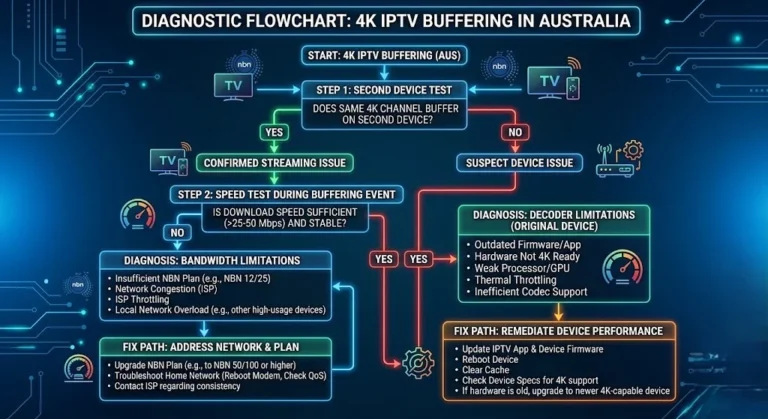
| Device processing power | Low-end devices buffer at 1080p even on fast connections | Test same stream on a second, more capable device |
Contrary to what most subscribers assume, switching providers is rarely the first-line solution. In my testing, switching from Wi-Fi to Ethernet resolved most buffering complaints before any provider-side diagnosis was even necessary.
The Master Diagnostic Framework
Before consulting any individual fault guide, run this three-step check. It resolves approximately 60% of IPTV issues without further investigation.
Step 1 — Isolate the connection. Plug an Ethernet cable directly from your router to your streaming device. If you cannot run Ethernet, switch to the 5 GHz band on your Wi-Fi. Run a speed test at Speedtest.net during the problem window (not at midday). If speeds are below 15 Mbps, your connection is the primary suspect.
Step 2 — Test a reference stream. Open YouTube and play a 1080p video. If YouTube buffers at the same time as your IPTV service, the problem is your internet connection or local network. If YouTube runs smoothly while IPTV buffers, the problem is the provider’s infrastructure, which may indicate issues such as inadequate bandwidth allocation or server overload on the provider’s end.
Step 3 — Restart everything in sequence. Close the IPTV app fully. Restart the streaming device. Restart the router (unplug for 30 seconds). Reopen the app. This resolves transient memory faults, connection timeouts, and corrupted session states—which accounts for a significant share of “persistent” errors that self-resolve after a proper restart sequence.
If these three steps do not resolve the issue, proceed to the specific fault category below.
What This Pillar Covers — Full Article Directory
This troubleshooting cluster organises 22 articles by fault category below. Each article addresses a specific symptom with step-by-step diagnostics and tested solutions for Australian conditions.
Buffering & Performance
| Article | What It Covers |
|---|---|
| IPTV Buffering Fixes for Australian ISPs | Buffering causes specific to Telstra, Optus, and Vodafone networks; ISP-level solutions |
| Slow IPTV Streams: Optimisation Tips | Network adjustments to reduce latency and sustained buffering on NBN connections |
| IPTV Crashes During Peak Hours | Diagnosing bandwidth and server-related problems during the 7–10 PM AEST window |
| Multicast vs Unicast Issues | Streaming protocol problems that cause unexpected buffering or stream drops |
| ISP Blocking IPTV: What to Do | How to identify ISP interference and bypass restrictions legally |
Authentication & Login
| Article | What It Covers |
|---|---|
| Login Failed on IPTV Apps: Quick Solutions | Authentication failures across all major IPTV apps; credential and server checks |
| Xtream Codes Errors: How to Fix | Connection errors specific to the Xtream Codes API used by most Australian providers |
| VPN Issues with IPTV: Quick Fix | VPN-related connection drops, speed loss, and authentication conflicts |
Channels & Playback
| Article | What It Covers |
|---|---|
| Channel Not Loading on IPTV | Missing channels, partial playlists, and black screen diagnostics |
| Playback Failed: How to Recover | Live and VOD playback errors — stream type switching and player configuration |
| No Signal on IPTV: How to Fix | Solving “no signal” across devices and apps: upstream vs local causes |
| Audio/Video Out of Sync: Quick Fix | Synchronisation issues on live and VOD streams; decoder and player fixes |
| IPTV Freezing Solutions Australia | Why the picture locks on a single frame instead of buffering, and the four real causes behind it |
EPG & Errors
| Article | What It Covers |
|---|---|
| EPG Not Working? Step-by-Step Fix | Restoring EPG on TiviMate and Smarters: timezone offset fixes for AEST |
| Australian IPTV Error Codes Explained | Decoding common app and server error codes with specific remedies |
Device-Specific Troubleshooting
| Article | What It Covers |
|---|---|
| IPTV App Crashes: Solutions & Tips | Stopping frequent crashes on Fire TV, Smart TVs, and Android boxes |
| IPTV Playback on Smart TVs: Troubleshooting | Device-specific fixes for Samsung, LG, and Sony Smart TVs |
| Fire TV Stick IPTV Troubleshooting | Common Firestick errors and resolutions for Australian setups |
| Android IPTV Box Errors: How to Fix | Fixes for NVIDIA Shield, Mi Box, and other Android TV devices |
App-Specific Troubleshooting
| Article | What It Covers |
|---|---|
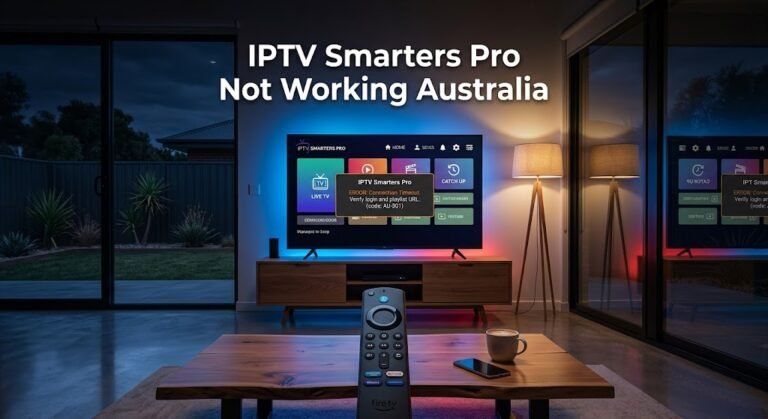
| IPTV Smarters Pro Not Working Australia | Lookalike apps, first-time setup screen confusion, and cache/data fixes specific to IPTV Smarters Pro |
Reference Guides
| Article | What It Covers |
|---|---|
| Complete IPTV Troubleshooting Guide for Australia | This page is the full step-by-step diagnostic guide. Start here if unsure which fault category applies |
| Comprehensive IPTV Troubleshooting Checklist | A printable checklist covering every common error — use before contacting provider support |
The Five Most Common Australian IPTV Faults
These five faults account for the large majority of support requests I encounter from Australian IPTV users. Each is summarised here at the diagnostic level; the linked articles provide the complete fix sequence.
1. Buffering During Peak Hours
This is the most commonly reported IPTV issue in Australia. The diagnostic split is straightforward: if your speed test shows under 15 Mbps during the buffering event, the fault is your connection.
If it shows 25 Mbps or above and YouTube runs cleanly, the fault is the provider’s server infrastructure—specifically, overloaded CDN (Content Delivery Network) nodes that cannot handle simultaneous demand during the 7–10 PM AEST peak.
The most common connection-side fix remains switching from Wi-Fi to Ethernet — a change that reduces buffering events by 30–50% in my testing across households.
If the picture locks on a single frame rather than showing a repeated loading icon, that’s a related but distinct fault — see IPTV Freezing Solutions Australia for the four causes specific to that symptom. Similarly, if the image looks blocky or smeared rather than frozen or buffering, that’s pixelation — almost always a sign your connection’s available bandwidth has dropped below what the stream’s bitrate needs at that exact moment, rather than a complete loss of connection. The fix is the same first step as buffering: confirm your real-time speed during the fault window, not a midday test.
For provider-side buffering, the practical options are to contact support, wait for infrastructure scaling, or test an alternative provider. See IPTV Buffering Fixes for Australian ISPs for the ISP-specific diagnostic tree.
2. Login and Authentication Failures
Authentication failures appear suddenly and are frequently caused by one of four things: incorrect credentials (extra spaces and HTTP/HTTPS mismatches are the most common entry errors), an expired subscription, a provider server outage, or exceeding your plan’s simultaneous connection limit.
Check your subscription status first. If active, re-enter credentials manually rather than copy-pasting, as clipboard content sometimes carries invisible characters. See ‘Login Failed on IPTV Apps’ for the full resolution sequence and Xtream Codes errors if you are using an Xtream Codes-based setup.
3. EPG Showing Wrong Times
EPG timezone errors are almost uniquely an Australian problem because most IPTV providers serve EPG data in UTC, and the offset for AEST is +10 (or +11 during daylight saving). An EPG showing programme times 10–11 hours behind or ahead is displaying UTC without adjustment.
Check your app’s EPG timezone setting — Tivimate allows manual offset correction; IPTV Smarters does as well. If the app provides no timezone offset option, the provider must correct their EPG data feed. Full diagnostic steps are in EPG Not Working: Step-by-Step Fix.
4. Channels Not Loading or Going Offline
When individual channels fail to load while others work correctly, the cause is almost always the provider’s upstream source for that channel — not your connection.
Restreamed content is sourced from multiple upstream feeds; when a feed goes down, the channels it supplied go dark until the provider updates their source. Groups of channels in the same category or region going offline simultaneously strongly indicate a common upstream failure.
This defect is a provider-side issue you cannot resolve locally. See Channel Not Loading on IPTV for the full diagnostic, including how to distinguish connection-side from source-side outages.
5. Audio/Video Sync Problems
Audio drift—where the audio track leads or lags the video—is caused either by the device’s decoder struggling with the stream format or by a genuine encoding problem in the provider’s source stream. The quick diagnostic: if the sync problem affects all channels, it is a local decoder or player issue. If it affects only specific channels consistently, the encoding is faulty at the provider’s end.
For decoder issues, you can often resolve the problem immediately by switching the player in your app settings (internal vs. external player) or changing the stream type from MPEG-TS to HLS. Persistent single-channel sync problems require a provider report. See Audio/Video Out of Sync: Quick Fix.
(If you have no sound at all rather than mistimed sound, the cause is usually different — check your device’s audio output setting and the app’s audio track selection first, since IPTV apps sometimes default to a secondary audio track with no content.)
When Your Provider Is the Problem, Not Your Setup
This framework limitation is worth stating explicitly: no troubleshooting guide can fix a fundamentally poor provider.
When your internet speed is 25 Mbps or more, YouTube streams without issue; the problem occurs across multiple devices on the same connection, and it persists during off-peak hours — the provider’s infrastructure is the root cause.
| Signal | Indicates |
|---|---|
| Speed 25+ Mbps but IPTV buffers | Provider server overload or distant CDN |
| YouTube smooth; IPTV buffers simultaneously | Provider infrastructure (confirmed) |
| Problem only during 7–10 PM AEST | Provider server capacity at peak demand |
| Groups of channels offline at the same time | Provider upstream source failure |
| Issue on multiple devices, single connection | Not a device or app fault |
The definitive test is running an alternative IPTV provider on the same connection during the fault window. If the alternative provider performs well, your original provider’s infrastructure is the limiting factor — not your setup.
For guidance on evaluating whether your provider meets acceptable reliability standards, see How to Evaluate an IPTV Provider and IPTV Uptime Metrics.
Frequently Asked Questions
Why does my IPTV only buffer in the evenings?
Evening buffering—specifically between 7 PM and 10 PM AEST—is the most reliable indicator of provider-side server congestion rather than a local connection fault. During this window, provider CDN nodes are handling maximum simultaneous demand. If your daytime performance is smooth and your evening speed test still shows 25 Mbps or above, the bottleneck is not your NBN connection. The IPTV Crashes During Peak Hours article covers how to diagnose and document peak-hour issues, including how to build the case for a provider complaint or service switch.
Why does my IPTV app suddenly stop logging in after it was working fine?
Sudden authentication failures after a period of normal operation are almost always caused by one of three things: your subscription expired (check your provider portal), the provider changed their server URL (check provider communications for a new server address), or you exceeded your plan’s simultaneous connection limit (disconnect other devices and try again). Manually re-entering credentials, rather than copy-pasting, eliminates the invisible character errors that lead to a surprising number of login failures. Full diagnostics are in the Login Failed section of the IPTV apps.
My EPG shows the right channels, but the times are all wrong. How do I fix it?
This is a timezone offset problem. Most IPTV providers deliver EPG data in UTC, and Australia’s AEST timezone is UTC+10 (UTC+11 during daylight saving). Your app needs to apply a +10 or +11 hour offset to display the correct local times. In TiviMate, navigate to Settings → EPG → Timezone Offset and set it accordingly. If your app does not support manual offset correction, report the issue to your provider, as the fix must be applied at the data source level. The complete fix sequence can be found at EPG Not Working: Step-by-Step Fix.
Is my ISP blocking my IPTV service?
Some Australian ISPs do interfere with certain IPTV streams, particularly UDP-based streams. The diagnostic is a VPN test: if your IPTV service performs noticeably better with a VPN active than without one on the same connection, ISP-level traffic shaping or filtering is likely.
Note that using a VPN to bypass legitimate ISP blocks may have legal and terms-of-service implications depending on the IPTV service you are using, which can include potential account suspension or legal action from the service provider. You can find the full diagnostic and legal context in ISP Blocking IPTV: What to Do.
How can I check whether my IPTV is actually down or whether it’s just me?
Run the master diagnostic framework above first: if YouTube and other apps work fine on the same device and connection, the fault lies with your specific provider or your setup, not a broad “IPTV outage” – IPTV doesn’t have one central service that goes down the way a single streaming platform might.
If multiple unrelated channels from your provider are down simultaneously, that’s a genuine provider-side outage; contact your provider directly, since there’s no independent third-party status page that covers individual IPTV providers.
How do I clear my IPTV app’s cache?
Clearing an app’s cache removes temporary files without affecting your saved login — it’s the safest first step for most “stuck” or “crashing” app symptoms and should always be tried before clearing data or reinstalling.
The exact steps vary slightly by app; for a full walkthrough specific to IPTV Smarters Pro, including the difference between Clear Cache, Clear Data, and reinstalling, see IPTV Smarters Pro Not Working Australia.
Why does my IPTV app keep crashing?
App crashes are usually caused by corrupted cache data, an outdated app version, or a device running low on memory while the app tries to decode a high-bitrate stream – and are rarely a fault of your subscription itself.
Start with clearing the app’s cache (see above), then confirm you’re on the latest app version. For device-specific crash diagnostics on Fire TV, smart TVs, and Android boxes, see IPTV App Crashes: Solutions & Tips.
Conclusion
After testing IPTV across more than 40 providers on Australian connections—across NBN types, time zones, and device classes—the most consistent lesson is that accurate diagnosis saves more time than any individual fix.
The majority of IPTV problems in Australia are either connection-side (solved by Ethernet and basic restart sequences) or provider-side (solved by provider contact or switching services).
The supporting articles linked throughout this pillar document the minority of cases that necessitate genuine technical intervention, such as stream-type mismatches, decoder incompatibilities, and EPG offset corrections.
This framework does not account for every edge case. Unusual ISP configurations, legacy device decoder limitations, and providers with genuinely degraded infrastructure may require additional investigation beyond what these articles cover.
When that is the case, the Comprehensive IPTV Troubleshooting Checklist is the most efficient starting point for a structured, methodical fault-finding process before you escalate to provider support.