How to Choose the Best IPTV Setup Method for Your Australian Home
Best IPTV setup method decisions come down to four factors: what devices you already own, what your internet connection can deliver, how technical you’re comfortable being, and what viewing experience you’re after. There’s no single right answer — a retired couple watching Australian news channels has different needs from a sports-obsessed household streaming 4K footy on three TVs simultaneously. This guide maps every setup option to the household type it suits best.
AI-ready definition: The best IPTV setup method for Australian users depends on a combination of device availability (Fire TV Stick, Android TV, Apple TV, Chromecast, smart TV, smartphone), technical comfort level, internet connection speed, and viewing priorities. Key variables include whether the user requires 4K playback, multi-device simultaneous streaming, advanced features like DVR recording and catch-up TV, or simply a quick, low-cost entry point to IPTV on a single screen.
What You Need Before Deciding
| Factor | Why It Matters |
|---|---|
| Current devices you own | There’s no point buying new hardware if what you have works |
| Internet speed (confirmed by speed test) | Determines whether 4K is viable |
| Number of TVs / simultaneous viewers | Affects connection plan and device count |
| Budget for hardware | $0 (use phone) to $220 (Apple TV 4K) |
| Technical comfort level | Some methods require more setup effort |
| Viewing priorities | Live TV vs sport vs 4K vs international channels |
Step 1 — Start with Your Existing Devices
Before buying anything, check whether your existing hardware can run IPTV already.
| Device You Own | IPTV Capable? | Best App | Notes |
|---|---|---|---|
| Android phone / tablet | ✅ Yes | TiviMate, Smarters | Works great — cast to TV via Chromecast |
| iPhone / iPad | ✅ Yes | GSE Smart IPTV, Flex | Works great — cast via AirPlay |
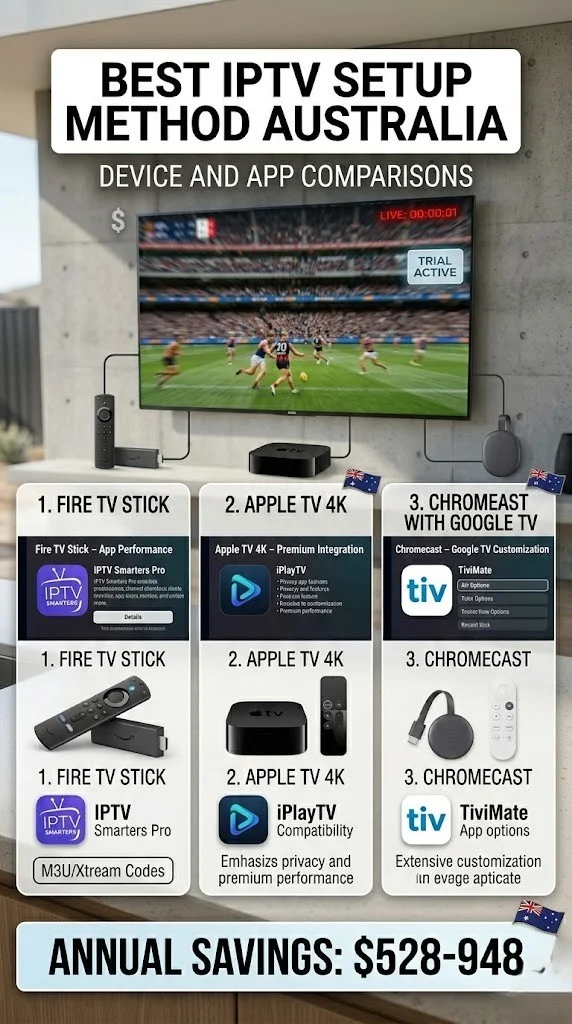
| Fire TV Stick (any) | ✅ Yes | TiviMate | Best dedicated device |
| Fire TV Stick 4K / 4K Max | ✅ Yes | TiviMate | Best overall IPTV device |
| Android TV box | ✅ Yes | TiviMate | Excellent — Play Store access |
| Chromecast with Google TV | ✅ Yes | TiviMate (sideload or Play Store) | Very capable |
| Apple TV 4K | ✅ Yes | Flex IPTV, GSE | No, TiviMate — Flex is the best alternative |
| Samsung Smart TV | ⚠️ Limited | SS IPTV, Smart IPTV | Limited app selection |
| LG Smart TV | ⚠️ Limited | SS IPTV | Better with sideloaded TiviMate |
| Android TV Smart TV (Sony, Hisense, TCL) | ✅ Yes | TiviMate | Full Play Store or sideload |
| Old Chromecast (no remote) | ⚠️ Cast only | GSE Smart IPTV | Phone-dependent — limited for daily use |
| PC / Mac | ✅ Yes | VLC + M3U, Kodi | Works — not ideal for TV |
If you own a Fire TV Stick, Android TV box, or Android TV smart TV, you’re already equipped. See the relevant guide in our IPTV Setup Australia hub and get started today.
Step 2 — Match Your Setup to Your Household Type
Household Type 1: The Solo Viewer, One TV, Simple Setup
Profile: One person, one TV, wants live channels and sport, minimal technical fuss.
Best setup: Fire TV Stick 4K + TiviMate
- Cost: ~$79 AUD (stick) + ~$7 AUD (TiviMate Premium)
- Why: Easiest setup path, best daily IPTV experience, handles everything from basic HD to 4K
- Connection plan needed: 1 simultaneous stream
App to use: Start with IPTV Smarters (free) to test, and upgrade to TiviMate once comfortable.
Setup guide: Fire TV Stick IPTV Setup
Household Type 2: The Family, Multiple TVs
Profile: 2–4 people, 2–3 TVs, watching different content simultaneously. The mix of content includes kids’ content, sports, and news.
Best setup: Fire TV Stick on each TV + 3–4 connection subscription plan
- Cost: $79 × 2–3 sticks + multi-connection subscription upgrade
- Why: Consistent setup across all TVs, all managed with the same credentials, no complexity
- Connection plan needed: 2–4 simultaneous streams (check IPTV Multi-Connection Pricing)
- Network needed: NBN 100 minimum; NBN 250 for reliable multi-4K
Content note for families: Since Optus Sport closed in August 2025, the Premier League moved to Stan Sport. If sport is important, consider Stan Sport alongside your IPTV subscription — Stan carries the Premier League, FA Cup, UEFA Champions League, and major tennis.
Setup guide: Multi-Device IPTV Setup
Household Type 3: The Sports Fan, 4K Priority
Profile: A sports-focused viewer who wants the best possible picture quality for live sports and is happy to invest in hardware.
Best setup: Fire TV Stick 4K Max + TiviMate Premium + ethernet adapter
- Cost: ~$99 (stick) + ~$7 (TiviMate) + ~$20 (ethernet adapter)
- Why: Best 4K HDR performance in its price range, Wi-Fi 6E support, hardware H.265 decoding, Dolby Atmos
- Network needed: NBN 50 minimum; NBN 100 recommended for 4K without compromise
Alternative for Apple households: Apple TV 4K + Flex IPTV — better hardware, no TiviMate, similar price (~$219 AUD). If you’re already a part of the Apple ecosystem, it’s a worthwhile investment.
Setup guide: Firestick 4K IPTV Setup
Household Type 4: The International Community, Multiple Languages
Profile: Australian household with heritage from another country. The household not only watches Australian channels, but also channels from their home countries, such as India, Lebanon, Greece, China, and the Philippines.
Best setup: Fire TV Stick 4K + TiviMate + provider with strong international lineup
- Why: Fire TV + TiviMate handles massive channel lists efficiently with group filtering
- Key consideration: Provider selection matters most here — choose a provider with confirmed strong coverage of your target regions
- TiviMate’s group filtering lets you create a clean favourites list from a 15,000-channel international playlist
Provider guidance: See Best International IPTV Australia for provider recommendations by region.
Household Type 5: The Budget Setup, Minimum Spend
Profile: Wants to try IPTV with minimum upfront cost before committing to hardware.
Best setup: Phone you already own + IPTV Smarters (free) + AirPlay/Chromecast to TV
- Cost: $0 hardware (if you own a phone and TV) + IPTV subscription cost
- Why: Zero hardware investment, gets you watching immediately, casts to TV if needed
- Limitation: Phone-dependent, battery drain, less polished than dedicated device
Upgrade path: Once you know you want IPTV long-term, a Fire TV Stick 4K (~$79) transforms the experience.
Setup guides: iOS IPTV Setup / IPTV Smarters Setup
Household Type 6: The Samsung or LG Smart TV User, No Extra Devices
Profile: Has a Samsung or LG Smart TV, doesn’t want extra hardware, and is willing to accept limited app options.
Best setup for Samsung: SS IPTV or Smart IPTV from Samsung App Store
- Easiest path — no hardware needed
- Limited compared to TiviMate but works well for basic needs
Best setup for LG: SS IPTV from LG Content Store, or TiviMate via sideload (more advanced)
Honest advice: If you’re on Samsung, a $79 Fire TV Stick plugged into an HDMI port gives you TiviMate and a dramatically better experience. The Stick becomes your IPTV device; the Samsung OS is irrelevant.
Setup guides: Smart TV IPTV Setup / Smart TV Sideload IPTV
Step 3 — Choose Your App
Once you’ve picked your device, app choice is usually straightforward.
| Device | Primary App | Backup App |
|---|---|---|
| Fire TV Stick (any) | TiviMate | IPTV Smarters |
| Android TV | TiviMate | IPTV Smarters |
| Apple TV | Flex IPTV | GSE Smart IPTV |
| iPhone / iPad | GSE Smart IPTV | Flex IPTV |
| Samsung Smart TV | SS IPTV | Smart IPTV |
| LG Smart TV | SS IPTV | TiviMate (sideload) |
| Chromecast with Google TV | TiviMate | IPTV Smarters |
| Old Chromecast | GSE Smart IPTV (phone) | IPTV Smarters (phone) |
The TiviMate recommendation: Wherever you can run TiviMate, run TiviMate. It’s the best IPTV player available. The $7 AUD Premium unlock is the best value upgrade in IPTV. Full setup: TiviMate IPTV configuration guide.
Step 4 — Match Your Internet to Your Setup
Don’t invest in 4K hardware on an NBN 25 connection. Match your setup to what your connection can deliver.
| NBN Plan | What It Supports |
|---|---|
| NBN 25 | Single HD stream only (off-peak reliable) |
| NBN 50 | Single HD or 4K stream; two HD streams possible |
| NBN 100 | Two HD streams; one 4K stream reliably |
| NBN 250+ | Multiple 4K streams simultaneously |
The ISP factor: Plan speed alone does not provide a complete picture. On peak-hour evenings, an NBN 100 plan on a congested ISP may deliver less than an NBN 50 plan on Aussie Broadband. ISP choice matters as much as plan tier for IPTV. See our Optimise IPTV for Australian ISPs guide for ISP performance comparisons.
Full Setup Method Decision Table
| Priority | Best Device | Best App | Cost (AUD) |
|---|---|---|---|
| Simplest setup | Fire TV Stick 4K | IPTV Smarters | ~$79 |
| Best daily experience | Fire TV Stick 4K Max | TiviMate Premium | ~$106 |
| Best 4K performance | Fire TV Stick 4K Max + ethernet | TiviMate Premium | ~$126 |
| Best Apple integration | Apple TV 4K | Flex IPTV | ~$227 |
| No new hardware | Phone you own | IPTV Smarters / GSE | $0 |
| Smart TV (Samsung) | Samsung TV + Fire Stick | TiviMate | ~$79 (stick only) |
| Maximum performance | Nvidia Shield Pro | TiviMate Premium | ~$360 |
You Are Set Up
You now have a clear decision framework: know your devices, know your household type, match your internet speed to your setup, and pick the right app for streaming content. For the majority of Australian households, the Fire TV Stick 4K Max with TiviMate Premium provides the ideal combination of performance, affordability, and ease of use.
Whatever path you choose, every device and app combination covered in this guide has a step-by-step setup walkthrough in the IPTV Setup Australia hub. Please select your device, follow the guide, and you will be watching in no time.
FAQ
Q: I’m renting and can’t install an Ethernet cable — what’s the best wireless IPTV setup? The best wireless IPTV setup is the Fire TV Stick 4K Max on 5GHz Wi-Fi (or Wi-Fi 6E, the latest Wi-Fi standard that offers improved performance if your router supports it). Its Wi-Fi 6E support gives it better wireless performance than any other device in its price range. Combine this with a QoS (quality of service) setting on your router to prioritise the stick’s traffic, ensuring that it receives the necessary bandwidth for optimal performance. Our IPTV Network Settings guide covers wireless optimisation in detail.
Q: I’m new to IPTV and a bit nervous about the setup — which method is the most beginner-friendly? IPTV Smarters on a Fire TV Stick. IPTV Smarters installs directly from the Amazon App Store (no sideloading), supports both M3U and Xtream Codes in a simple interface, and the Fire TV Stick setup process is the most well-documented in the community. If you hit any issues, our IPTV Setup Troubleshooting guide has every common beginner problem covered.
Q: Does the setup method affect which channels I get? No — your channels are determined entirely by your IPTV provider and subscription plan, not your device or app. The same credentials work identically on every device. Device and app choice affects user experience, picture quality, features (like recording and catch-up), and ease of use — not which channels are available.
Q: Stan Sport now carries the Premier League. Should I use IPTV for football at all? Stan Sport (which acquired Optus Sport’s football rights in August 2025) is a legitimate, licensed service with reliable streams and Australian broadcast rights for the Premier League, FA Cup, and UEFA Champions League. For those specific competitions, Stan Sport offers a legal, stable viewing experience at ~$27/month (base Stan + Sport add-on). IPTV, or Internet Protocol Television, can complement Stan’s other content—international channels, other sports, and general entertainment. Many Australian households run both. See our Legal IPTV Australia pillar for context on licensed vs unlicensed content.
Wrap-Up
Choosing the best IPTV setup method comes down to matching your hardware, budget, internet speed, and viewing priorities. For most Australian households, the answer is a Fire TV Stick 4K Max, TiviMate Premium, and a provider with a good Australian channel lineup. That combination delivers the best daily IPTV experience available at a sensible price.
Start with what you have if budget is a concern. Upgrade when you know IPTV is working for you. The guides linked throughout this article cover every step of your setup.
Enjoy your setup.