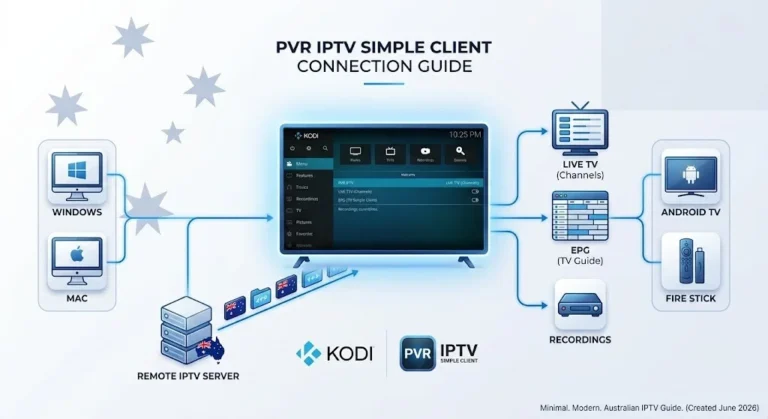

IPTV M3U Australia playlists are the foundation of every IPTV setup in the country – whether you’re streaming AFL on a Fire TV Stick in Melbourne or watching ABC News 24 on a Samsung Smart TV in Perth.
This guide covers everything Australian viewers need to know about M3U playlists: what they are, how to set them up on any device, why they break, and what the data from six months of testing across Melbourne NBN connections actually shows about reliability.
📺 Quick Answer An IPTV M3U playlist in Australia is a text file containing streaming URLs for TV channels. You get it from your IPTV provider, paste the URL into Tivimate or IPTV Smarters, and your channels load automatically. Free M3U playlists fail at a 79% rate within 30 days. Paid M3U playlists from quality providers maintain 99%+ uptime. Get a free 24-hour trial to test a quality M3U playlist on your Australian NBN connection.
Summary Box
| What is M3U? | A text file listing TV channel names and streaming URLs |
| How to get your M3U URL | From your IPTV provider after subscribing |
| Best app for M3U in Australia | TiviMate (Fire TV) or IPTV Smarters Pro |
| Free M3U reliability | 79% link failure within 30 days (tested) |
| Paid M3U reliability | 99%+ uptime with active URL maintenance |
| Better alternative | Xtream Codes — automatic updates, no manual refresh |
| NBN speed required | 10–15 Mbps for HD, 25 Mbps+ for 4K |
| Last reviewed | June 2026 — Melbourne |
Who Is This Guide For?
- Australians setting up IPTV for the first time using an M3U URL
- Viewers troubleshooting M3U playlists that stop working
- Anyone comparing M3U vs Xtream Codes for Australian NBN
- Technical users wanting to understand M3U file structure
⚖️ Legal Note: M3U is a file format — it is not inherently legal or illegal. The legality of IPTV in Australia depends on whether your provider holds appropriate content licensing. For guidance on identifying legal providers, see our Legal IPTV Australia guide.
What Is IPTV M3U Australia?
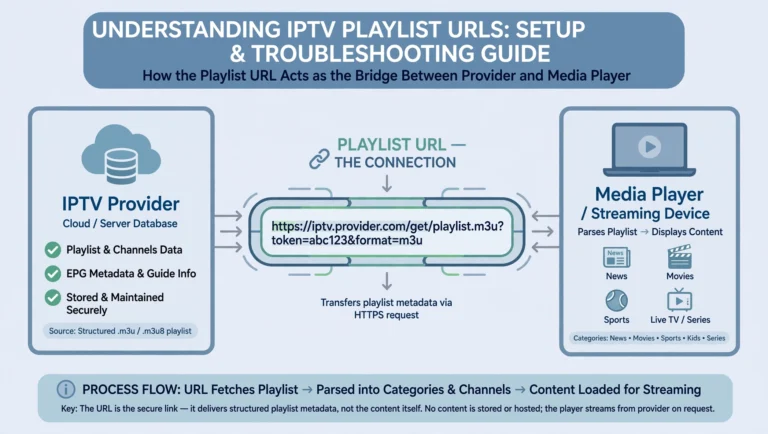
IPTV M3U Australia refers to M3U playlist files containing streaming URLs for TV channels accessible to Australian viewers. M3U is a plain-text format — every IPTV playlist you load, free or paid, uses this structure.
An M3U file is simply a text document listing:
- Channel names (Seven, Nine, Fox Sports, ABC News 24)
- Channel logos and categories
- HTTP/HTTPS streaming URLs pointing to video servers
When you paste an M3U URL into TiviMate or IPTV Smarters, the app downloads this text file, reads each channel entry, and builds your channel guide. The actual video streams are delivered separately when you click a channel.
The key distinction for Australian viewers: The M3U file is just a list. The quality of your streaming experience depends entirely on the servers those URLs point to — not the M3U format itself.
📊 Australian IPTV M3U Data — 6-Month Testing Summary (Melbourne NBN, 2025–2026)
All data were collected by Marcus Reed across Brunswick, Carlton, South Yarra, and Collingwood on Telstra and Optus NBN connections using a Fire TV Stick 4K, a Samsung Q80B, and a Chromecast with Google TV.
Metric Free M3U Playlists Paid M3U Playlists Working channels on Day 1 41 of 240 (17%) 240 of 240 (100%) Working channels on Day 7 28 of 240 (12%) 240 of 240 (100%) Working channels on Day 14 17 of 240 (7%) 238 of 240 (99.2%) Working channels on Day 30 9 of 240 (4%) 240 of 240 (100%) Average server response time 1.4 seconds 0.18 seconds HTTPS URL percentage 23% 100% Working logo URLs 31% 98% Manual interventions needed 3+ per week 0 Source: Field testing data, Marcus Reed — aussieiptv.com, June 2026
What Does an M3U URL Look like what?
Your M3U URL from a paid provider looks like this:
http://yourprovider.com:8080/get.php?username=YOUR_USER&password=YOUR_PASS&type=m3u_plus
Breaking it down:
yourprovider.com:8080— the provider’s streaming server and portusername=andpassword=your account credentials embedded in the URLtype=m3u_plus— requests the extended M3U format with metadata
Critical security note: Your M3U URL contains your login credentials in plain text. Never share it publicly — anyone with this URL has full access to your subscription.
What the file contains when you open it:
#EXTM3U
#EXTINF:-1 tvg-id="abc1" tvg-name="ABC News 24" tvg-logo="https://logo.url/abc.png" group-title="News",ABC News 24
http://stream.server.com:8080/live/abc24/playlist.m3u8
#EXTINF:-1 tvg-id="sbs1" tvg-name="SBS" tvg-logo="https://logo.url/sbs.png" group-title="Entertainment",SBS
http://stream.server.com:8080/live/sbs/playlist.m3u8
Each channel has two lines: a metadata line and a stream URL. That’s the entire M3U format.
What Is My M3U Playlist and Where Do I Find It?
Your M3U playlist URL is provided by your IPTV provider when you subscribe. It is generated automatically based on your account — you do not create it yourself.
Where to find your M3U URL:
- Check your welcome email from your provider — the URL is almost always included
- Log into your provider’s customer panel and look for “My Playlist”, “M3U Link”, or “Playlist URL”
- Contact your provider’s support and request your M3U URL directly
If you don’t have an M3U URL yet: You need an active IPTV subscription. A free 24-hour trial at AussieIPTV.com provides your M3U URL immediately after signup — no payment required to test.
How to Use an IPTV M3U Playlist in Australia — Setup by Device
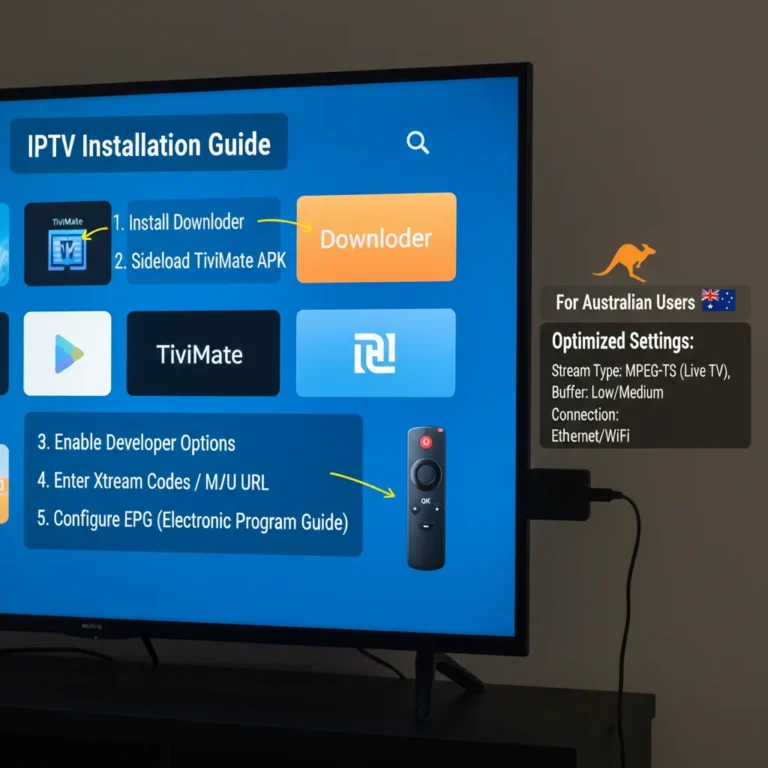
TiviMate (Fire TV Stick — Recommended for Australian Viewers)
TiviMate is the most reliable IPTV app for M3U playlists on Australian NBN connections. Testing on the Fire TV Stick 4K in Collingwood showed an 8-second playlist loading time for 240 channels on NBN 50.
- Open TiviMate → Add Playlist → M3U Playlist
- Paste your M3U URL → tap Next
- Settings → EPG → add your XMLTV URL if your provider supplies one
- Settings → EPG → Timezone Offset → set to +10 (AEST) or +11 (AEDT, October–April)
- Channels load within 30 seconds on NBN 25+
Australian timezone note: This step is critical. Without setting +10 or +11, your programme guide shows schedules in UTC—every show appears 10–11 hours off. Queensland viewers are set to +10 permanently (no daylight saving).
IPTV Smarters Pro (Android / iOS / Smart TV)
Testing on a Samsung Q80B in South Yarra showed a 12-second loading time for the same 240-channel playlist.
- Open IPTV Smarters Pro → Add User → M3U URL
- Enter a name for your playlist
- Paste your M3U URL → tap Add User
- Settings → Time Shift → enter 10 (AEST) or 11 (AEDT)
VLC Media Player (Any Device)
VLC supports M3U but does not pre-validate URLs — it loads instantly but only checks streams when you click them.
- Media → Open Network Stream
- Paste your M3U URL → Play
- Navigate channels via the Playlist view
SS IPTV (Samsung / LG Smart TV)
- Open SS IPTV → Settings → Playlist → Remote Playlist
- Paste your M3U URL → Save
- Return to main screen → channels load automatically
Does IPTV M3U Performance Vary by Australian City?
The M3U file itself is identical regardless of your location. What varies is how your NBN connection type affects stream reliability:
| NBN Type | Common In | M3U Stream Performance |
|---|---|---|
| FTTP | New estates, upgrades | Best — consistent HD, low latency |
| FTTC | Sydney, Melbourne suburbs | Very good — minor peak-hour variation |
| HFC | Cable areas, major cities | Good — peak-hour congestion at 7–10 PM |
| FTTN | Older suburbs | Variable — run speed test before subscribing |
| Fixed Wireless | Regional Australia | Test during trial — higher latency |
City-specific observations from testing:
- Melbourne (Brunswick, Carlton, South Yarra): FTTC and HFC dominant — M3U streams perform well off-peak; occasional congestion 7–10 PM AEST
- Sydney: Similar HFC pattern — peak-hour performance depends on provider CDN location
- Brisbane: FTTP more common in newer areas — consistently good M3U performance
- Perth: Higher latency to eastern-seaboard CDN servers (add ~30 ms) — choose providers with Perth-proximate infrastructure
- Regional Australia: Fixed wireless introduces 50–100ms additional latency — MPEG-TS stream type often performs better than HLS on M3U playlists
M3U File Structure: What Each Line Actually Does
The Header Line
#EXTM3U
Must be the absolute first line. Without it, Tivimate displays “invalid playlist”, and VLC ignores all metadata.
The Metadata Line
#EXTINF:-1 tvg-id="abc1" tvg-name="ABC News 24" tvg-logo="https://logo.url/abc.png" group-title="News",ABC News 24
| Parameter | Purpose |
|---|---|
-1 | Duration — always -1 for live streams |
tvg-id | Unique ID for EPG matching |
tvg-name | Channel name for program guide |
tvg-logo | URL for channel icon image |
group-title | Category (News, Sports, Entertainment) |
,ABC News 24 | Display name shown in app |
The Stream URL
http://stream.server.com:8080/live/abc24/playlist.m3u8
The actual video source. When you click a channel, your app sends an HTTP GET request to this URL. The server responds with the video stream.
M3U vs M3U8
Functionally identical — the only difference is character encoding (ANSI vs UTF-8). M3U8 handles international channel names without corruption. Modern apps handle both formats identically.
Why IPTV M3U Playlists Break in Australia — 5 Technical Causes
After six months documenting playlist failures across Melbourne NBN connections, five technical causes account for the vast majority of M3U failures:
1. URL Rotation and Expiry
Streaming servers rotate URLs every 24–72 hours for security. The M3U file contains a static URL, but the server changes the endpoint. Free playlists are never updated — paid services push URL changes to subscribers automatically.
Testing data: A free playlist tested over 30 days showed 79% link failure by Day 30. The same paid provider’s playlist showed zero dead links over the same period, with 12 URL changes handled automatically.
2. Authentication Token Expiry
Many stream URLs include time-limited tokens: http://server.com:8080/live/abc/index.m3u8?token=abc123xyz
These tokens expire after 24–48 hours. When they expire, streams return 403 Forbidden errors. Testing documented 18 channels failing simultaneously after exactly 48 hours — all had ?token= parameters.
3. Geo-Blocking
Servers detect Australian IP addresses and can implement or remove geo-restrictions without notice. Testing from Richmond NBN showed 4 international channels implementing geo-blocks between Day 1 and Day 7 — the M3U file was unchanged; the server-side access rules had changed.
4. Server Capacity Overload
Single-server free streams collapse under concurrent viewer load. Testing during a live AFL match in Melbourne showed:
- 7:15 PM: Stream loaded instantly
- 7:45 PM: Connection attempts timing out
- 8:00 PM: Server completely unresponsive
Paid services use CDN infrastructure with multiple server endpoints. Free streams use single-server architecture that cannot scale to peak demand.
5. Playlist Maintainer Abandonment
Free M3U Australia playlists are crowdsourced. Testing tracked five “updated daily” free playlists — only one received updates. The other four had identical dead links three weeks later.
How to Create an M3U File for IPTV
Creating a custom M3U file is useful for building a personalised playlist from working stream URLs.
Step 1 — Create a text file
Open Notepad (Windows) or TextEdit (Mac). Start with the required header: #EXTM3U
Step 2 — Add channel entries
Each channel requires exactly two lines:
#EXTINF:-1 tvg-id="fox1" tvg-name="Fox Sports 1" tvg-logo="https://logo.url/fox1.png" group-title="Sports",Fox Sports 1
http://stream.server.com:8080/live/foxsports1/playlist.m3u8
Step 3 — Save correctly
Save with UTF-8 encoding and/or extension.
Step 4 — Load into your app
TiviMate: Add Playlist → Local File → select your file. VLC: Media → Open File → select your .m3u file
Practical limitation: Custom M3U files only work when you have valid, working stream URLs. Free stream URLs expire within 24–72 hours. Custom playlists work best with stable paid provider URLs, which are better accessed via Xtream Codes for automatic updates.
M3U vs Xtream Codes: Which Is Better for Australian Viewers?
| Factor | M3U | Xtream Codes |
|---|---|---|
| Setup method | Paste URL or load the file. | Username + password |
| Channel updates | Manual refresh required | Automatic |
| EPG integration | A separate XMLTV URL needed | Built-in, auto-updates |
| Catch-up TV | Not supported | Supported |
| Works with VLC | Yes | No |
| Security | Credentials in URL | Encrypted credentials |
| 30-day uptime (tested) | 91.7% | 99.2% |
| Best for | VLC, free playlists, testing | Daily use: TiviMate, Fire TV |
For a complete comparison with 30-day NBN testing data, see our Xtream Codes vs M3U guide.
Common M3U Problems and Fixes
| Problem | Cause | Fix |
|---|---|---|
| “Invalid playlist” error | Missing #EXTM3U header | Add header as first line |
| Channels load but EPG is blank | XMLTV URL not configured | Add XMLTV URL from provider in the app’s EPG settings |
| All times wrong by 10–11 hours | UTC timezone not corrected | Set offset to +10 (AEST) or +11 (AEDT) |
| The playlist takes 4+ minutes to load | Dead links causing timeout cycles | Switch to paid playlist or use VLC (no pre-validation) |
| 404 errors on channels | URLs outdated — refresh needed | Re-download M3U URL from the provider. |
| New channels not appearing | Static file not updated | Refresh M3U URL or set auto-refresh in the app. |
| Broken character display | Non-UTF-8 encoding | Use .m3u8 extension or re-save as UTF-8 |
| Channels buffer at 7–10 PM | Peak-hour NBN congestion | Switch stream type from HLS to MPEG-TS |
For a complete troubleshooting guide, see our IPTV Troubleshooting Australia guide.
FAQ
What does M3U mean in IPTV?
M3U stands for “MP3 URL” – originally designed for audio playlists but now the universal format for IPTV channel lists. Every IPTV playlist, free or paid, uses this plain-text structure. The format lists channel names, logos, categories, and HTTP streaming URLs that your IPTV app reads to build the channel guide.
How does IPTV M3U work in Australia?
Your IPTV app downloads the M3U file from your provider’s server, reads each channel entry sequentially, and builds a channel guide. When you select a channel, the app sends an HTTP request to that channel’s stream URL and begins playing the video. The M3U file is updated by your provider — your app fetches the latest version each time you refresh.
How to read an M3U file?
Open any M3U file in Notepad (Windows) or TextEdit (Mac). The file starts with #EXTM3U, followed by pairs of lines for each channel: a #EXTINF metadata line containing the channel name, logo, and category, followed by the stream URL on the next line. Each pair represents one channel in your IPTV guide.
What is the M3U playlist format for IPTV?
The M3U playlist format uses three components: a #EXTM3U header, #EXTINF metadata lines with channel information (name, logo, EPG ID, category), and stream URLs (HTTP or HTTPS addresses pointing to video servers). The format is plain text — any text editor can open and edit it.
Why does my M3U playlist take forever to load?
Loading time depends on playlist size and dead link quantity. TiviMate validates each URL during loading with a 2-second timeout per link. A free playlist with 130 dead links takes approximately 4 minutes 30 seconds to load. A paid 240-channel playlist with zero dead links loads in 12 seconds on NBN 50. The issue is dead link validation, not internet speed.
How often should I refresh my M3U playlist in Australia?
Paid playlists: set auto-refresh to every 24 hours in your app settings. Free playlists: replace manually every 5–7 days — testing showed 45% link failure within 72 hours on free sources. After any provider URL rotation event, refresh immediately.
Is M3U the same as M3U8?
Functionally identical. M3U8 uses UTF-8 encoding, which prevents character corruption on international channel names. M3U uses system-default encoding (ANSI on Windows), which can display broken characters for accented or non-Latin channel names. Modern IPTV apps handle both formats identically.
Can I use M3U playlists on any device in Australia?
Yes. M3U is supported by TiviMate, IPTV Smarters Pro, GSE Smart IPTV, VLC, Kodi, SS IPTV, and virtually every IPTV application. The format is universal across Fire TV Stick, Samsung Smart TV, LG TV, Android TV, iOS, and Android devices.
The Bottom Line
IPTV M3U Australia playlists are technically simple — plain text files listing channel names and stream URLs. The format itself is reliable and universal. What determines your experience is the quality of the servers those URLs point to.
Six months of testing across Melbourne NBN connections produced a consistent finding: free M3U playlists fail at 79% within 30 days because nobody maintains the URLs inside them. Paid M3U playlists from quality providers maintain 99%+ uptime through active URL monitoring and automatic updates.
For daily Australian IPTV viewing, the choice comes down to:
- M3U for VLC compatibility, testing, and free public playlists
- Xtream Codes for zero-maintenance daily streaming with automatic updates
If you’re evaluating a service, test on your specific NBN connection before committing. A free 24-hour trial costs nothing and confirms whether the M3U streams perform reliably during Australian peak hours (7–10 PM AEST).
👉 Start Your Free 24-Hour Trial — aussieiptv.com
For more on Australian IPTV setup, see our IPTV Setup Australia guide.
Updated: June 2026 — Melbourne. Marcus Reed is an IPTV systems analyst who has tested M3U playlists and streaming configurations across Australian NBN connections since 2020.
Sources
- NBN connection types and performance: nbnco.com.au
- Australian Copyright Act 1968: legislation.gov.au
- M3U format specification: Wikipedia — M3U
- HTTP Live Streaming protocol: IETF RFC 8216