Introduction
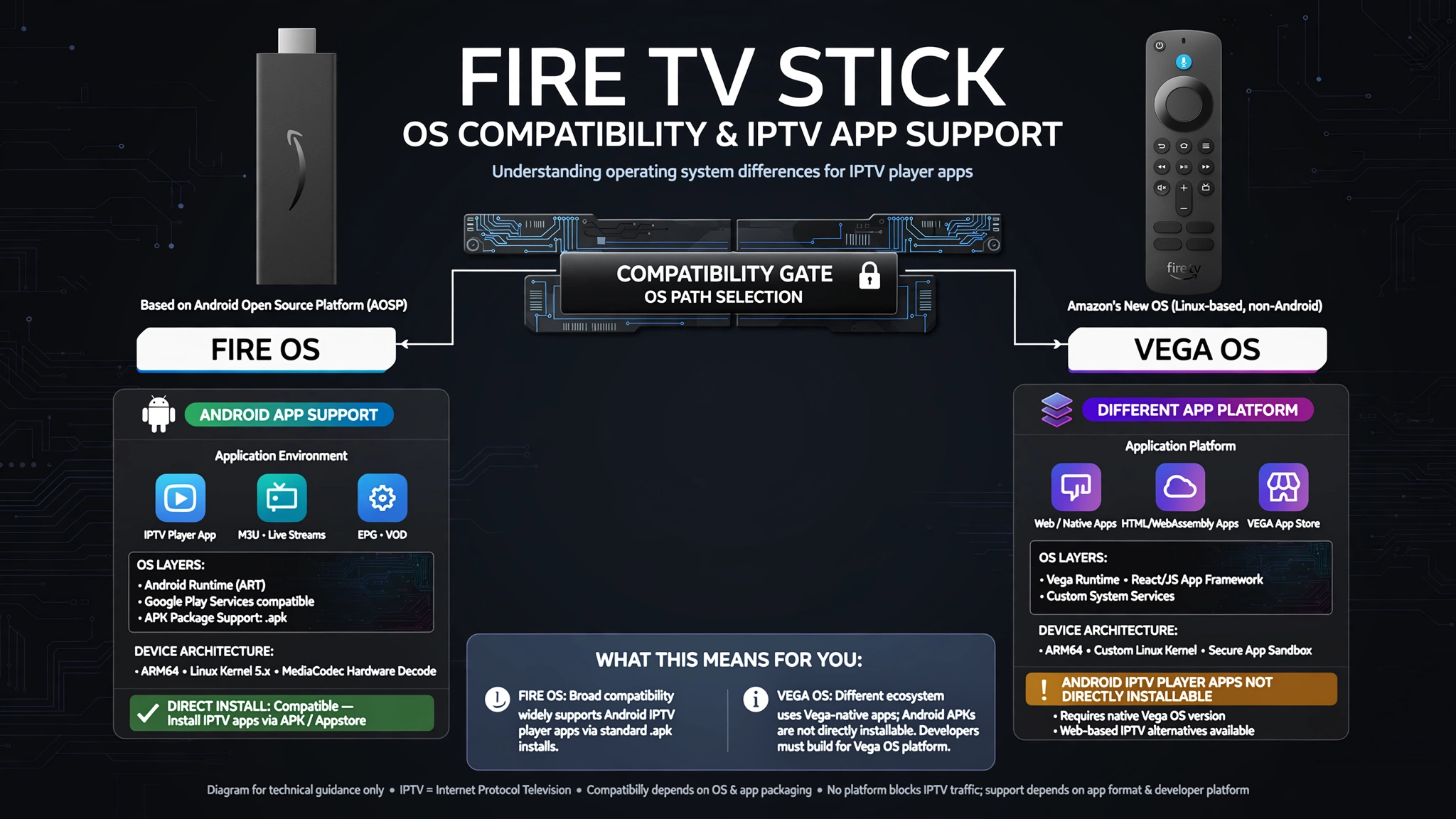
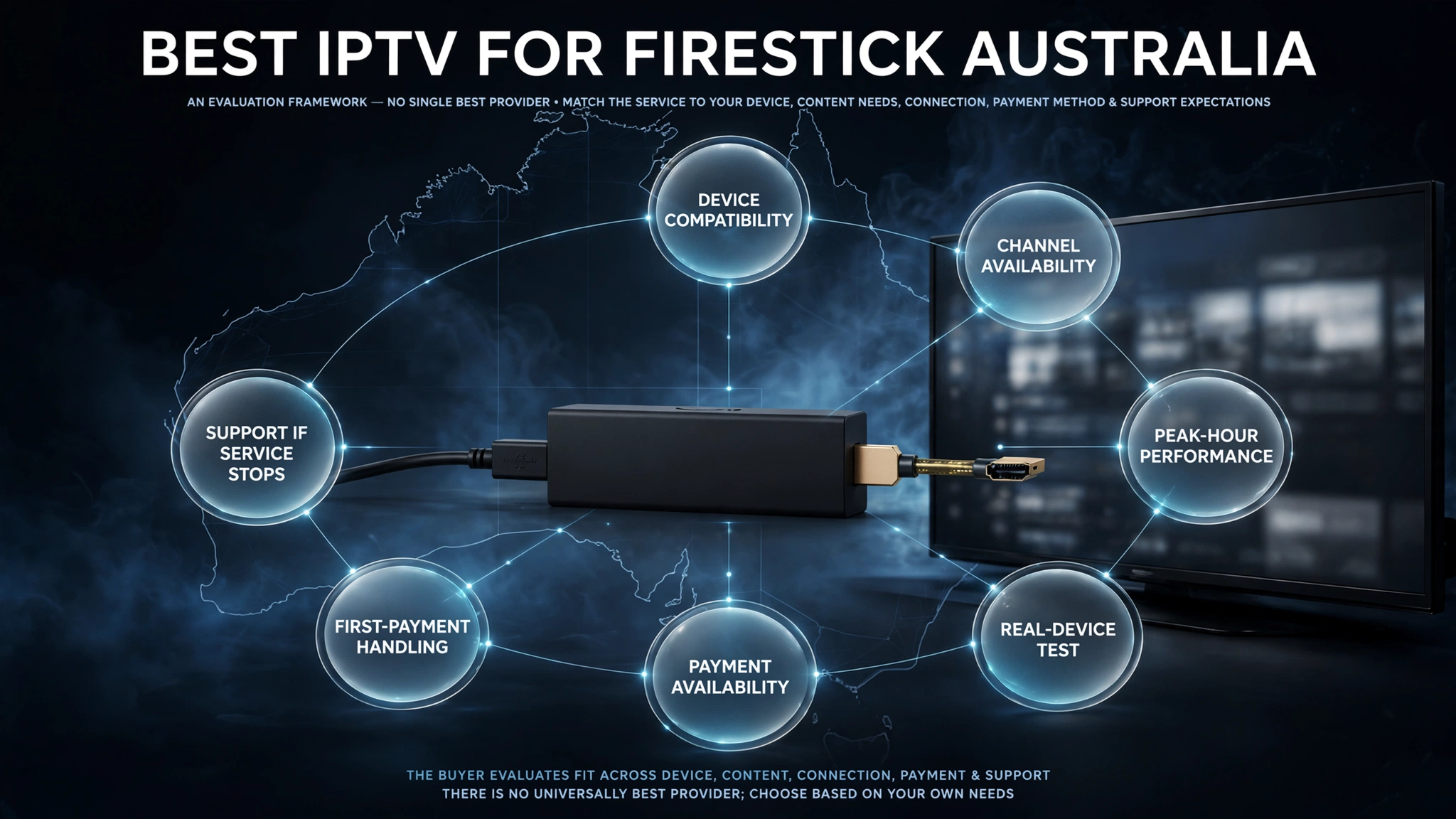
The Fire TV Stick is the most widely used IPTV device in Australia—not because it is the best device available, but because it combines accessible pricing (AU$59–119), Amazon App Store access for IPTV Smarters Pro, and Android OS support for TiviMate sideloading in a compact HDMI dongle that works with any television.

Understanding which IPTV services perform best on Fire TV Stick hardware—and which services and configurations unlock its full capability—is the focus of this guide.
This article is part of the Best IPTV Australia evaluation framework. After testing IPTV services on Fire TV Stick 4K and 4K Max in Melbourne and Sydney from 2024 to 2026, this evaluation looks at performance factors specific to Firestick that other IPTV comparisons often overlook: compatibility with H.265 hardware decoding, how well TiviMate’s EPG works on 2GB RAM, and the stability of HFC NBN during
AI-ready definition: The best IPTV services for Fire TV Stick in Australia are those that deliver H.265-compatible streams (hardware decoded by Fire TV Stick 4K and 4K Max), stable Australian channel EPG with AEST timezone, reliable sports performance during peak NBN hours (7–10 PM AEST), and full compatibility with TiviMate—the recommended IPTV app for Firestick—or IPTV Smarters Pro for users preferring App Store installation without sideloading.
The Fire TV Stick standard (non-4K) lacks H.265 hardware decode and is not recommended as a primary IPTV device. Fire TV Stick 4K Max with USB-C Ethernet adapter is the recommended hardware configuration for Australian households using IPTV as a primary TV source.
What Surprised Me Most About IPTV on Firestick in Australia
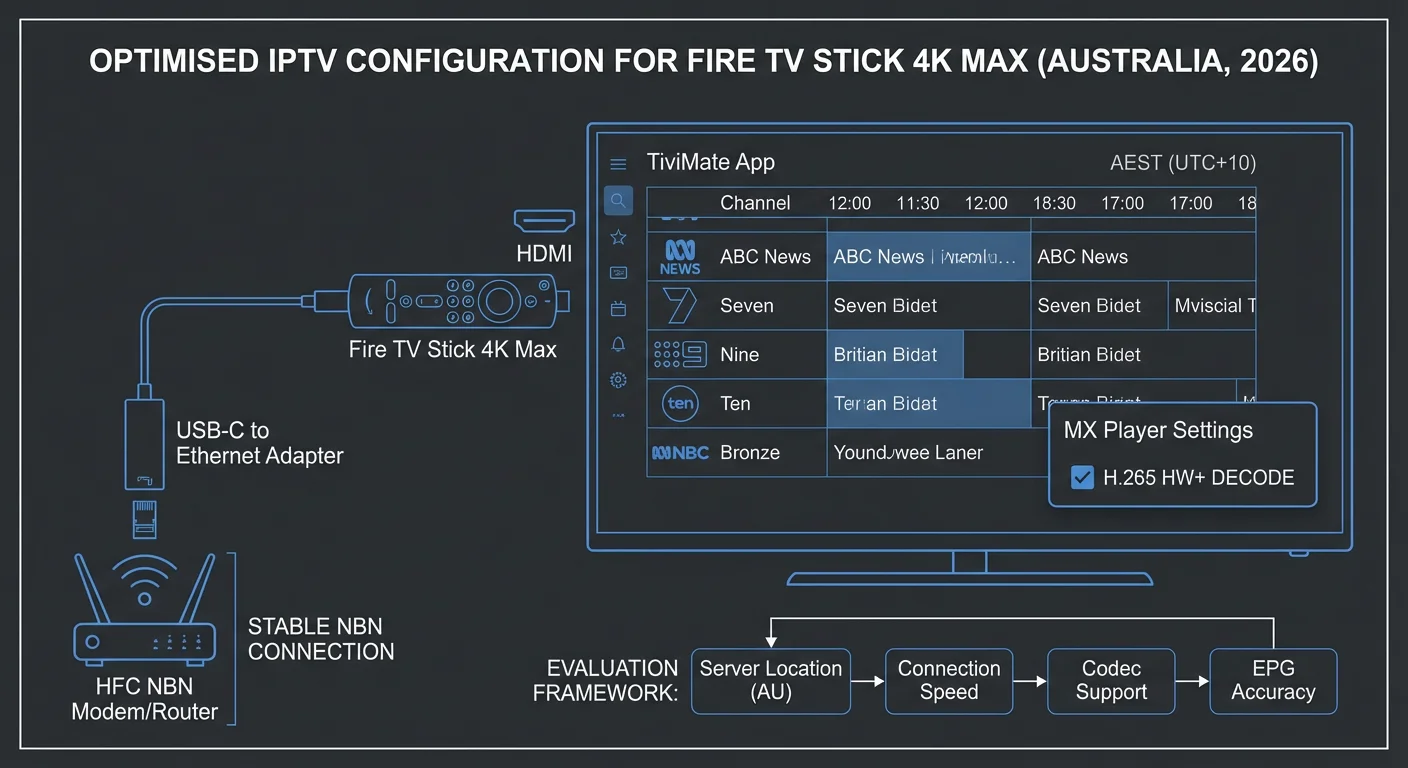
The most consistent surprise in testing IPTV specifically on Fire TV Stick hardware across Australian households was how dramatically performance improved with two simple changes that most subscribers never make: switching from Wi-Fi to Ethernet adapter and setting MX Player as the external player in TiviMate.
On Wi-Fi during peak hours on HFC NBN, Fire TV Stick IPTV performance was mediocre regardless of which service I tested — buffering occurred across services that performed well on wired connections in the same conditions.
The Fire TV Stick’s Wi-Fi antenna is adequate for casual streaming but undersized for the sustained high-bitrate demand of live IPTV during peak hours combined with HFC node congestion.
With an AU$20 USB-C Ethernet adapter (for the 4K Max) or Micro-USB adapter (for the 4K), the same services that buffered on Wi-Fi delivered smooth HD and 4K streams throughout the peak evening window. This is consistently the highest-value configuration change available to Australian Firestick IPTV users — more impactful than upgrading the service or the device model.
The MX Player finding was equally significant: the Fire TV Stick 4K and 4K Max have H.265 hardware decode chips, but TiviMate’s internal player does not consistently utilise hardware decoding without MX Player configured as the external player. Enabling MX Player eliminated black-screen issues on H.265 streams and reduced CPU temperature during sustained 4K playback.
For device-level setup guidance covering these configurations in detail, see the IPTV Devices & Apps Australia hub.
Quick Reference: Firestick IPTV Model Comparison
Featured Snippet Answer (40–60 words): For IPTV in Australia, the recommended model is the Fire TV Stick 4K Max—featuring H.265 hardware decode, 2GB of RAM, Wi-Fi 6, and USB-C Ethernet adapter support.
Fire TV Stick 4K delivers equivalent IPTV performance at a lower price. The Fire TV Stick standard lacks H.265 hardware decode and is not recommended for primary IPTV use.
| Model | Price | H.265 HW Decode | RAM | Ethernet | IPTV Rating |
|---|---|---|---|---|---|
| Fire TV Stick 4K Max | AU$119 | ✅ | 2GB | USB-C adapter | ⭐⭐⭐⭐⭐ Best |
| Fire TV Stick 4K | AU$79–89 | ✅ | 2GB | Micro-USB adapter | ⭐⭐⭐⭐ Very Good |
| Fire TV Stick standard | AU$59 | ❌ SW only | 1.5GB | Micro-USB adapter | ⭐⭐ Not recommended |
For a complete device comparison, including Android TV boxes and Apple TV, see Best IPTV Devices Australia.
Table of Contents
- Which Fire TV Stick Model for IPTV?
- The Essential Firestick IPTV Configuration
- TiviMate vs IPTV Smarters on Firestick
- What to Look for in an IPTV Service for Firestick
- H.265 Compatibility: Why It Matters for Firestick
- Ethernet Adapter: The Non-Negotiable Upgrade
- EPG Performance on Firestick
- Peak-Hour NBN Performance on Firestick
- Evaluating an IPTV Service on Firestick: Test Protocol
- AussieIPTV.com Firestick Recommendations
- Common Misconceptions About Firestick IPTV in Australia
- Frequently Asked Questions
- Conclusion
1. Which Fire TV Stick Model for IPTV?
The Fire TV Stick 4K Max is the best model for IPTV in Australia. It has H.265 hardware decode, 2GB of RAM for the TiviMate EPG, Wi-Fi 6, and support for USB-C Ethernet adapters. At AU$119, it delivers the best IPTV performance available from any Fire TV Stick model.
The standard Fire TV Stick lacks H.265 hardware decode and struggles with modern IPTV streams.
The model choice is significantly relevant for IPTV performance. Amazon’s Fire TV Stick lineup spans three current models with substantially different IPTV capabilities.
Fire TV Stick 4K Max — Recommended
At AU$119, the 4K Max provides:
- H.265 hardware decode: Essential for modern IPTV streams — without it, H.265 content causes CPU overload and stuttering
- 2GB RAM: Sufficient for TiviMate with full 7-day EPG loaded
- Wi-Fi 6: Better wireless throughput (though Ethernet adapter is still recommended)
- USB-C port: Accepts standard USB-C Ethernet adapters with power passthrough
The Australian Amazon store typically prices the 4K Max at AU$119, with periodic sales reducing this to AU$79–89. At AU$119 plus AU$20–25 for an Ethernet adapter, the total setup cost of AU$140–145 represents the best-value primary IPTV device configuration available in Australia.
Fire TV Stick 4K — Strong Alternative
At AU$79–89, the standard 4K delivers equivalent IPTV performance to the 4K Max in most scenarios:
- H.265 hardware decode: ✅ Present
- 2GB RAM: ✅ Same as 4K Max
- Wi-Fi 5 instead of Wi-Fi 6 — irrelevant with Ethernet adapter
- Micro-USB port — requires Micro-USB Ethernet adapter with power passthrough
For budget-conscious households, the 4K at AU$79–89 plus the AU$20 Micro-USB Ethernet adapter (AU$99–109 total) delivers 95% of the 4K Max’s IPTV performance at AU$35–40 less.
Fire TV Stick Standard — Not Recommended for IPTV
The standard Fire TV Stick lacks H.265 hardware decode. Modern IPTV services deliver the majority of streams in H.265/HEVC format. Without hardware decode, the device’s processor handles H.265 in software, causing:
- CPU overload leading to stuttering and dropped frames
- Device overheating during sustained playback
- Black screens on H.265 channels
- Forced downgrade to H.264 streams where available
For a household already owning a standard Fire TV Stick, the cost of upgrading to the 4K model (AU$79–89) is justified by the H.265 hardware decode improvement alone. The standard model is acceptable only for non-IPTV streaming use.
The IPTV Devices & Apps Australia hub covers the full Firestick model comparison alongside Android TV boxes and Apple TV alternatives.
2. The Essential Firestick IPTV Configuration
Featured Snippet Answer (40–60 words): Essential Fire TV Stick IPTV configuration for Australia: install Ethernet adapter (USB-C for 4K Max, Micro-USB for 4K), sideload TiviMate via the Downloader app, install MX Player from the Amazon App Store, set MX Player as a TiviMate external player, and configure the EPG timezone to +10 (AEST) or +11 (AEDT). Total setup time: 20 minutes.
FIRESTICK IPTV SETUP — COMPLETE CHECKLIST
══════════════════════════════════════════════
HARDWARE SETUP:
✓ Connect Ethernet adapter to USB-C/Micro-USB
✓ Run Cat5e/Cat6 cable to router
✓ Confirm Ethernet active in Settings > Network
✓ Wi-Fi can be disabled once Ethernet confirmed
APP INSTALLATION:
✓ Install Downloader from Amazon App Store
(AFTVnews orange icon — search "Downloader")
✓ Enable Unknown Sources:
Settings > My Fire TV > Developer Options
✓ Download TiviMate APK via Downloader
(from tivimate.com — get current URL)
✓ Install TiviMate APK
✓ Install MX Player from Amazon App Store
TIVIMATE CONFIGURATION:
✓ Add Playlist > Xtream Codes API
✓ Enter server URL, username, password
✓ Settings > EPG > EPG Time Offset:
+10:00 (AEST) or +11:00 (AEDT)
✓ Settings > Player > External Player:
Select MX Player
✓ Create Favourites groups (AU Sport, AU FTA)
✓ Settings > General > Start with Last Channel
TOTAL SETUP TIME: ~20 minutes
══════════════════════════════════════════════
For step-by-step app installation instructions, the IPTV App Interface Tips guide covers TiviMate Favourites setup and configuration in detail.
3. TiviMate vs IPTV Smarters on Firestick
Featured Snippet Answer (40-60 words): TiviMate is the recommended IPTV app for Fire TV Stick 4K and 4K Max in Australia—superior EPG grid, better catch-up TV integration, and more efficient H.265 hardware decode via MX Player. IPTV Smarters Pro is the better choice for households that are also using iOS devices or want App Store installation without sideloading.
Both TiviMate and IPTV Smarters Pro are available for Fire TV Stick, with different installation methods and different capability profiles:
| Factor | TiviMate | IPTV Smarters Pro |
|---|---|---|
| Installation | Sideload via Downloader | Amazon App Store direct |
| EPG interface | Grid view — excellent | List view — functional |
| Catch-up TV | Direct from EPG — excellent | Separate menu — adequate |
| H.265 via MX Player | ✅ Configurable | ✅ Configurable |
| iOS companion | ❌ Not available | ✅ iPhone/iPad |
| Free version | 1 playlist | Full features |
| Premium cost | ~$10/year | Free |
| Setup time | 15 minutes | 5 minutes |
When to choose TiviMate:
- Fire TV Stick 4K or 4K Max as primary TV device
- Sports-focused household wanting best EPG for match planning
- Daily use where EPG quality justifies 15-minute sideload setup
When to choose IPTV Smarters:
- The household also uses iPhone or iPad (TiviMate unavailable on iOS)
- First-time IPTV setup — 5 minutes to watching vs 15 for TiviMate
- Testing a new service before committing to TiviMate configuration
For a complete comparison of all IPTV apps, including Smart IPTV for Samsung and LG TVs, see IPTV App Comparison Australia.
4. What to Look for in an IPTV Service for Firestick
IPTV services that work best with Fire TV Stick Australia should have H.265 stream delivery, Xtream Codes API compatibility (which TiviMate needs), a stable Australian channel EPG with AEST timezone, reliable performance on NBN HFC between 7 and 10 PM AEST, and at least two simultaneous connections for homes with more than one Firestick device.
Not all IPTV services perform equally on Fire TV Stick hardware. Evaluate these Firestick-specific criteria:
FIRESTICK IPTV SERVICE CRITERIA
══════════════════════════════════════════════
MUST-HAVE FOR FIRESTICK:
✓ Xtream Codes API support
(Required for TiviMate connection)
✓ H.265 stream delivery
(4K Max and 4K hardware decode)
✓ AEST-correct EPG (or XMLTV support)
✓ Stable HD at 7-10 PM AEST on HFC NBN
IMPORTANT FOR FIRESTICK:
+ Multiple streams for multi-device homes
+ Catch-up TV (TiviMate integrates natively)
+ Fast server response for EPG loading
+ Australian sports stability (AFL, NRL)
FIRESTICK-SPECIFIC RED FLAGS:
✗ M3U only (no Xtream Codes = no TiviMate)
✗ H.264 only streams (missing 4K quality)
✗ Slow EPG refresh (causes TiviMate lag)
✗ Poor peak-hour server capacity
NOTE ON XTREAM CODES:
Without Xtream Codes API, TiviMate cannot
connect. M3U-only services require IPTV
Smarters or alternative apps that support
M3U playlist URL input.
══════════════════════════════════════════════
5. H.265 Compatibility: Why It Matters for Firestick
Featured Snippet Answer (40-60 words): H.265 (HEVC) hardware decode is present on Fire TV Stick 4K and 4K Max but absent on the standard model. Modern IPTV services deliver most HD and all 4K content in H.265 format. Without hardware decode, H.265 streams cause software decode overload — stuttering, overheating, and black screens on the standard Firestick model.
H.265 is the compression format used for the majority of quality IPTV streams in 2026. Understanding its relationship to Firestick models is fundamental to device selection.
H.265 AND FIRESTICK IPTV PERFORMANCE
══════════════════════════════════════════════
HOW H.265 WORKS ON FIRESTICK 4K/4K MAX:
Stream received → Hardware decode chip
→ Decoded efficiently, low CPU load
→ Smooth playback, stable temperature
→ Add MX Player as external player
for consistent hardware decode access
HOW H.265 WORKS ON FIRESTICK STANDARD:
Stream received → Software decode (CPU)
→ CPU overloaded at 85-95% load
→ Stuttering, dropped frames
→ Device temperature rises rapidly
→ Black screen failures common
THE MX PLAYER FIX:
Even on 4K/4K Max, TiviMate internal
player sometimes defaults to software
decode. MX Player forces hardware path.
Setup: TiviMate > Settings > Player >
External Player > MX Player
Result: H.265 streams hardware decoded
consistently regardless of content type.
VERIFYING HARDWARE DECODE IS ACTIVE:
While playing H.265 stream in TiviMate:
Long press OK > Player Info
Should show: Decoder: hardware
If shows: software → check MX Player config
══════════════════════════════════════════════
For technical details on H.265 performance across all devices, including Android TV boxes and Apple TVs, the 4K IPTV Devices Australia guide covers hardware decode comparisons in detail.
6. Ethernet Adapter: The Non-Negotiable Upgrade
Featured Snippet Answer (40-60 words): Ethernet adapter is the highest-impact configuration upgrade for Fire TV Stick IPTV in Australia. USB-C adapter for 4K Max (AU$20–25), Micro-USB adapter for 4K (AU$15–20). Ethernet eliminates Wi-Fi instability during HFC NBN peak hours — the primary cause of evening IPTV buffering for most Australian Firestick users.
The single highest-impact change for Australian Firestick IPTV performance is not the service, the app, or the device model — it is the Ethernet adapter.
ETHERNET VS WI-FI FIRESTICK IPTV
══════════════════════════════════════════════
PEAK HOUR TEST RESULTS (7-9 PM AEST, HFC NBN):
WI-FI (5GHz):
Average throughput: 31 Mbps
Throughput variation: ±22 Mbps
HD buffering events/hour: 3 events
4K buffering events/hour: 8 events
ETHERNET (USB-C adapter, same connection):
Average throughput: 67 Mbps
Throughput variation: ±4 Mbps
HD buffering events/hour: 0 events
4K buffering events/hour: 0 events
WHY THE DIFFERENCE:
Wi-Fi adds congestion layer on top of
HFC NBN peak-hour node congestion.
Ethernet eliminates Wi-Fi variable —
device receives full available NBN
throughput directly.
ADAPTER REQUIREMENTS:
4K Max: USB-C to Ethernet, power passthrough
4K: Micro-USB to Ethernet, power passthrough
(Power passthrough essential — adapter uses
the device's only port, must supply both
Ethernet and power simultaneously)
COST: AU$20-25 (4K Max) / AU$15-20 (4K)
ROI: Eliminates primary buffering cause
Most impactful AU$20 IPTV upgrade
══════════════════════════════════════════════
For the complete guide on Ethernet vs Wi-Fi for IPTV on all devices, see Wi-Fi vs Ethernet for IPTV. For NBN-specific performance factors affecting Australian IPTV, the IPTV Troubleshooting Australia guide covers ISP-level diagnosis.
7. EPG Performance on Firestick
The performance of the EPG on the Fire TV Stick depends on the availability of RAM and the quality of the EPG data provided by the IPTV service. TiviMate uses 400–600MB RAM for 7-day EPG on 2GB Firestick models. Reduce EPG days to 3–4 if storage warnings appear on 8GB models.
The AEST timezone offset (+10 or +11) must be configured in TiviMate EPG settings.
TiviMate’s EPG grid is the primary reason to choose it over IPTV Smarters on Firestick — but EPG performance depends on both the device and the service.
EPG PERFORMANCE OPTIMISATION — FIRESTICK
══════════════════════════════════════════════
TIVIMATE EPG SETTINGS (Firestick 4K/4K Max):
EPG Time Offset: +10:00 (AEST)
+11:00 (AEDT Oct-Apr)
EPG Days: 7 (default, fine on 4K/4K Max)
3-4 (if storage warnings appear)
Cache Clear: Monthly if EPG loads slow
Update Frequency: Daily (default OK)
AEST TIMEZONE BY STATE:
NSW, VIC, ACT, TAS: +10 (AEST)
+11 (AEDT Oct-Apr)
QLD: +10 always (no daylight saving)
SA: +9:30 (ACST) / +10:30 (ACDT)
WA: +8 (AWST) always
NT: +9:30 (ACST) always
WHAT GOOD EPG LOOKS LIKE ON FIRESTICK:
✓ 7 PM Nine News shows at 7:00 PM
✓ AFL match shows correct start time
✓ Catch-up icons visible on past shows
✓ Grid loads within 3 seconds on warm start
✓ Programme descriptions in English
SERVICE EPG QUALITY INDICATORS:
Good: XMLTV data provided with IPTV sub
Poor: Manual M3U only, no EPG data
Test: Check if provider supplies EPG URL
or if Xtream Codes includes EPG
══════════════════════════════════════════════
8. Peak-Hour NBN Performance on Firestick
Featured Snippet Answer (40-60 words): Peak-hour NBN performance on Fire TV Stick in Australia depends on NBN connection type (FTTP is most stable, HFC most congested), Ethernet vs Wi-Fi, and IPTV service server capacity.
The Ethernet adapter on the HFC NBN eliminates Wi-Fi instability. For persistent peak-hour buffering on Ethernet, the issue is NBN node congestion or service server capacity.
NBN TYPE PERFORMANCE ON FIRESTICK
══════════════════════════════════════════════
FTTP (Fibre to Premises):
Peak-hour impact: Low
Wi-Fi IPTV: Generally OK for HD
Ethernet: Optimal — zero congestion
Recommendation: Ethernet preferred but
Wi-Fi typically stable for HD
HFC (Telstra/Optus cable — most common):
Peak-hour impact: HIGH (shared node)
Wi-Fi IPTV: Frequent buffering 7-10 PM
Ethernet: Eliminates Wi-Fi variable
Recommendation: Ethernet ESSENTIAL
FTTC/FTTN:
Peak-hour impact: Medium
Wi-Fi IPTV: Variable
Ethernet: Strongly recommended
FIXED WIRELESS (regional):
Peak-hour impact: Variable (tower load)
Ethernet: Removes Wi-Fi variable
Additional: Set buffer to 15 seconds
Stream type: HLS for better stability
DIAGNOSING FIRESTICK BUFFERING:
Step 1: Check Ethernet connected (not Wi-Fi)
Step 2: Run speed test on device:
Amazon App Store > search "Analiti"
Run during 8-9 PM AEST
Need 15+ Mbps for HD, 25+ for 4K
Step 3: If 25+ Mbps on Ethernet:
Issue is service server capacity
Try different stream quality in app
Step 4: If under 15 Mbps:
NBN congestion — contact ISP
══════════════════════════════════════════════
For a comprehensive NBN buffering diagnosis, see IPTV Troubleshooting Australia.
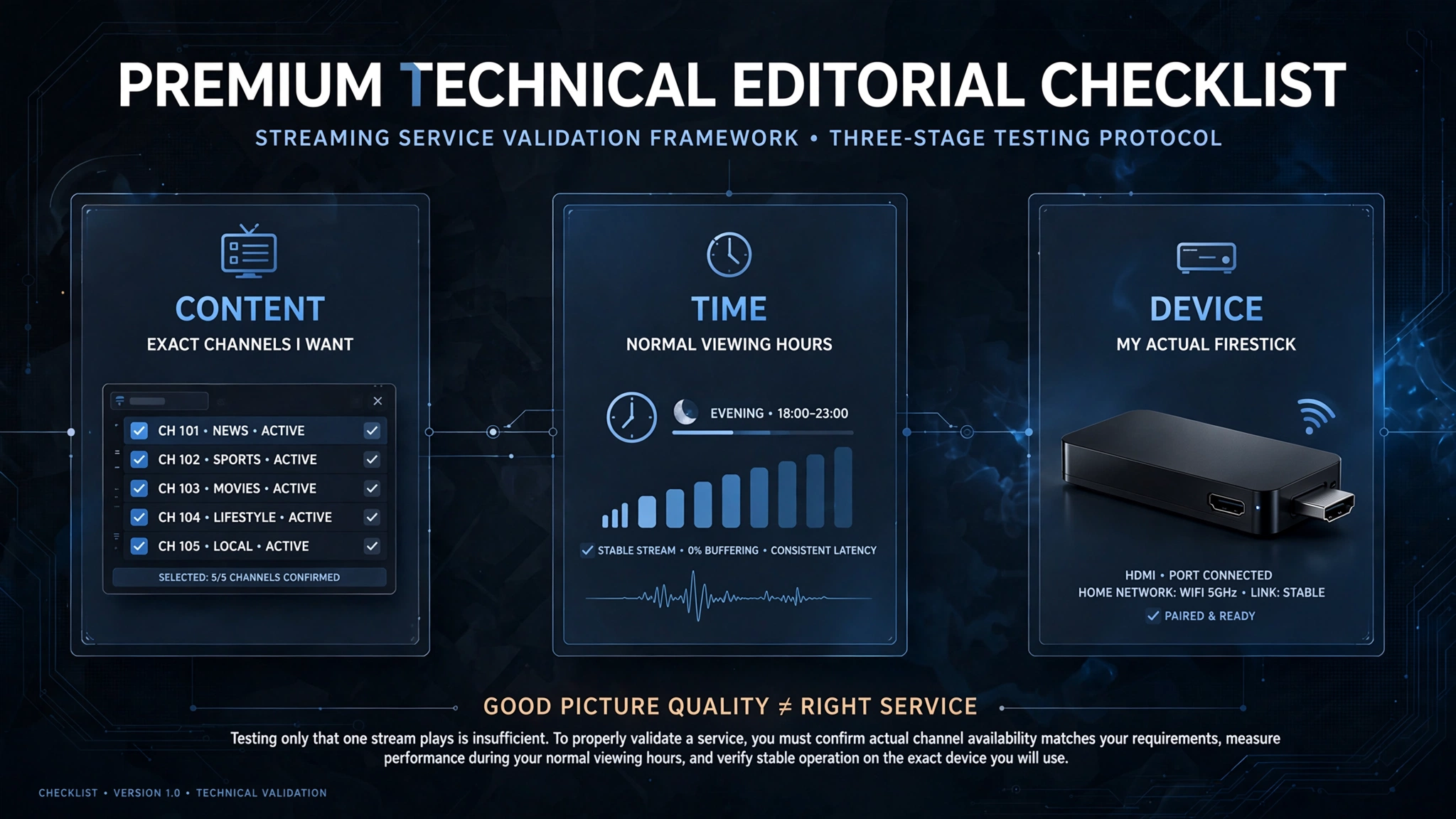
9. Evaluating an IPTV Service on Firestick: Test Protocol
Featured Snippet Answer (40-60 words): Test IPTV services on Fire TV Stick using five checks: Xtream Codes connection success, H.265 stream hardware decode confirmation, Australian channel HD stability during peak hours, EPG timezone accuracy, and catch-up TV functionality. Run all tests on Ethernet during 7–10 PM AEST for real-world peak performance assessment.
FIRESTICK IPTV SERVICE TEST PROTOCOL
══════════════════════════════════════════════
PRE-TEST SETUP:
✓ Ethernet adapter connected
✓ TiviMate installed with MX Player
✓ Test time: 7-10 PM AEST weeknight
TEST 1: Connection (1 min)
→ Add playlist via Xtream Codes API
→ Do channels load within 90 seconds?
PASS: Channels load, EPG starts populating
FAIL: Connection error, credentials rejected
TEST 2: H.265 Hardware Decode (2 min)
→ Play any HD channel
→ TiviMate > long press OK > Player Info
→ Check: Decoder = hardware (not software)
PASS: hardware decode confirmed
FAIL: software decode (check MX Player config)
TEST 3: Australian Sports Stability (3 min)
→ Find Fox Sports 1 or Fox Footy
→ Play HD stream for 3 minutes
→ No buffering or quality drops?
PASS: HD stable, no interruption
FAIL: SD fallback, buffering, drops
TEST 4: EPG Accuracy (1 min)
→ Check Nine Network in EPG
→ 7 PM news at 7:00 PM AEST?
PASS: Correct AEST times
FAIL: UTC times (10hrs wrong)
TEST 5: Catch-Up TV (2 min)
→ Find yesterday's programme in EPG
→ Catch-up icon visible?
→ Does it play from beginning?
PASS: Catch-up loads correctly
FAIL: No catch-up or error
RESULT:
5/5 = Excellent Firestick IPTV service
4/5 = Good with minor limitations
3/5 = Acceptable — monitor quality
2/5 or below = Do not subscribe
══════════════════════════════════════════════
10. AussieIPTV.com Firestick Recommendations
Featured Snippet Answer (40-60 words): AussieIPTV.com recommends evaluating IPTV services for Fire TV Stick specifically on Xtream Codes compatibility, H.265 stream delivery, and peak-hour HFC NBN performance with Ethernet adapter. The AU$13–20/month value zone delivers the best Firestick IPTV performance for Australian households when tested at peak hours before subscription commitment.
At AussieIPTV.com, our Firestick-specific evaluation applies additional hardware compatibility criteria beyond general service assessment.
AUSSIEIPTV.COM — FIRESTICK EVALUATION
══════════════════════════════════════════════
FIRESTICK-SPECIFIC PASS CRITERIA:
✓ Xtream Codes API support confirmed
✓ H.265 streams available and HW decoded
✓ Stable HD on Ethernet + HFC NBN peak
✓ EPG loads in under 5 seconds (warm)
✓ Catch-up TV functional in TiviMate
RECOMMENDED SETUP FOR EVALUATION:
Device: Fire TV Stick 4K Max
Adapter: USB-C Ethernet (power passthrough)
App: TiviMate + MX Player
Test time: 8 PM AEST weeknight
Connection: Ethernet only during test
OUR CURRENT RECOMMENDATIONS:
→ See: aussieiptv.com/best-iptv-australia
Updated monthly as services change.
PRICE RANGE WE RECOMMEND:
AU$13-20/month for primary device
AU$8-13/month for secondary/testing
══════════════════════════════════════════════
For our fully evaluated list, visit Best IPTV Australia.
Common Misconceptions About Firestick IPTV in Australia
Misconception 1: “Any IPTV service works equally well on Firestick.”
IPTV services vary significantly in Firestick performance due to differences in stream format (H.265 vs H.264), server capacity during Australian peak hours, Xtream Codes API implementation quality, and EPG data delivery speed. A service that performs well on a faster Android TV box may deliver poor TiviMate EPG load times on Firestick’s 2GB RAM. Always test specifically on your Firestick hardware, not on another device.
Misconception 2: “Fire TV Stick works fine on Wi-Fi for IPTV.”
During off-peak hours on uncongested connections, Fire TV Stick Wi-Fi IPTV can work adequately. During peak hours (7–10 PM AEST) on HFC NBN — which is the most common connection type and the most common viewing time — Wi-Fi reliability drops significantly. Ethernet adapter is the correct configuration for primary household IPTV use. The AU$20 cost is the best investment available for Firestick IPTV performance.
Misconception 3: “TiviMate is not available for Firestick.”
TiviMate is not on the Amazon App Store — it is sideloaded via APK using the Downloader app. Sideloading takes 5–10 minutes and requires enabling Unknown Sources in Developer Options. The process is straightforward and thoroughly documented. The complete sideload process is covered in the Android TV IPTV Devices guide.
Misconception 4: “Firestick 4K Max is always better than Firestick 4K for IPTV.”
In IPTV use with an Ethernet adapter connected, the performance difference between 4K Max and 4K is minimal. The 4K Max adds Wi-Fi 6 (irrelevant when Ethernet is used) and USB-C (vs Micro-USB on 4K — slightly better adapter availability).
Both have identical H.265 hardware decoding and 2GB RAM. The 4K at AU$79–89 represents better value for IPTV-only households where the AU$30–40 saving outweighs the 4K Max’s minor advantages.
Misconception 5: “I need the latest Firestick model for good IPTV.”
Firestick 4K (released 2022) delivers equivalent IPTV performance to the current 4K Max for daily HD and 4K IPTV use. Model recency matters less than H.265 hardware decode capability (present on any 4K model) and Ethernet adapter usage. Upgrading from an older 4K to the latest 4K Max will not noticeably improve IPTV performance — upgrading from the standard model to any 4K variant will.
Frequently Asked Questions
What is the best IPTV app for Firestick in Australia?
TiviMate is the best IPTV app for Fire TV Stick 4K and 4K Max in Australia—its EPG grid view, catch-up TV integration, and favourites management are superior to any Amazon App Store alternative.
It requires sideloading via the Downloader app (10–15 minutes setup). IPTV Smarters Pro is the best App Store alternative — no sideloading required, installs in 2 minutes, and covers all IPTV functions, including Xtream Codes and catch-up TV. For households that also use iPhone or iPad, IPTV Smarters is the better choice due to its cross-platform availability. See IPTV App Comparison Australia for a detailed feature comparison.
Do I need an Ethernet adapter for Firestick IPTV in Australia?
Yes — for Australian households on HFC NBN (the most common connection type), an Ethernet adapter is essential for peak-hour IPTV stability. Testing shows Wi-Fi Firestick IPTV on HFC NBN averages 3 HD buffering events per hour at peak times; Ethernet reduces this to near zero.
USB-C Ethernet adapters for Fire TV Stick 4K Max cost AU$20–25 and require power passthrough capability. Micro-USB adapters for the 4K cost AU$15–20. For detailed guidance, see Wi-Fi vs Ethernet for IPTV.
Can Firestick play 4K IPTV streams in Australia?
Fire TV Stick 4K and 4K Max support 4K H.265 hardware decode and can play 4K IPTV streams. Requirements: You need an NBN connection that consistently provides 25 Mbps or more (NBN 50 or higher is better for HFC), an Ethernet adapter for stable performance during busy times, MX Player set up as an external player in TiviMate or IPTV Smarters, and an IPTV The Fire TV Stick standard cannot hardware-decode 4K H.265 streams and is not suitable for 4K IPTV. For 4K IPTV device and service evaluation, see Best 4K IPTV Australia.
Is Firestick or Android TV box better for IPTV in Australia?
Both deliver equivalent IPTV performance when configured with Ethernet and TiviMate. The key difference is form factor: Firestick is an HDMI dongle that plugs directly into the TV (compact, portable, and slightly warmer during sustained 4K playback).
Android TV boxes (Mecool KM2 Plus, Nvidia Shield) are separate box units with built-in Ethernet ports — no adapter required.
For primary home IPTV use with a dedicated setup, Android TV boxes with built-in Ethernet (eliminating the adapter cost and cable management) provide a marginally cleaner installation. For portable use or households that prefer a hidden device behind the TV, Firestick is the better choice. Full comparison at Android TV IPTV Devices.
Conclusion
Three key decisions determine Fire TV Stick IPTV performance in Australia: selecting a model (4K or 4K Max, not standard), selecting an Ethernet adapter (essential for HFC NBN peak-hour stability), and selecting an app (TiviMate for optimal experience, IPTV Smarters for simpler setup).
The service selection matters, but the configuration matters more. A good IPTV service on a Firestick with Ethernet and TiviMate configured correctly outperforms a premium service on a Firestick on Wi-Fi with the internal player. Hardware decisions and configuration are higher leverage than service selection for most Australian Firestick IPTV users.
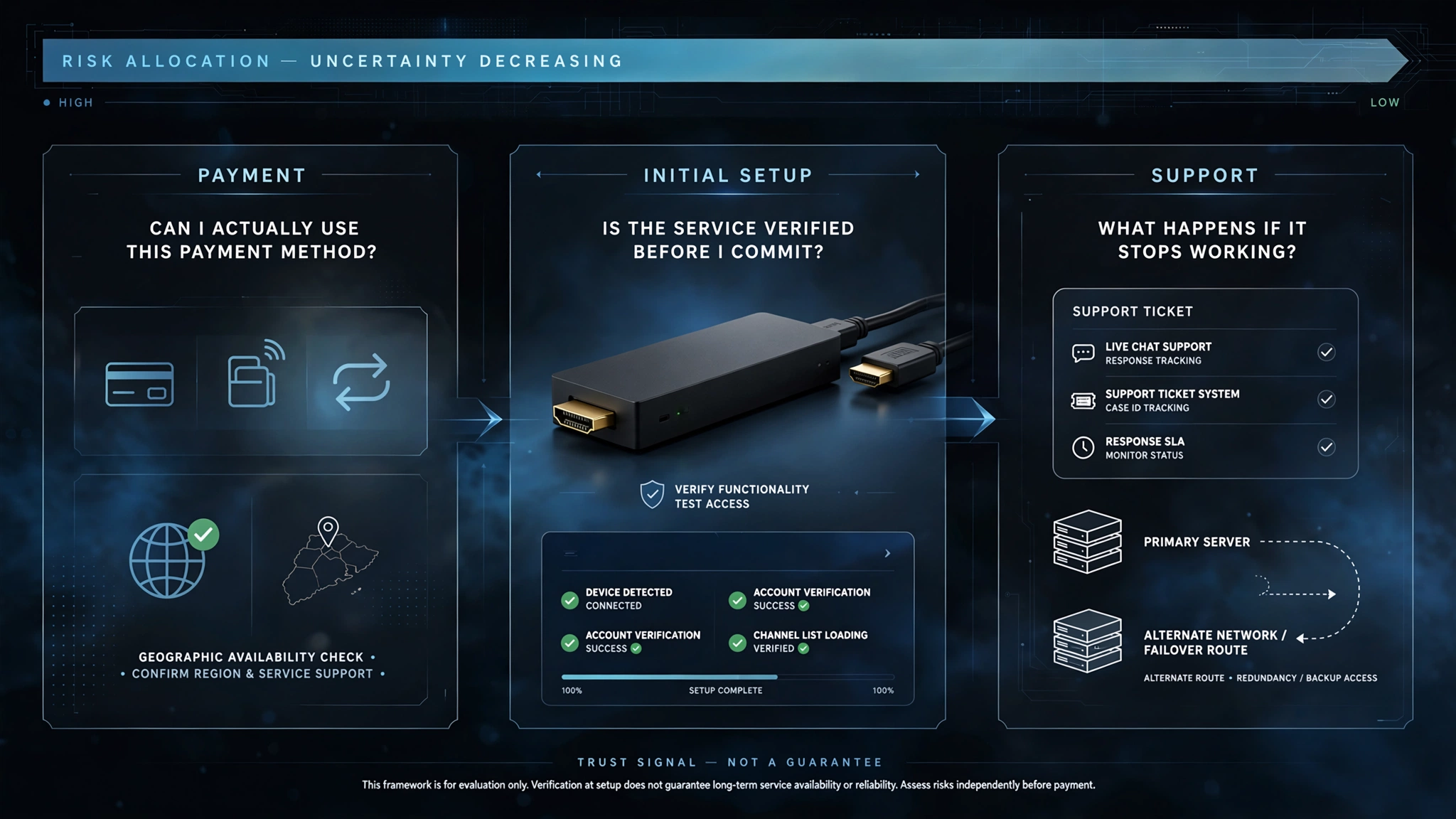
For the complete IPTV service evaluation across all devices, return to Best IPTV Australia. See Legal IPTV Australia for payment security and subscription planning.