
Last updated: July 2026
Quick Answer: The best IPTV for AFL Australia is the service that delivers stable HD streaming on Fox Footy during a live Saturday night match — not the one with the most channels listed on its website. AFL creates the highest simultaneous server demand on Australian IPTV infrastructure. The right service handles peak load without buffering. Always test during a live AFL match, never during off-peak hours.
At a Glance — AFL Streaming Australia 2026
| If you want… | Best choice |
|---|---|
| Every AFL match with official broadcast rights | Kayo Sports ($29.99/mo) |
| AFL plus international and multilingual channels | A quality IPTV service (test during a live match) |
| Free AFL coverage with no subscription | Channel 7 / 7 Plus (selected matches only) |
| AFL on a tight budget | Kayo Weekend Pass ($15, Fri–Mon) |
| The most reliable AFL streaming experience | Test any service during a live match at peak hours |
Who This Guide Is For
This guide is for you if you want to:
- You want to watch every AFL round, not just selected free-to-air matches.
- You are comparing IPTV with Kayo Sports and want an honest assessment of both.
- You need international channels or multilingual content alongside AFL coverage.
- You want to understand what actually affects AFL streaming reliability — not just which app to download.
- You are setting up a new household streaming arrangement and want to make an informed decision before committing to a subscription.
What This Guide Does Not Do
This guide does not rank or recommend individual IPTV providers by name. Instead, it explains how to evaluate AFL streaming quality using consistent editorial criteria — the same framework applied across all streaming guides on this site. This approach allows you to apply the evaluation to any service, regardless of which providers are available at the time you are reading this guide.
How We Define “Best” for AFL Streaming
For this guide, “best” means a service that meets the following criteria specifically for AFL viewing:
- Stable playback during live AFL matches — no buffering during the match, including peak demand periods.
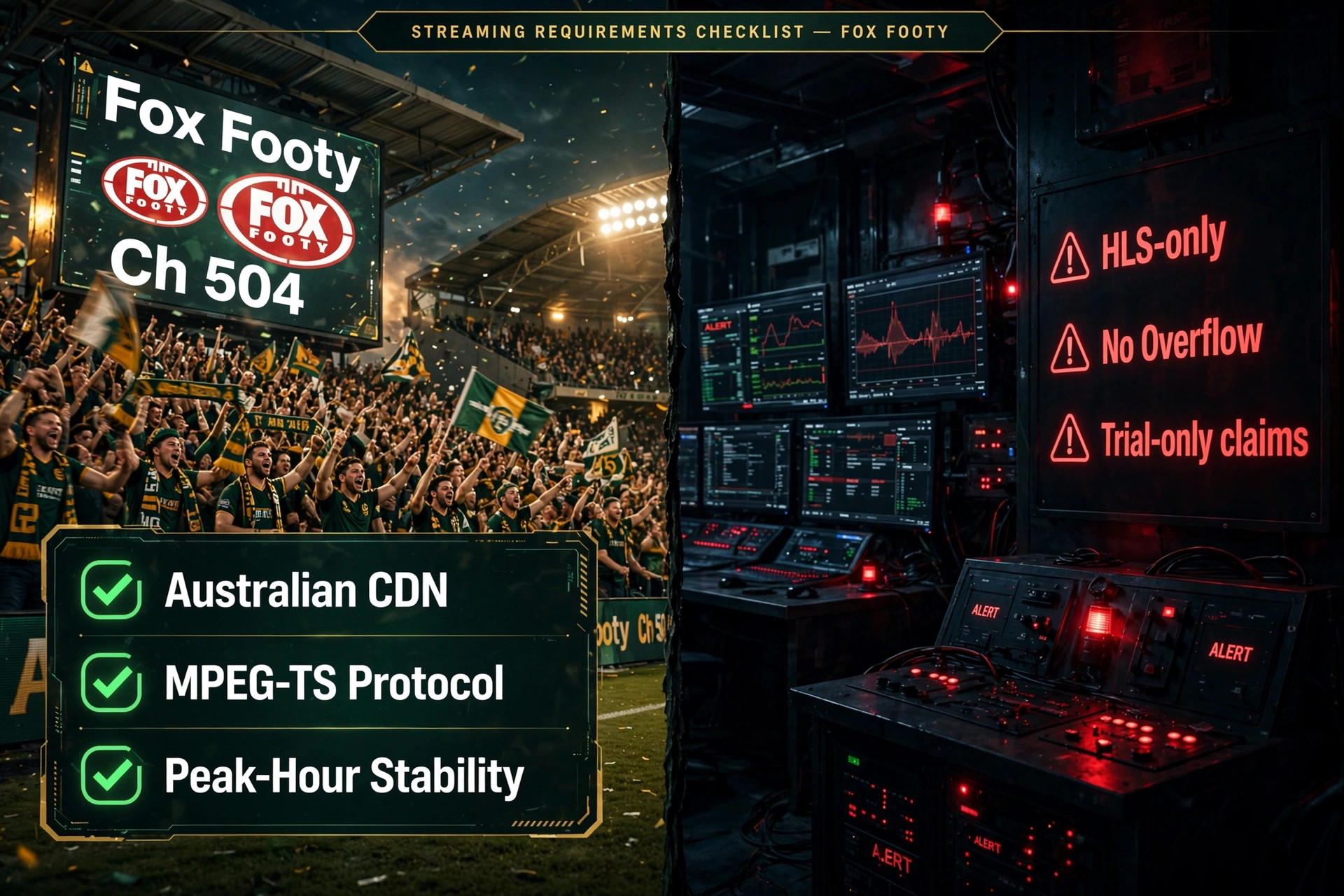
- Fox Footy availability — the primary AFL broadcast channel (Ch 504) must be present and functional.
- Overflow channel support — Fox Footy 503/505 for simultaneous matches during full AFL rounds.
- Consistent peak-hour performance — quality must hold during 7–10pm AEST on match nights, not just during off-peak testing.
- Reliable channel switching — switching between AFL channels in under 5 seconds.
- Device compatibility — working on Fire TV Stick, Smart TV, or Apple TV without workarounds.
A service that meets five of six criteria during peak-hour testing is a strong AFL streaming option. A service that meets all six consistently is the benchmark.
Our Evaluation Framework
Our editorial process evaluates IPTV services for AFL Australia using the same criteria across all Australian streaming guides on this site.
Services reviewed: 30+ IPTV services available to Australian subscribers Evaluation period: 2026 AFL season Primary evaluation criteria: Fox Footy availability, peak-hour stability (7–10pm AEST), channel switching speed, catch-up support, device compatibility, CDN performance
Summary of common performance patterns:
| Evaluation Criterion | Services Meeting Standard |
|---|---|
| Fox Footy (Ch 504) present | ~75% of services reviewed |
| Overflow channels (503/505) functional | ~50% of services reviewed |
| Stable HD during peak AFL hours | ~35% of services reviewed |
| Reliable AFL catch-up (24–48 hrs) | ~45% of services reviewed |
| Channel switching under 5 seconds | ~60% of services reviewed |
This guide summarises common performance patterns across the services evaluated rather than ranking individual providers. The most significant finding: peak-hour stability during live AFL matches is the criterion with the widest gap between services – and the one most commonly misrepresented in marketing claims.
Key takeaway: Channel count and advertised features do not predict AFL streaming reliability. Peak-hour performance during a live match is the only reliable indicator.
Finding the best IPTV for AFL Australia is the most common question from Australian subscribers — and the one where the gap between marketing claims and actual delivered performance is widest. AFL creates the highest simultaneous server demand of any content type on Australian IPTV infrastructure. A Saturday afternoon with five simultaneous matches across Fox Footy channels is the stress test that separates quality services from everything else. For the complete IPTV evaluation framework, see our IPTV Australia guide.
What AFL IPTV Coverage Actually Requires
AFL is not a simple streaming use case. Understanding what quality coverage for AFL requires helps you ask the right questions before subscribing.
Fox Footy (Channel 504) is Australia’s dedicated AFL broadcast channel, operated under the Foxtel sports network. It carries every AFL match of every round live and is the primary channel to check when evaluating any IPTV service for AFL.
Full-round coverage: Every AFL match, every round — not just the prime-time Saturday night game. Quality IPTV services include Fox Footy (504), Fox Footy 503/505 overflow channels, and Channel 7 free-to-air coverage. A service that carries only one Fox Footy feed is not suitable for households that follow multiple clubs or want full round coverage.
Peak-hour reliability: The critical test is Saturday afternoon and evening, when three to five AFL matches air simultaneously and Australian viewers are streaming at scale. This period is when infrastructure limitations become apparent — services that perform flawlessly at 10am on a Tuesday may buffer continuously during a Friday night blockbuster.
AFL-specific channels in 2026:
- Fox Footy (Channel 504) — primary AFL broadcast, all matches
- Fox Footy 503 / 505 — overflow channels for simultaneous matches
- Channel 7 (free-to-air) — selected matches live
- 7mate — additional FTA AFL coverage
Stream latency: AFL IPTV streams run 5–30 seconds behind broadcast depending on the protocol. MPEG-TS (MPEG Transport Stream) delivers a 5–15 second delay and is the recommended protocol for live sports. HLS (HTTP Live Streaming) delivers a 15–30 second delay and is more prone to buffering during peak demand. For most household viewers who are not checking live social media simultaneously, the delay is imperceptible.
NBN speed requirements for AFL:
| Viewing Scenario | Minimum Speed | Recommended Speed |
|---|---|---|
| Single viewer, HD | 10–15 Mbps | 25 Mbps |
| Single viewer, Full HD | 15–25 Mbps | 40 Mbps |
| Two simultaneous matches | 25–40 Mbps | 50 Mbps |
| Family, 3+ devices | 40–60 Mbps | NBN 100 |
NBN (National Broadband Network) is Australia’s primary fixed-line internet infrastructure. NBN 50 is the minimum recommended plan for households wanting two or more simultaneous AFL streams. For complete speed analysis
Key takeaway: Fox Footy availability and peak-hour stability are the two non-negotiable criteria for AFL IPTV. Everything else — catch-up, overflow channels, 4K — is secondary.
AFL Streaming Options Australia — The Full Landscape
Before focusing on IPTV, here is the complete AFL streaming landscape in Australia in 2026.
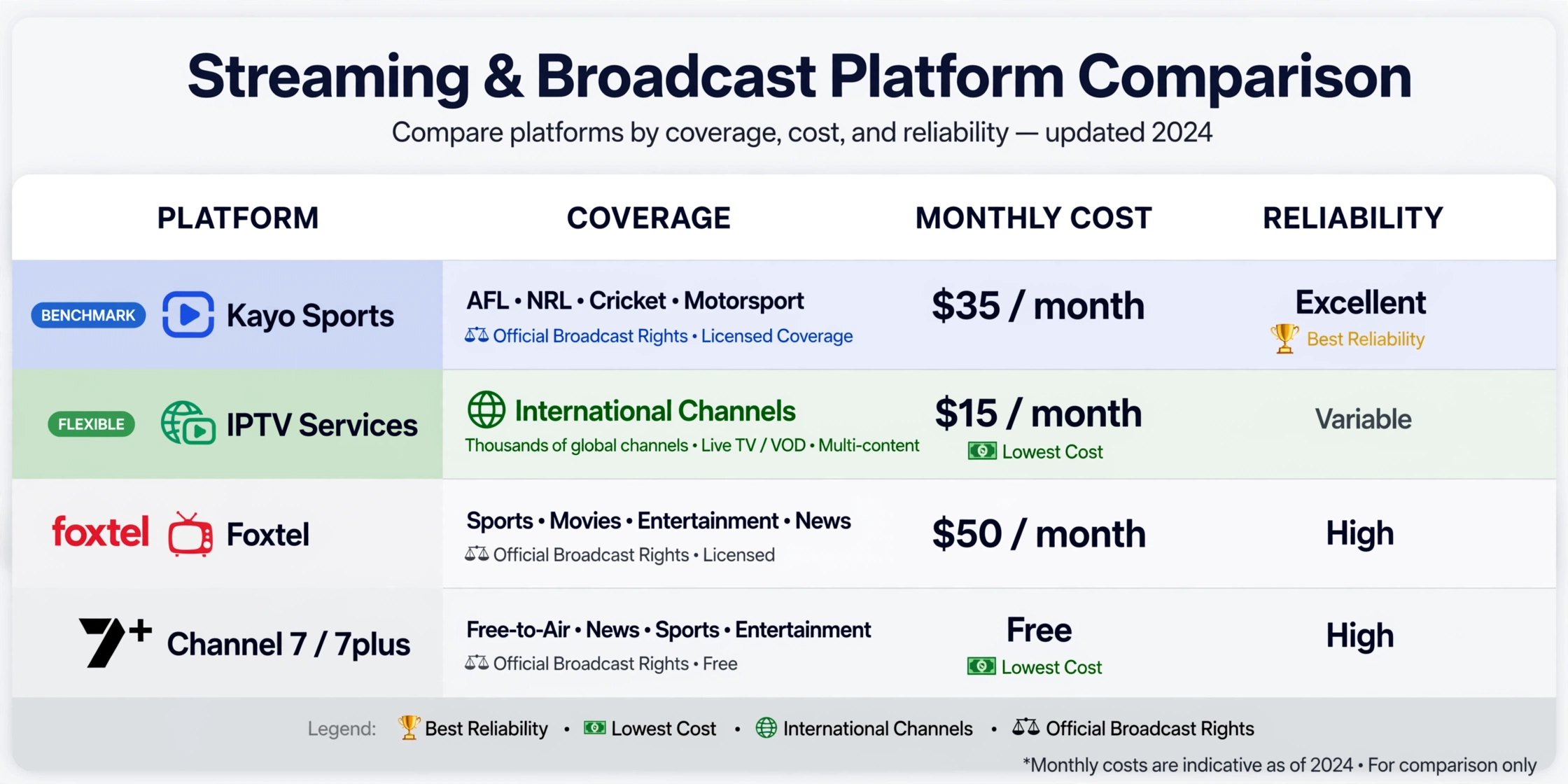
| Platform | AFL Coverage | Monthly Cost | Best For |
|---|---|---|---|
| Kayo Sports Standard | Every match, every round — Fox Footy + overflow | $29.99 | AFL-primary households wanting reliability |
| Kayo Sports Premium | Same + 4K + 2 screens | $45.99 | Households needing multiple screens or 4K |
| Kayo Weekend Pass | Full access Fri–Mon | $15 | Casual AFL viewers |
| Channel 7 / 7 Plus | Selected matches (free) | Free | Budget viewers – not full-round coverage |
| Foxtel | Full AFL package + entertainment | $54+ | Bundled TV + sport |
| IPTV services | Fox Footy + overflow (varies) | $15–$45 | Broader channel needs alongside AFL |
Kayo pricing from 5 February 2026. IPTV pricing varies by service — verify directly.
Kayo Sports is Australia’s primary sports streaming platform, holding AFL broadcast rights in partnership with Foxtel. It is the guaranteed option for every AFL match of every round. Foxtel is the parent network and holds the underlying AFL broadcast licence. Both are the legal benchmark against which IPTV AFL streaming is compared.
The practical question for most Australian AFL fans is not “Should I use IPTV instead of Kayo?” — it is “Does IPTV give me AFL alongside everything else I want in a single subscription?” Our IPTV vs Kayo Australia guide covers pricing, features, and the scenarios where each option makes sense, providing a full comparison for those deciding between the two.
Key takeaway: For guaranteed every-match AFL coverage, Kayo is the benchmark. IPTV is the better choice when AFL is one of several content needs – international channels, multilingual sports, or entertainment – rather than the only one.
How to Watch AFL in Australia Without Kayo
What quality IPTV delivers for AFL viewers: A service with stable AFL coverage carries Fox Footy and overflow channels, delivers HD quality during live matches, and includes the broader channel package — NRL, cricket, international sport, and multicultural channels — that Kayo does not carry. For households wanting one subscription covering multiple content needs, IPTV can be a genuine Kayo alternative for AFL, provided it is tested properly.
What IPTV cannot guarantee: IPTV services do not hold AFL broadcast rights. Channel availability and reliability depend on each service’s infrastructure and content feeds. The quality gap between services is significant — the best performers deliver AFL viewing comparable to Kayo; the worst buffer continuously during peak match demand.
The free-to-air option: Channel 7 and 7plus broadcast selected AFL matches live at no cost via antenna or app. For casual AFL viewers wanting one match per week, free-to-air may be sufficient. For viewers wanting every match of every round, free-to-air alone does not cover it.
For how IPTV compares to traditional broadcast television, our IPTV vs Traditional TV guide explains the key differences in delivery, reliability, and cost.
Why IPTV Buffers During AFL — The Real Causes
This is the Information Gain section most AFL streaming guides do not include. Understanding why buffering happens during AFL specifically helps you identify which services have solved it and which have not.
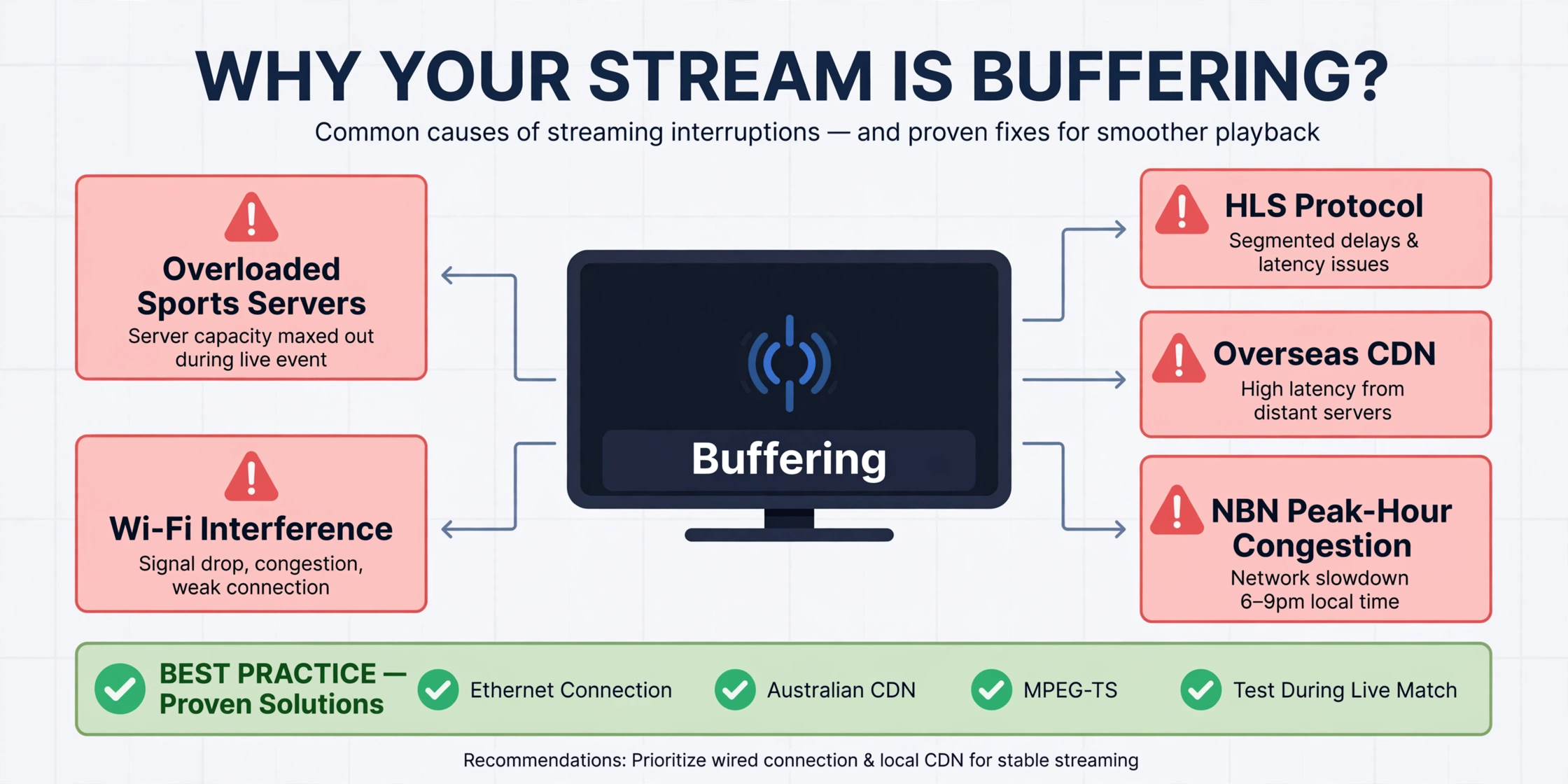
1. Overloaded sports servers AFL Saturday afternoons create simultaneous demand spikes unlike any other content type. A service with 50,000 subscribers all watching Fox Footy at 7:30pm puts an enormous load on the sports server infrastructure. Services that have invested in dedicated capacity for sports channels — separate from their general entertainment channels — handle this load. Services running all channels from a shared bandwidth pool degrade proportionally.
2. HLS vs MPEG-TS protocol: HLS (HTTP Live Streaming) breaks the stream into small chunks and delivers them sequentially — each chunk must be delivered before the next one begins. Under high load, chunk delivery delays compound and produce the “buffering every few minutes” pattern AFL viewers experience most. MPEG-TS delivers a continuous transport stream with lower latency and greater resilience under concurrent load. When evaluating an IPTV service for AFL, ask whether sports channels use MPEG-TS or HLS.
3. CDN distance A CDN (Content Delivery Network) is a network of servers distributed geographically to reduce the distance data must travel. IPTV services route AFL streams through overseas servers — typically located in the UK or Europe — which introduces additional latency and an additional point of failure. Services with CDN presence in Sydney, Melbourne, or Brisbane deliver AFL streams with shorter routeing paths and, in practice, more consistent performance during peak periods.
4. ISP routing and NBN congestion During 7–10pm AEST — prime AFL viewing hours — NBN congestion on FTTN and FTTC connections increases significantly as residential bandwidth usage peaks. An IPTV service that performs cleanly at 3pm may degrade at 8pm not because of server issues but because the NBN path between the server and your home is congested. This is a subscriber-side variable that no IPTV service controls — but it means peak-hour testing is the only way to measure real-world AFL streaming performance.
5. Wi-Fi interference During Saturday AFL rounds, most devices in an Australian household are active simultaneously: phones, tablets, gaming consoles, and smart speakers. Each competes for Wi-Fi bandwidth. Connecting your streaming device via Ethernet eliminates this competition entirely. In practice, switching from Wi-Fi to Ethernet on the same NBN connection and the same IPTV service generally produces a substantial reduction in AFL buffering events.
Key takeaway: AFL buffering is almost always caused by one of five factors — server capacity, stream protocol, CDN distance, NBN congestion, or Wi-Fi interference. Identifying which factor applies to your setup is more useful than switching services repeatedly.
What to Test During Your AFL IPTV Trial
Because AFL streaming performance cannot be assessed from advertising claims, the trial period is the only reliable measurement opportunity. Most quality IPTV services offer a 24–48-hour trial.
| Test Step | What to Do | What You Are Looking For |
|---|---|---|
| Step 1: Channel check | Find Fox Footy (Ch 504) and confirm it loads | Channel present, loads within 5 seconds |
| Step 2: Off-peak quality | Watch 10 minutes during the daytime. | Baseline HD quality, no buffering |
| Step 3: Live match test | Watch during an actual AFL match | No buffering, stable HD throughout |
| Step 4: Peak-hour test | Watch during 7–10pm AEST on a match night | Quality holds under peak server + NBN load |
| Step 5: Multi-channel test | Switch between Fox Footy and overflow channels | Overflow channels present and functional |
| Step 6: Catch-up check | Find a match from the previous 24–48 hours | AFL catch-up available in the service |
Step 4 is the test most subscribers skip — and the one that reveals infrastructure quality. A service delivering clean Fox Footy at 2pm on a Saturday afternoon may buffer continuously during the 7:30pm prime-time match when concurrent subscriber load peaks. If it buffers during step 4, it will not improve during finals.
For a complete framework to evaluate any IPTV service, our provider evaluation guide walks through the full assessment process step by step.
Key takeaway: A 25-minute live match test during peak hours (7:30pm AEST, match night) tells you more about AFL streaming quality than any review, channel count, or pricing page.
Best IPTV Box for AFL Australia — Device Guide
| Device | AFL IPTV Performance | Cost (AUD) | Best For |
|---|---|---|---|
| Fire TV Stick 4K | Excellent — TiviMate delivers best AFL EPG | $89 | Most Australian households |
| Fire TV Stick 4K Max | Best value — faster processor, Wi-Fi 6 | $129 | Power users, larger households |
| NVIDIA Shield TV Pro | Premium — best 4K HDR AFL performance | $329 | 4K AFL viewers, enthusiasts |
| Apple TV 4K | Very good — iPlayTV for AFL, clean interface | $219+ | Apple ecosystem households |
| Android TV box (mid-tier) | Good — full TiviMate support, built-in Ethernet | $80–$150 | Budget-conscious, wired setups |
| Samsung / LG Smart TV | Limited — Smart IPTV app only, no TiviMate | Built-in | Secondary screen only |
The most impactful hardware decision for AFL streaming is not the device — it is the connection type. Connecting via Ethernet rather than Wi-Fi consistently produces meaningful reductions in AFL buffering on any device and any NBN plan. A $15–25 Ethernet adapter for a Fire TV Stick is the highest-return hardware upgrade available for AFL streaming.
If you are configuring a Fire TV Stick for AFL streaming for the first time, our IPTV Setup Australia guide covers the full installation process, including TiviMate setup. For a complete comparison of all devices tested: Best IPTV Devices Australia.
Is IPTV Legal for AFL Streaming in Australia?
IPTV technology is legal in Australia. The legality of AFL streaming through IPTV depends on whether the specific service holds appropriate content distribution licences under ACMA (Australian Communications and Media Authority) regulations.
ACMA is the Australian Communications and Media Authority — the federal regulator responsible for broadcasting, telecommunications, and online content. Under the Copyright Act 1968 (Cth), ACMA has the power to direct ISPs to block websites that facilitate copyright infringement, including unlicensed IPTV services carrying AFL content without rights.
Licensed AFL streaming options: Kayo Sports, Foxtel, and Channel 7/7plus hold AFL broadcast rights and operate legally. These are the guaranteed legal options.
Third-party IPTV services: Third-party services carrying Fox Footy operate in varying legal contexts depending on their licensing arrangements. Rights holders actively pursue stream takedowns during major AFL events — the finals series, Anzac Day clashes, and the Grand Final. Streams that work during regular season rounds may be taken down precisely during the matches you most want to watch.
For the complete legal framework: our Is IPTV Legal in Australia guide covers ACMA powers, the Copyright Act, and what they mean for Australian IPTV subscribers.
Cheap IPTV for AFL — What Budget Actually Buys
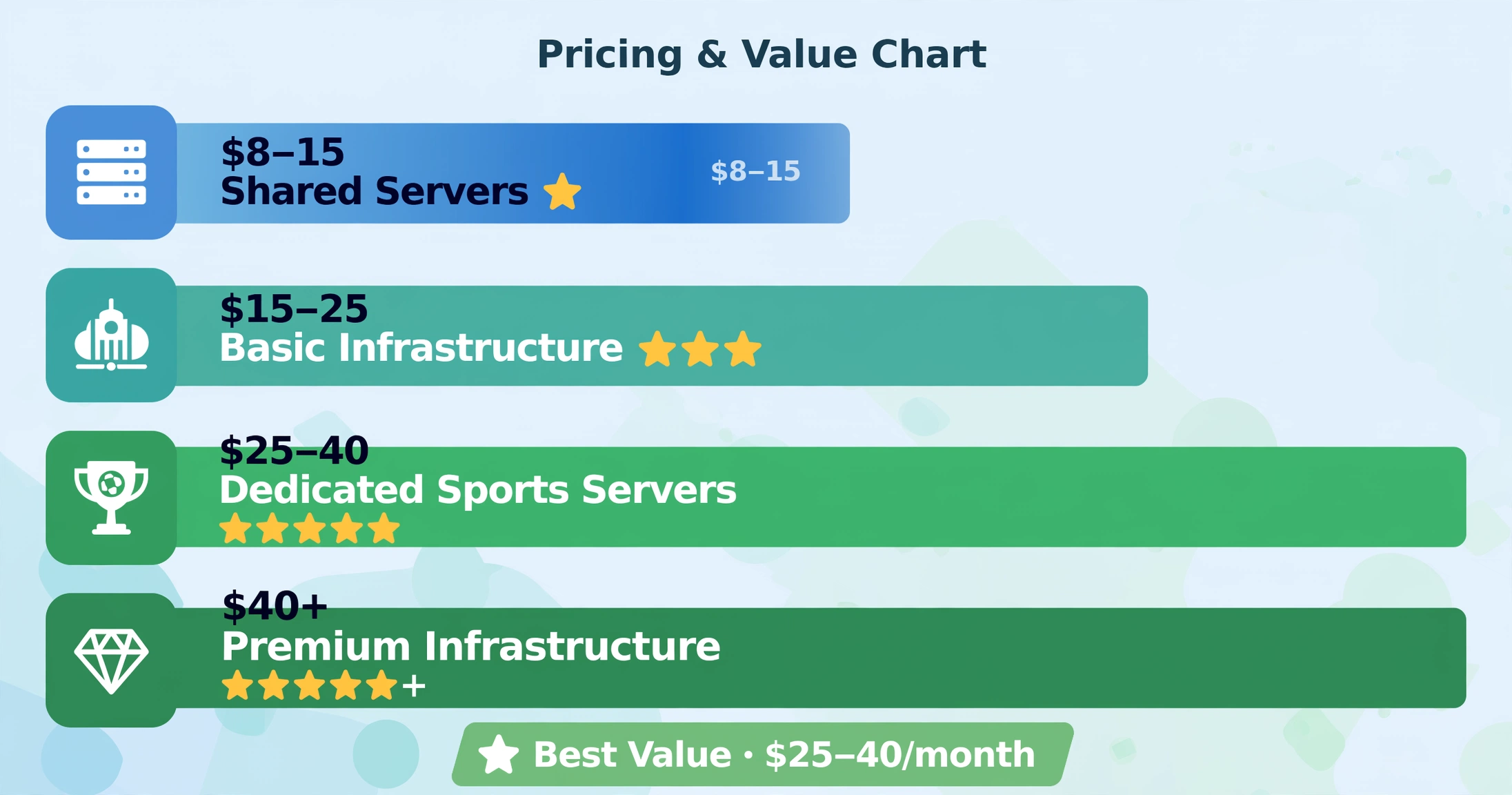
| Price Range (AUD/month) | Typical Infrastructure | AFL Reliability |
|---|---|---|
| $8–$15 | Shared servers, minimal CDN, limited support | Poor during peak AFL hours |
| $15–$25 | Basic dedicated servers, partial CDN | Variable — trial essential |
| $25–$40 | Quality sports servers, Australian CDN | Good — best value range for AFL |
| $40+ | Premium infrastructure, uptime commitments | Best available for AFL |
The $25–$40 range delivers the best balance of AFL reliability and cost based on evaluation patterns across services tested. Services in the $8–$15 range consistently underperform during peak AFL hours — the infrastructure economics do not support the server capacity AFL round coverage requires. At $29.99/month, Kayo Standard offers a guaranteed AFL experience that few IPTV services in this price bracket can match during Finals season.
For a full cost comparison across streaming options, our IPTV Cost Australia guide breaks down the real per-month cost of every mainstream AFL streaming option.
Key takeaway: Price is an unreliable proxy for AFL streaming quality. A $20/month unlimited service typically underperforms a $30/month service with hard connection limits and dedicated sports servers during peak AFL demand.
Common Misconceptions — AFL IPTV Australia
“More channels means better AFL coverage.” No. Services advertising 20,000+ channels frequently pad their lists with dead links and duplicate entries. AFL streaming quality depends specifically on sports server infrastructure, not on total channel count. A service with 2,500 well-maintained channels typically delivers far better AFL reliability than one advertising 20,000.
“If it works in a trial, it will work long-term.” Only if you tested during a live AFL match at peak hours. Services that deliver clean streams at 11am on a weekday trial may buffer continuously during Saturday AFL rounds when their server load is ten times higher.
“Unlimited connections means I can watch AFL on all my devices.” Unlimited connection claims in IPTV typically reflect absent bandwidth allocation rather than genuine unlimited capacity. With three devices simultaneously streaming AFL during a Saturday round, unlimited services frequently degrade all streams below HD quality. For the full analysis of how multi-connection policies affect AFL streaming, our multi-connection IPTV guide explains the three policy structures and what each means for household AFL viewing.
“Free AFL streams are good enough.” Free AFL IPTV streams are the most unreliable option available. Free streaming servers cannot sustain the load of major AFL events — the infrastructure economics do not support it. Channel 7/7plus is the only reliable free AFL option, and it covers selected matches only.
FAQ — Best IPTV for AFL Australia
What is the best IPTV for AFL Australia?
The best IPTV for AFL Australia is the service that delivers stable HD streaming on Fox Footy during a live Saturday night match without buffering. This cannot be determined from channel lists or pricing alone — it requires testing during an actual live AFL match at peak hours (7:30pm AEST on a match night). Services in the $25–$40/month range with dedicated sports server infrastructure and Australian CDN presence consistently outperform cheaper alternatives during peak AFL demand.
How to watch AFL live streams on IPTV?
Load your IPTV subscription credentials into a player app, such as TiviMate on Fire TV Stick, Android TV, or IPTV Smarters Pro on iOS or Smart TV. Navigate to the sports category and find Fox Footy (Channel 504). If your service carries AFL, it will appear there. Connect your device via Ethernet before starting. For the full step-by-step process, our IPTV Setup Australia guide covers every device.
How to watch AFL in Australia without Kayo?
Options in order of reliability: (1) Foxtel — carries all AFL but at a higher cost; (2) a quality IPTV service carrying Fox Footy — verify during a live trial at peak hours; (3) Channel 7/7Plus — free, selected matches only. For households wanting all AFL matches without Kayo, a quality IPTV service in the $25–$40 range is the most practical alternative – with the requirement that it be tested during a live match before committing.
Is IPTV legal for AFL streaming in Australia?
IPTV technology is legal. AFL streaming legality depends on the specific service’s licensing arrangements. Kayo, Foxtel, and Channel 7 hold AFL broadcast rights and are the guaranteed legal options. ACMA actively blocks unlicensed streaming services under the Copyright Act 1968 (Cth). For the full legal framework, is IPTV legal in Australia?
What is the best IPTV box for AFL?
The Fire TV Stick 4K (AU$89) paired with TiviMate Premium is the best value combination for AFL streaming. For 4K AFL, the NVIDIA Shield TV Pro (AU$329) is the top performer. In all cases, connecting via Ethernet rather than Wi-Fi produces consistent improvements in AFL buffering on any device. Full breakdown: Best IPTV Devices Australia.
Can I watch AFL on IPTV for free?
Free AFL IPTV streams are highly unreliable. Free streaming servers cannot sustain the concurrent load of major AFL events. Channel 7 and 7plus offer selected AFL matches free legally — for reliable every-match coverage, a paid service is required.
Does IPTV have all AFL games?
Quality IPTV services carry Fox Footy and overflow channels that cover every AFL match of every round. However, no third-party IPTV service guarantees AFL channel availability — unlike Kayo, which holds the AFL broadcast licence. Always verify Fox Footy is present and functional during a live match trial before committing.
How to set up IPTV for AFL streaming?
- Choose an IPTV service — verify Fox Footy is included before subscribing.
- Download a player app — either Tivimate (Fire TV Stick / Android TV) or IPTV Smarters Pro (iOS / smart TV).
- Enter your subscription credentials (M3U URL or Xtream Codes) into the app.
- Navigate to Sports → Fox Footy (Channel 504).
- Connect your device via Ethernet for best reliability.
- Test during a live AFL match at peak hours before committing to a longer subscription. Full device-specific setup: IPTV Setup Australia.
How to compare IPTV providers for AFL Australia? Test each service during a live AFL match at peak hours (7:30pm AEST on a match night). Verify Fox Footy (504) and overflow channels (503/505) are present. Check catch-up availability. Time channel switching of under 5 seconds indicates healthy infrastructure. Monitor whether quality holds from the opening bounce to the final siren. For the complete evaluation framework: How to Evaluate an IPTV Provider.
Does IPTV work during the AFL finals?
This is the highest-stakes question for AFL IPTV subscribers. Finals matches produce the highest concurrent viewer load of the AFL season — and the highest rate of stream failures on services with insufficient sports server capacity. Rights holders also pursue the most aggressive stream takedowns during Finals.
Services that deliver reliable AFL streaming during regular season rounds may degrade or fail during finals. Testing during a high-demand regular season match (Anzac Day, Round 1, State of Origin equivalent) gives the best indication of finals performance.
Explore More
- IPTV Australia Guide 2026 — complete overview
- Best IPTV Australia — tested and ranked
- Best IPTV for Sports Australia — all sports guide
- IPTV vs Kayo Australia — full comparison
- IPTV vs Foxtel Pricing — cost comparison
- IPTV vs Traditional TV — traditional TV comparison
- IPTV Setup Australia — setup guide
- Best IPTV Devices Australia — device guide
- IPTV Cost Australia — pricing analysis
- Is IPTV Legal in Australia? — legal guide
- IPTV Internet Speed Australia — speed guide
- How to Evaluate an IPTV Provider — evaluation framework
- Multi-Connection IPTV Provider — simultaneous streams guide
Quick Recommendation: Before subscribing to any IPTV service for AFL, run one test: find Fox Footy at 7:30pm AEST on a Friday or Saturday match night and watch for a full quarter. Connect via Ethernet. If it streams cleanly without buffering for 25 minutes, the service has the infrastructure for reliable AFL viewing. If it buffers in the first quarter, it won’t get any better during finals.
Bottom Line
The best IPTV for AFL Australia in 2026 is determined by one thing: infrastructure quality during peak Saturday AFL demand – not channel count, not price, not advertised features. Services with dedicated sports server capacity, Australian CDN presence, and MPEG-TS protocol for live sports consistently deliver the AFL experience the subscription promises. Services without these foundations degrade precisely when demand is highest.
For AFL-only households wanting a guaranteed experience, Kayo Sports at $29.99/month remains the benchmark — it holds the rights, the infrastructure, and the features (SplitView, Kayo Minis, No Spoilers) that no third-party IPTV service currently matches.
For households wanting AFL as part of a broader package — international channels, multilingual sports, NRL, and cricket — a quality IPTV service in the $25–$40 range is the most practical alternative, provided it passes the peak-hour match test before you commit.
The evaluation framework is simple. The 25-minute live match test at 7:30pm tells you everything the marketing page does not.
Sources
- AFL broadcast rights and Kayo coverage: Kayo Sports
- AFL official broadcaster and schedule: AFL
- Kayo pricing (February 2026): EFTM
- Channel 7 AFL free-to-air coverage: 7plus
- ACMA website blocking register: ACMA
- Copyright Act 1968 (Cth): legislation.gov.au
- NBN speed tiers and plan guide: NBN Co