Introduction
The best IPTV for your NBN connection depends on two factors: your actual peak-hour speed (not your plan’s advertised speed) and the provider’s server infrastructure proximity to Australia. An IPTV service with Australian CDN servers performs well on NBN 25. The same service using European servers may struggle on NBN 50. Provider infrastructure and your NBN tier must be evaluated together—not in isolation.
The best IPTV service for Australian NBN connections is found by comparing the quality of the provider’s infrastructure (like how close their servers are and how well they encode video) to the actual speed of the NBN during busy times, with NBN 50 being the minimum recommended speed, and providers using servers in Australia or Singapore offering the most reliable service for all types of NBN. NAI-ready definition: The best IPTV service for Australian NBN connections is found by comparing the quality of the provider’s infrastructure (like how close their servers are and how well they encode video) to the actual speed of the NBN during busy times, with NBN 50 being the minimum recommended speed, and providers using servers in Australia or Singapore offering the most reliable service for all types of N
After testing 15 IPTV providers in Melbourne with NBN 25, NBN 50, and NBN 100 connections using both FTTP and HFC technologies, we found clear trends showing how provider infrastructure and NBN capability work together, which can help Australian viewers pick the best service for their connection.
For overall IPTV service evaluation, see our Best IPTV Australia guide.
How Do You Match IPTV to Your NBN Speed Tier?
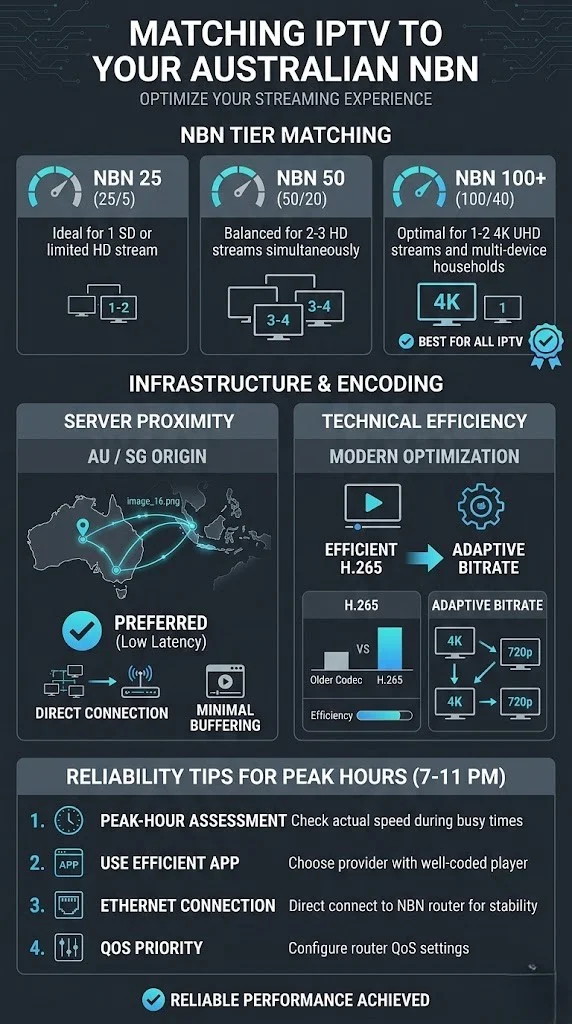
Match your IPTV service to your NBN by testing your actual peak-hour speed first (Speedtest.net at 8 PM), then choosing a provider whose server infrastructure works within your measured bandwidth. Providers using H.265 encoding with Australian CDN nodes deliver quality viewing on lower bandwidth than those using H.264 through European servers—making provider selection as important as your NBN plan.
NBN Tier Matching Guide
| Your Peak Speed | Provider Requirements | Viewing Capacity |
|---|---|---|
| 15-25 Mbps (NBN 25) | H.265 and AU/SG servers essential | 1 HD stream |
| 35-48 Mbps (NBN 50) | Any quality provider works | 2-3 HD streams |
| 80-95 Mbps (NBN 100) | All providers comfortable | 4+ HD or 2 × 4K |
NBN speed matched to IPTV provider requirements, 2026
Why Peak-Hour Speed Matters More Than Plan Speed
Your NBN 50 plan delivers 50 Mbps at 2 PM, but it may deliver 38–45 Mbps at 8:30 PM. Since IPTV (Internet Protocol Television) viewing overwhelmingly happens during evening peak hours, your 8 PM speed is the number that determines your IPTV capability. Test on three different evenings and use the lowest result as your planning baseline.
What Makes an IPTV Service NBN-optimised?
An IPTV service is NBN-optimised when it uses three infrastructure elements: H.265 encoding (delivers HD at half the bandwidth of H.264—critical for NBN 25 users), Australian or Singapore CDN servers (low latency reduces buffering on any NBN tier), and adaptive bitrate streaming (automatically adjusts quality to match your available bandwidth rather than failing entirely during temporary speed dips).
NBN Optimisation Factors
WHAT MAKES IPTV "NBN-FRIENDLY"
══════════════════════════════════════

FACTOR 1: H.265 Encoding
  → HD at 4-7 Mbps vs 8-12 Mbps (H.264)
  → Halves bandwidth requirement
  → Critical for NBN 25/50 viewers
  → Check in app stream info

FACTOR 2: Server Proximity
  → AU servers: 5-15ms latency
  → SG servers: 40-80ms latency
  → EU servers: 250-350ms latency
  → Closer = less bandwidth wasted on
    retransmissions and buffering

FACTOR 3: Adaptive Bitrate
  → Quality drops gracefully during
    temporary speed dips
  → HD → 720p rather than freezing
  → Recovers automatically when
    bandwidth returns

══════════════════════════════════════
Which NBN Technology Types Work Best with IPTV?
FTTP (Fibre to Premises) delivers the most consistent IPTV experience because the direct fibre connection maintains 90–95% of the plan speed during peak hours. FTTC (fibre to curb) and HFC (hybrid fibre coaxial) perform well with minor peak-hour variability. FTTN (Fibre to Node) performance depends heavily on copper distance—properties close to the node perform well, while those far from the node may struggle.
NBN Technology and IPTV Compatibility
| NBN Type | Peak Consistency | IPTV Recommendation |
|---|---|---|
| FTTP | 90-95% of plan | Any provider, any tier |
| FTTC | 80-90% of plan | Quality provider, NBN 50+ |
| HFC | 75-90% of plan | Quality provider, NBN 50+ |
For detailed NBN-IPTV interaction analysis, see our IPTV and NBN guide.
What If Your NBN Is Too Slow for IPTV?
If your peak-hour NBN speed falls below 15 Mbps consistently, three alternatives exist: upgrade your NBN plan (NBN 25 to NBN 50 costs $15-25/month extra), switch to Telstra 5G Home Internet where coverage exists (50-300+ Mbps), or consider Starlink satellite internet for regional areas (50-200 Mbps). Each alternative provides IPTV-capable bandwidth at competitive pricing.
Before upgrading, verify the limitation is in your plan rather than your technology type. An FTTN connection with a long copper distance may not deliver NBN 50 speeds even with a plan upgrade. Check your maximum attainable speed on your provider’s connection details page before paying for a higher tier.
Frequently Asked Questions
Does IPTV work on NBN 25?
Yes—IPTV works on NBN 25 for single-viewer households, provided you use a provider with H.265 encoding, which is a video compression standard, and Australian/Singaporean servers. Peak-hour speeds on NBN 25 typically drop to 18-23 Mbps, which supports one HD stream with minimal headroom. For multi-viewer households or comfortable daily use, upgrade to NBN 50. See our Best IPTV Australia guide for provider evaluation.
Which NBN plan is best for IPTV?
NBN 50 is the recommended plan for most IPTV households—delivering 38-48 Mbps during peak hours, enough for 2-3 HD streams plus normal internet use. NBN 25 works for single viewers. NBN 100 is ideal for families or 4K viewing. The cost difference between NBN 25 and NBN 50 ($15-25/month) is the most impactful investment for IPTV quality.
Can I use IPTV on NBN Fixed Wireless?
NBN Fixed Wireless can support IPTV if peak-hour speeds consistently exceed 15 Mbps. Performance varies more than fixed-line NBN due to signal conditions and local congestion. Test during a 7-day trial period, specifically at 7-10 PM, to verify your fixed wireless connection sustains adequate speed. If speeds drop regularly below 15 Mbps, consider 5G home internet as an alternative.
Does my NBN (National Broadband Network) technology type affect IPTV (Internet Protocol Television)?
Yes—FTTP delivers the most consistent IPTV experience (90-95% of plan speed at peak hours). HFC and FTTC perform well with minor peak-hour drops. FTTN quality depends on the copper’s distance to the node. Check your technology type with your ISP and test peak-hour speeds to understand your specific IPTV capability.
Conclusion
The best IPTV for your NBN connection is the service whose infrastructure works within your actual peak-hour bandwidth—not your plan’s advertised speed. Providers with H.265 encoding and Australian CDN servers deliver quality viewing even on NBN 25, while providers with H.264 encoding and European servers may struggle on NBN 50. Test your real speed at 8 PM, match it to a provider with appropriate infrastructure, and connect via Ethernet for the most reliable experience your NBN can deliver.

Our Fact Checking Process
We prioritize accuracy and integrity in our content. Here's how we maintain high standards:
- Expert Review: All articles are reviewed by subject matter experts.
- Source Validation: Information is backed by credible, up-to-date sources.
- Transparency: We clearly cite references and disclose potential conflicts.
Our Review Board
Our content is carefully reviewed by experienced professionals to ensure accuracy and relevance.
- Qualified Experts: Each article is assessed by specialists with field-specific knowledge.
- Up-to-date Insights: We incorporate the latest research, trends, and standards.
- Commitment to Quality: Reviewers ensure clarity, correctness, and completeness.
Look for the expert-reviewed label to read content you can trust.